EasyManua.ls Logo

Sansui SLED5000 - Component Identification; Front and Side Controls; Rear Panel Connections

Sansui SLED5000
31 pages
Print Icon
To Next Page IconTo Next Page
To Previous Page IconTo Previous Page
Loading...
9 EN
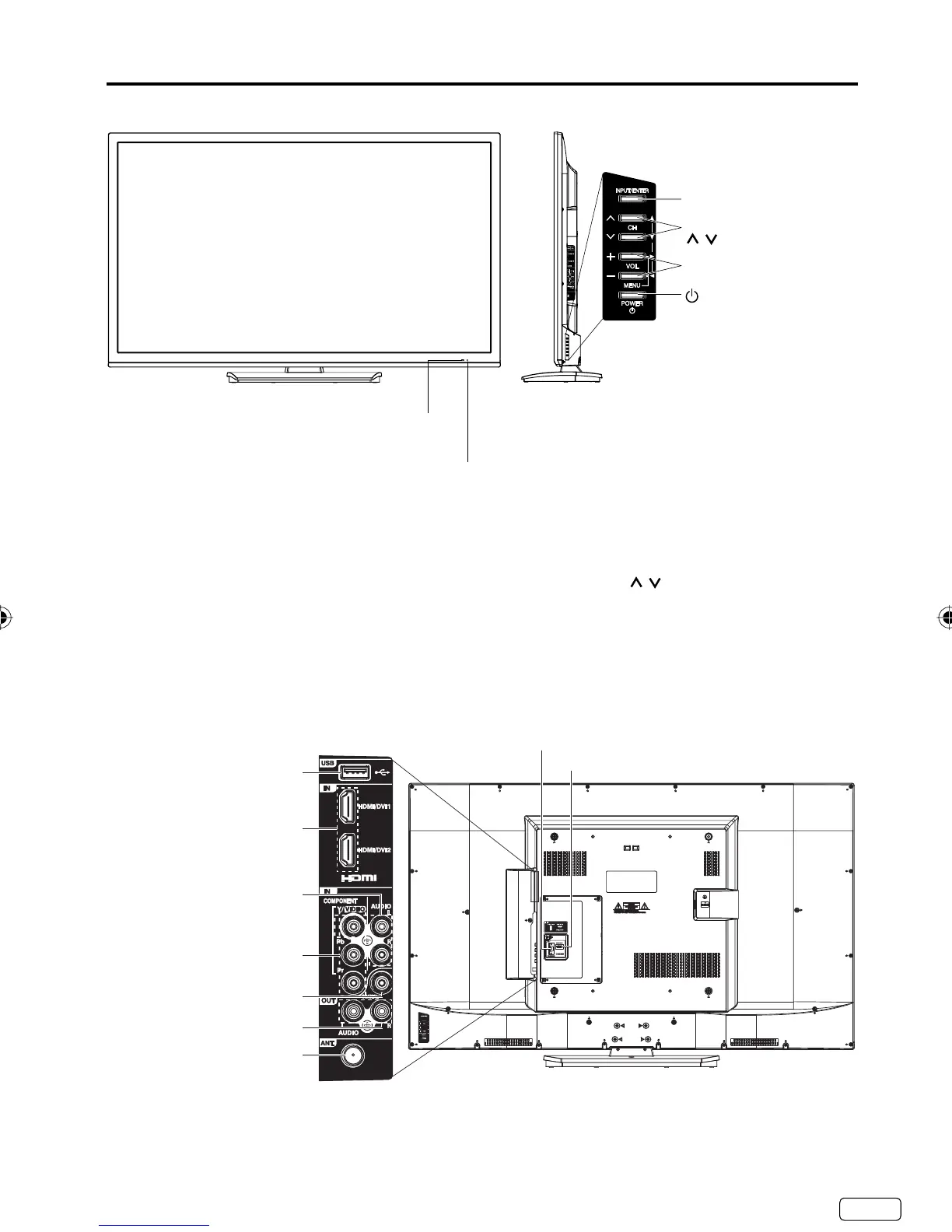
Parts and functions
Right SideFront
Remote sensor
Power Indicator
Red: Standby
Green: On
POWER button
INPUT/ENTER button
VOL (VOLUME)
+/–/
/
/MENU buttons
CH (CHANNEL)
/ // buttons
To display the menu screen.
Press MENU button to display the menu screen.
CH (CHANNEL)
/ buttons,
VOL (VOLUME)
+/
buttons and INPUT/ENTER button can be used
to select the desired setting during the menu screen
operations.
AUDIO IN (L/R) jacks
COMPONENT IN
(Y(VIDEO)/Pb/Pr) jacks
DIGITAL AUDIO
COAXIAL OUT jack
ANT. (RF) IN jack
HDMI/DVI1/2 IN jacks
USB INPUT
Rear
PC MONITOR IN jack
Right side
HDMI/DVI3 IN jack
AUDIO OUT jacks
J3QE0121A_EN.indd 9J3QE0121A_EN.indd 9 12/14/12 6:03:28 PM12/14/12 6:03:28 PM

Related product manuals