8
1 2 3
1 2 3
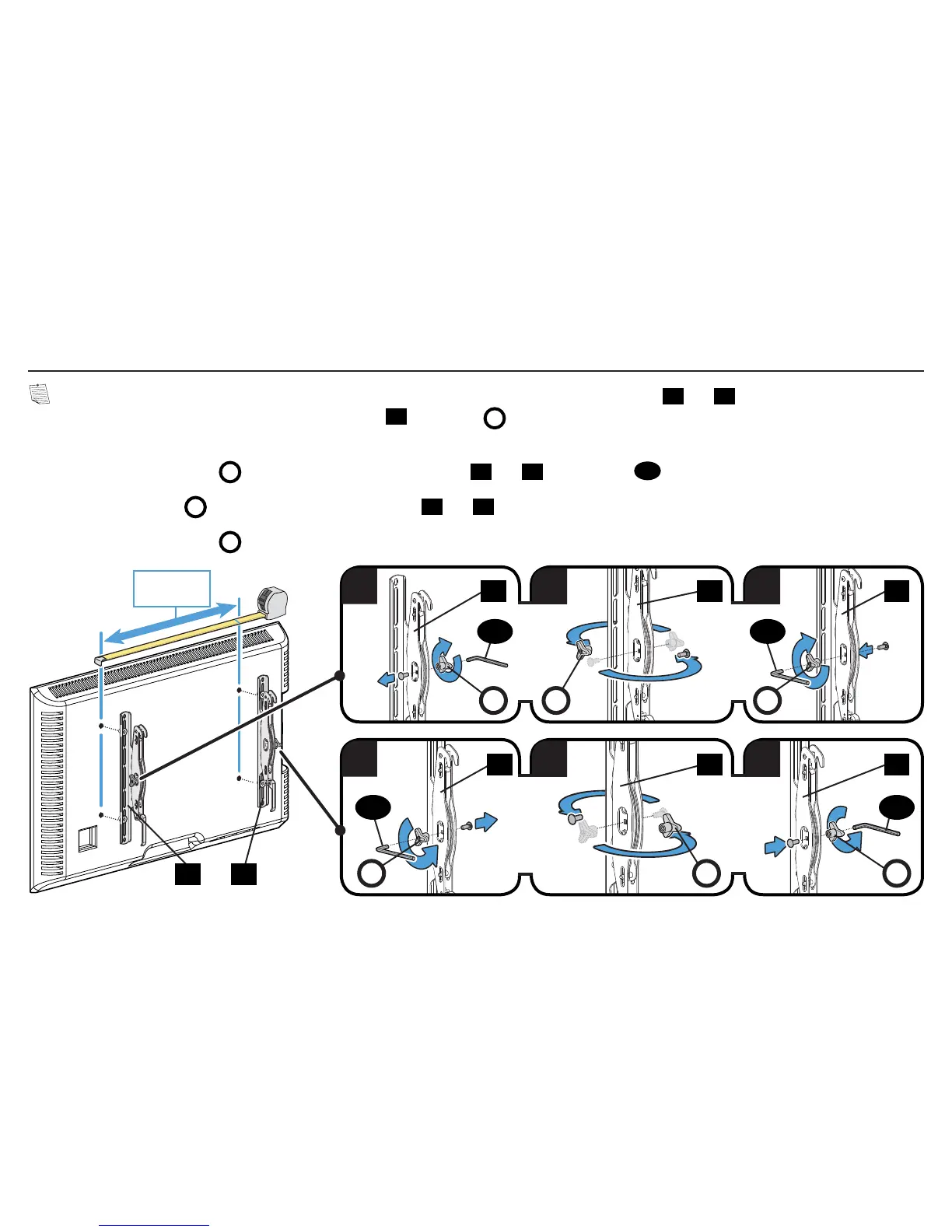
1-4 Prepare TV Brackets (ONLY For TV Hole Patterns Wider than 600mm)
NOTE: For TV's with hole patterns wider than 600 mm (≈23 5/8 in.), the placement of TV brackets
01
and
02
must be reversed on your TV
to fit your pattern and still allow hanging onto wall plate
23
. The knobs
K
need to be repositioned to the outside for accessability and tilt
tension adjustments after installation.
1. Unscrew tilt tension knob
K
from the screw on both TV brackets
01
and
02
using hex key
27
.
2. Flip tilt tension knob
K
to the opposite side of TV bracket
01
and
02
.
3. Reattach tilt tension knob
K
onto the screw.
> 600mm
(
≈
23 5/8 in.)
K K
010101
K
02 02 02
KKK
02 01
27
2727
27


 To Next Page