7
STEP 1 Attach Brackets to TV
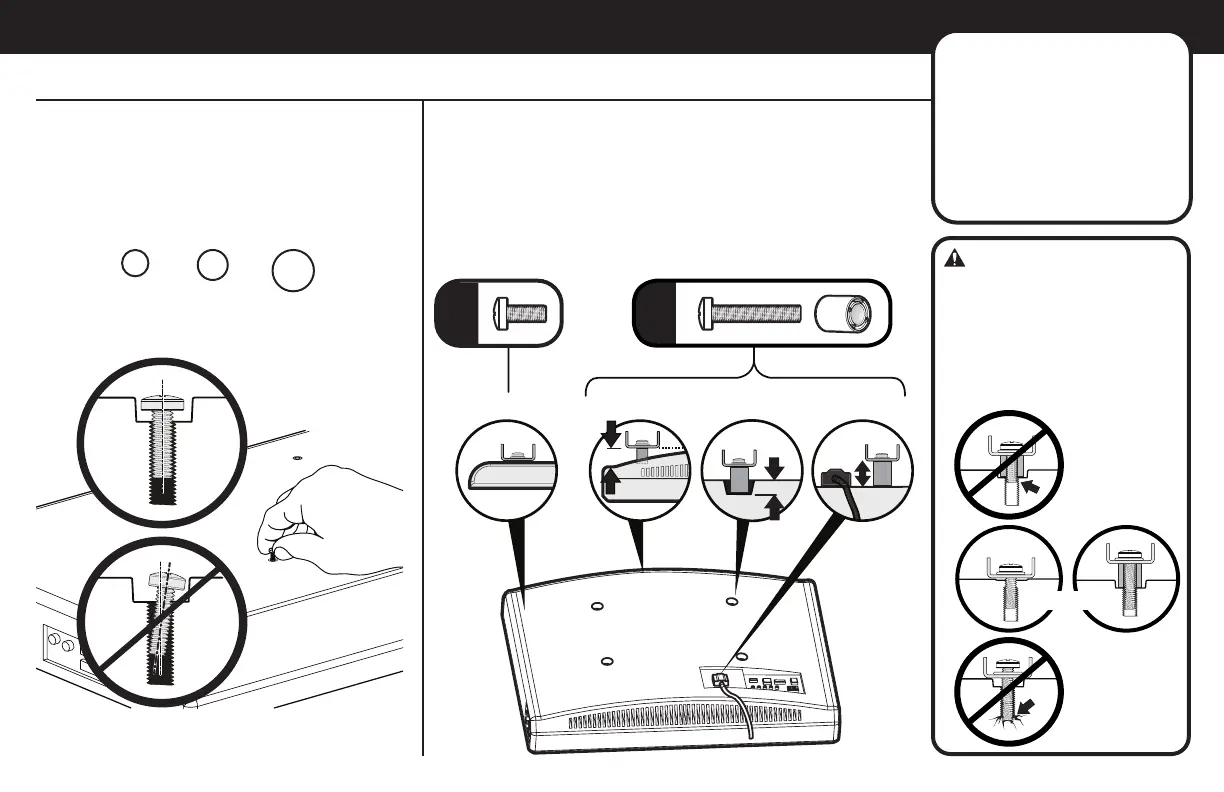
FLAT BACK ROUND BACK CABLESINSET HOLES
1-1 Select TV
Screw Diameter
1-2 Select TV
Screw Length
Hand thread screws into the threaded inserts
on the back of your TV to determine which
screw diameter (M5, M6, or M8) to use.
a
b
If your TV has a flat back AND you want your TV closer to
the wall, use the shorter screws (a).
Use the spacers and longer screws (b) to accommodate:
● Round/irregular back TVs
● TVs with inset mounting holes
● Extra space needed for cables
Too Short
Too Long
CAUTION:
Verify adequate thread
engagement with the screw or
screw/spacer combination.
- Too short will not hold the TV.
- Too long will damage the TV.
Correct
Standard configurations
are shown. For special
applications, or if you
are uncertain about your
hardware selection,
contact Customer Service
at 1-800-359-5520.
M6M5 M8


 To Next Page