11
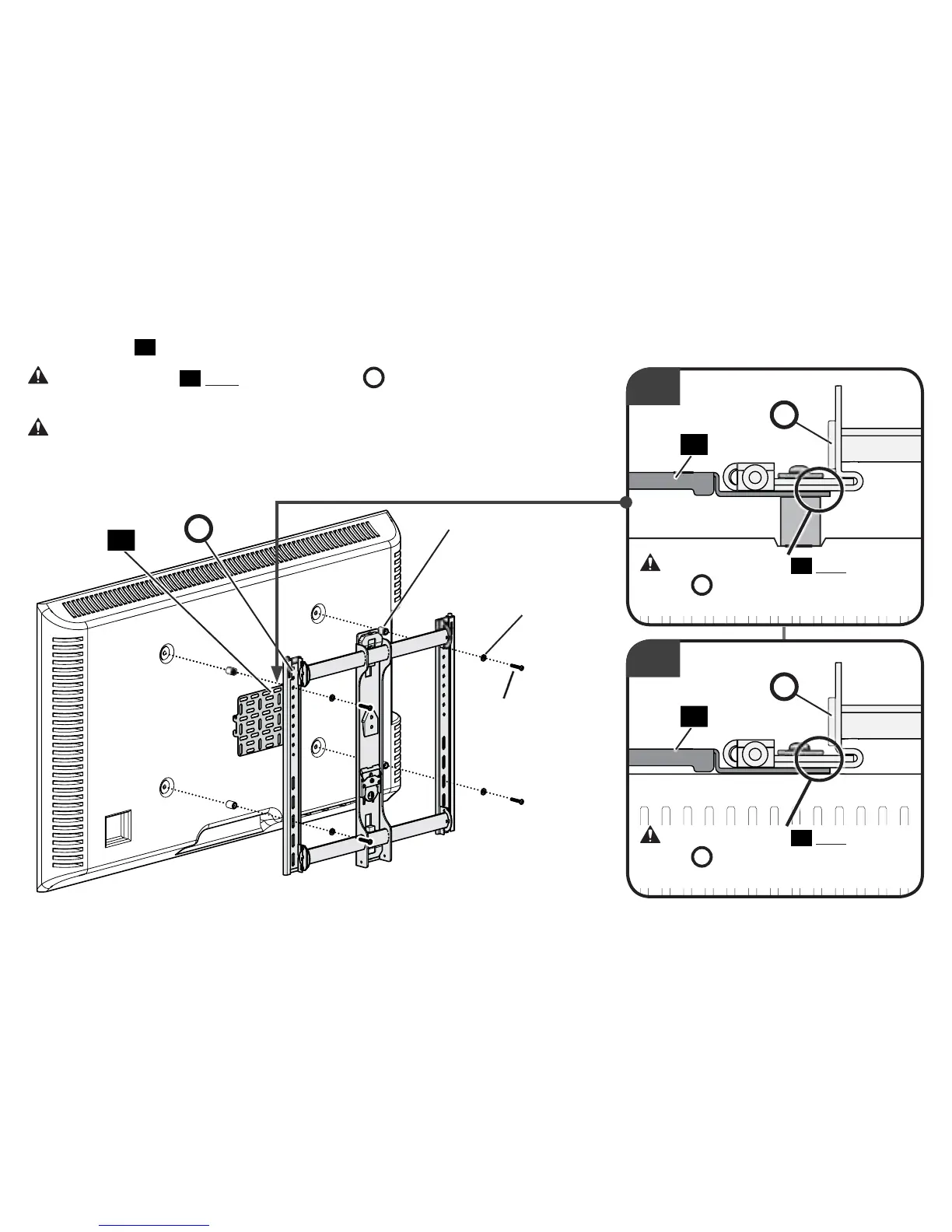
4. Attach panel
01
using your TV mount’s hardware (screws/washers/spacers).
CAUTION: Panel
01
must touch TV bracket
B
. Any spacers/adapters must be
mounted on the TV side.
CAUTION: Avoid potential personal injuries and property damage! You may
require longer screws for this step - - verify adequate thread engagement (PAGE 9).
Additional screw lengths and spacers are provided if required.
Continue with STEP 2 on PAGE 14.
1x
01
B
CAUTION: Panel
01
must touch TV
bracket
B
. Any spacers/adapters must
be mounted on the TV side.
CAUTION: Panel
01
must touch TV
bracket
B
. Any spacers/adapters must
be mounted on the TV side.
Screws
(from TV Mount
or hardware bag)
Washers
(from TV Mount or
hardware bag)
With Spacers
Without Spacers
Spacers
(from TV Mount
or hardware bag)
01
B
1x
01
B


 To Next Page
 Loading...