19
1 2 3 4
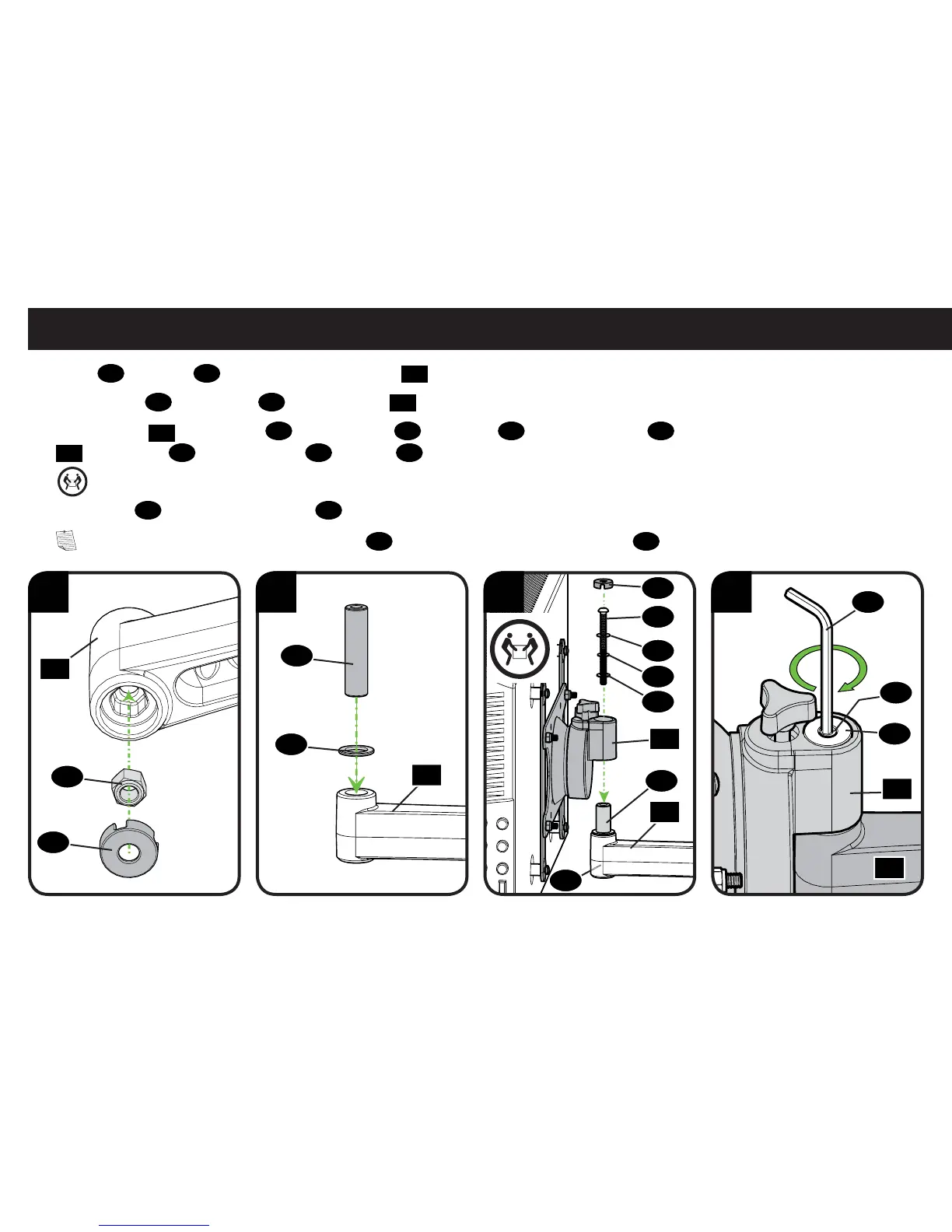
1. Fit nut
23
and cover
20
into underside of mount arm
15
.
2. Place washer
22
and pivot pin
21
onto mount arm
15
.
3. Fit the bracket
01
onto pivot pin
21
. Slide washers
26
and spacer
25
onto mounting bolt
24
and fi t bolt through mounting bracket
01
and pivot pin
21
until it meets nut
23
. Fit cover
20
over mounting bolt.
HEAVY! You may need assistance with this step.
4. Use hex key
27
to tighten mounting bolt
24
and secure mounting bracket to arm.
NOTE: You may need to hold the mounting nut
23
in place as you are tightening the bolt
24
.
STEP 3 Hang TV Mount to Arm
15
15
15
01
15
20
21
22
20
20
26
26
23
21
24
25
01
24
27
23



 To Next Page