20
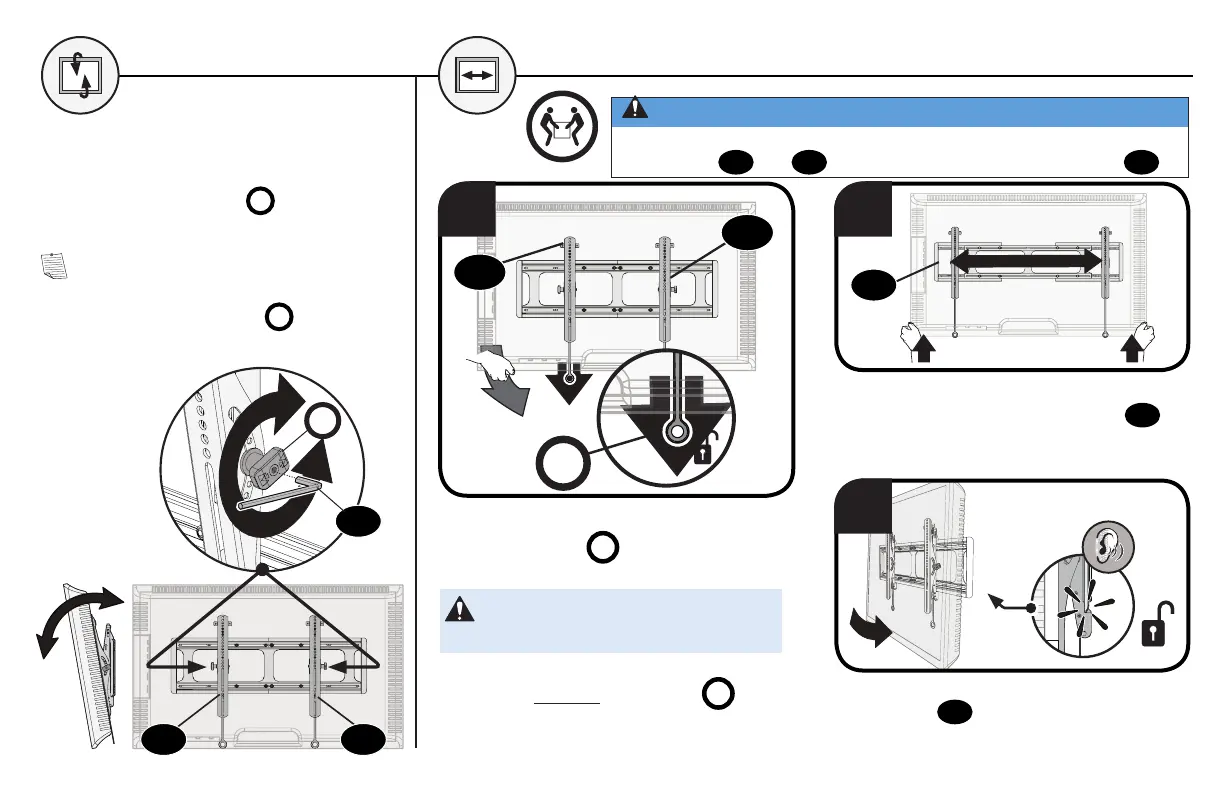
TILT TV LATERAL SHIFT
Your TV should adjust easily when moved,
then stay in place.
Adjust the tilt tension knob
T
if your TV
naturally tilts up or down.
NOTE: If you do not intend to adjust the
tilt for different viewing locations, you can
tighten the tilt tension knobs
T
to prevent
unwanted movement.
T
Lift your TV up then carefully reposition
on the wall plate. The wall plate
10
has stops to limit lateral movement.
1 2
To unlock your TV: Pull down AND HOLD
both release tabs
R
while gently pulling
the bottom of the TV away from the wall.
CAUTION: Avoid potential personal
injury or property damage!
To prevent breaking the locking latch:
always pull and hold release tabs
R
down
while pulling the TV away from the wall.
04
05
R
3
Press the bottom of your TV into the
wall plate
10
until you hear the lock
click, securing the TV in place.
0405
10
13
CAUTION: Avoid potential personal injury or property damage!
For CONCRETE APPLICATIONS:
TV brackets
04
and
05
MUST remain centered in wall plate
10
.


 To Next Page