4
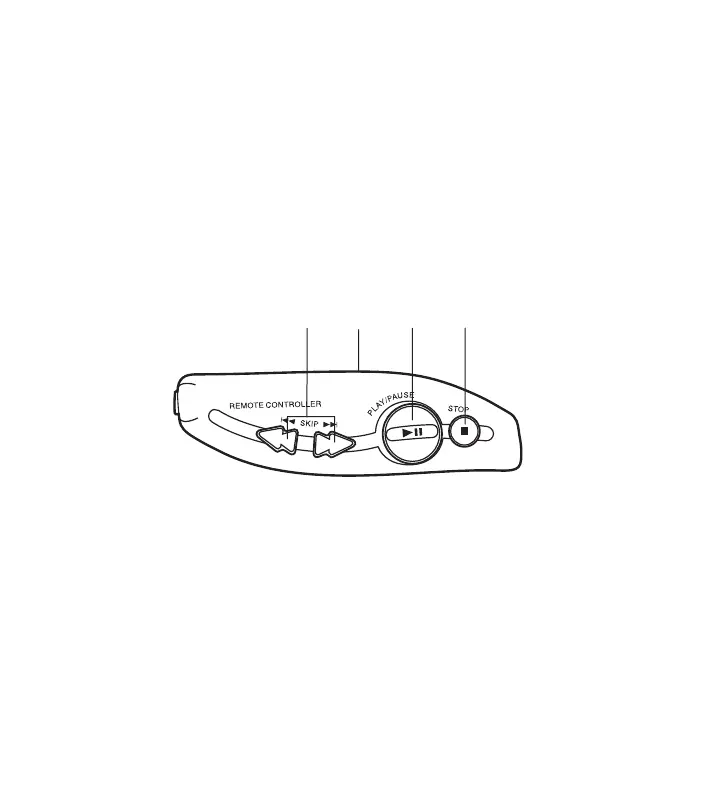
The buttons on the remote control function in the same way as the corresponding
buttons on the unit.
1. Skip/Search buttons (SKIP)
2. Volume Control (VOLUME)
3. Play/Pause button (PLAY/PAUSE)
4. Stop button (STOP)
15
USING THE LINE OUT SOCKET
To hear through a pair of speakers
Connect the patch cable (not supplied)
from the LINE OUT socket on the unit to
the AUX or CD INPUT sockets on a
stereo system.
To record from the CD player
Connect the patch cable (not supplied)
from the LINE OUT socket on the unit to
the LINE INPUT socket on a cassette
recorder.
LINE OUT
CDP-4100CR/AU-final 2/3/05, 10:50 AM5


 To Next Page