EasyManua.ls Logo

Sanyo DVW-7200 - User Manual

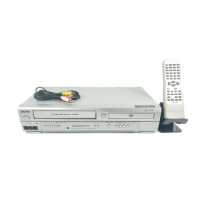
Sanyo DVW-7200
44 pages
Print Icon
To Next Page IconTo Next Page
Loading...
Precautions
DVD Functions
Setup
VCR Functions
Information
Español
Supplied Accessory
AC
outlets
Plug in
4
5
From TV
From DVD+VCR
Please refer to “Connections” on page 6.
Cable TV
signal
ANT-OUT
ANT-IN
RF cable (supplied)
(Back of DVD+VCR)
(Back of TV)
or
Antenna
2
Connect
3
Connect
(Back of TV)
or
Disconnect
Antenna
Cable TV
signal
Basic TV Connection
Table of Contents
Precautions
Laser Safety. . . . . . . . . . . . . . . . . . . . . . . . . . . . . . . . . . . . . . . . 2
IMPORTANT SAFEGUARDS . . . . . . . . . . . . . . . . . . . . . . . . . . . 3
Installation Location . . . . . . . . . . . . . . . . . . . . . . . . . . . . . . . . . . 4
Avoid the Hazards of Electrical Shock and Fire. . . . . . . . . . . . . . 4
Moisture Condensation Warning . . . . . . . . . . . . . . . . . . . . . . . . . 4
About Copyright . . . . . . . . . . . . . . . . . . . . . . . . . . . . . . . . . . . . . 4
Notice for Progressive Scan Outputs . . . . . . . . . . . . . . . . . . . . . 4
Symbols Used in This Manual . . . . . . . . . . . . . . . . . . . . . . . . . . 4
Maintenance . . . . . . . . . . . . . . . . . . . . . . . . . . . . . . . . . . . . . . . 4
About the Video Cassettes and Discs . . . . . . . . . . . . . . . . . . . 5
Playable Video Cassettes . . . . . . . . . . . . . . . . . . . . . . . . . . . . . . 5
Playable Discs . . . . . . . . . . . . . . . . . . . . . . . . . . . . . . . . . . . . . . 5
Unplayable Discs . . . . . . . . . . . . . . . . . . . . . . . . . . . . . . . . . . . . 5
Setup
Connections . . . . . . . . . . . . . . . . . . . . . . . . . . . . . . . . . . . . . . . 6
RF Output Channel . . . . . . . . . . . . . . . . . . . . . . . . . . . . . . . . . . 6
Hints for Cable Box or Satellite Box . . . . . . . . . . . . . . . . . . . . . . 6
Connection to an Audio System . . . . . . . . . . . . . . . . . . . . . . . . . 6
Connection to a TV . . . . . . . . . . . . . . . . . . . . . . . . . . . . . . . . . . 7
Front & Rear Terminals. . . . . . . . . . . . . . . . . . . . . . . . . . . . . . . . 7
Remote Control . . . . . . . . . . . . . . . . . . . . . . . . . . . . . . . . . . . . . 8
Installing the Batteries for the Remote Control . . . . . . . . . . . . . . 8
Preparation for Use. . . . . . . . . . . . . . . . . . . . . . . . . . . . . . . . . . 9
Turn On the Unit for the First Time . . . . . . . . . . . . . . . . . . . . . . . 9
To Add/Delete Channels. . . . . . . . . . . . . . . . . . . . . . . . . . . . . . . 9
Clock Setup . . . . . . . . . . . . . . . . . . . . . . . . . . . . . . . . . . . . . . . . 9
Function Overview . . . . . . . . . . . . . . . . . . . . . . . . . . . . . . . . . 10
Front Panel Indicator . . . . . . . . . . . . . . . . . . . . . . . . . . . . . . . . 10
VCR/DVD Switching . . . . . . . . . . . . . . . . . . . . . . . . . . . . . . . . . 10
VCR Functions
Playback . . . . . . . . . . . . . . . . . . . . . . . . . . . . . . . . . . . . . . . . . 11
Other Operations . . . . . . . . . . . . . . . . . . . . . . . . . . . . . . . . . . 11
Index Search . . . . . . . . . . . . . . . . . . . . . . . . . . . . . . . . . . . . . . 11
Time Search. . . . . . . . . . . . . . . . . . . . . . . . . . . . . . . . . . . . . . . 11
Auto Repeat. . . . . . . . . . . . . . . . . . . . . . . . . . . . . . . . . . . . . . . 12
Recording . . . . . . . . . . . . . . . . . . . . . . . . . . . . . . . . . . . . . . . . 12
Recording & OTR (One Touch Recording) . . . . . . . . . . . . . . . . 12
Timer Recording. . . . . . . . . . . . . . . . . . . . . . . . . . . . . . . . . . . . 12
Hints for OTR and Timer Recording . . . . . . . . . . . . . . . . . . . . . 13
Copying a Video Tape. . . . . . . . . . . . . . . . . . . . . . . . . . . . . . . . 14
MTS System (Multi-Channel Television Sound) . . . . . . . . . . . 14
When You Receive or Record a Program Broadcast in MTS . . . 14
When You Play Back a Tape Recorded in Hi-Fi Stereo . . . . . . . 14
DVD Functions
Playback . . . . . . . . . . . . . . . . . . . . . . . . . . . . . . . . . . . . . . . . . 15
On-Screen Display . . . . . . . . . . . . . . . . . . . . . . . . . . . . . . . . . 16
Search Function . . . . . . . . . . . . . . . . . . . . . . . . . . . . . . . . . . . 17
Track Search / Title/Chapter Search / Time Search . . . . . . . . . . 17
Marker Setup. . . . . . . . . . . . . . . . . . . . . . . . . . . . . . . . . . . . . . 17
Repeat / Random / Programmed Playback . . . . . . . . . . . . . . 18
Repeat Playback / Repeat A-B Playback /
Random Playback / Programmed Playback. . . . . . . . . . . . . . . . 18
Special Settings . . . . . . . . . . . . . . . . . . . . . . . . . . . . . . . . . . . 19
Subtitle Language / Audio Language / Camera Angle /
Black Level Setting / Stereo Sound Mode / Virtual Surround
. . . . . . . 19
DVD Setup. . . . . . . . . . . . . . . . . . . . . . . . . . . . . . . . . . . . . . . . 20
LANGUAGE Setting . . . . . . . . . . . . . . . . . . . . . . . . . . . . . . . . . 20
DISPLAY Setting . . . . . . . . . . . . . . . . . . . . . . . . . . . . . . . . . . . 21
AUDIO Setting . . . . . . . . . . . . . . . . . . . . . . . . . . . . . . . . . . . . . 21
PARENTAL Setting . . . . . . . . . . . . . . . . . . . . . . . . . . . . . . . . . . 22
OTHERS Setting . . . . . . . . . . . . . . . . . . . . . . . . . . . . . . . . . . . 22
Reset to the Default Setting (Except for PARENTAL Setting) . . . 23
Information
Troubleshooting Guide . . . . . . . . . . . . . . . . . . . . . . . . . . . . . . 23
Specifications . . . . . . . . . . . . . . . . . . . . . . . . . . . . . . . . . . . . . 24
Language List . . . . . . . . . . . . . . . . . . . . . . . . . . . . . . . . . . . . . 24
Limited Warranty. . . . . . . . . . . . . . . . . . . . . . . . . . . . . . . . . . . 25
Español . . . . . . . . . . . . . . . . . . . . . . . . . . . . . . . . . . . . . . . . . . 26
DVD Player & Video Cassette Recorder
SANYOS HELP-LINE
Call the toll-free number below if you have any
difficulties operating this product.
TOLL FREE: 1-800-813-3435
(Weekdays: 7:30 AM - 4:00 PM Central Time)
DVW-7200
INSTRUCTION MANUAL
Please read before using this equipment.
• Remote control
(NA230UD)
with two AA batteries
• RF cable
• Audio/Video
cables
• Instruction
manual
• Quick start
guide
INSTRUCTION MANUAL
Quick start guide
H9880UD(EN).qx3 05.1.17 17:30 Page 1

Table of Contents

Other manuals for Sanyo DVW-7200

Questions and Answers

  • C
    craigpearsonSep 8, 2025
    What causes video or color to fade when copying a video tape on a Sanyo DVW-7200 DVD VCR Combo?
    • S
      seanswansonSep 8, 2025
      If the video or color fades in and out when copying a video tape on your Sanyo DVD VCR Combo, it is likely due to copy guard protection on a copyrighted video tape.
  • N
    Nicole LeeAug 23, 2025
    What to do if my Sanyo DVD VCR Combo has no power?
    • K
      Kimberly CarneyAug 23, 2025
      If your Sanyo DVD VCR Combo has no power, ensure the power plug is properly connected to an AC outlet and that the power is turned on.
  • B
    brandonpetersAug 25, 2025
    What to do if TV programs cannot be seen normally on Sanyo DVW-7200 DVD VCR Combo?
    • B
      Barry MartinezAug 25, 2025
      If you cannot see TV programs normally on your Sanyo DVD VCR Combo, please check the following: * Ensure the ANT-IN and ANT-OUT connections are correctly connected. * Press the [VCR/TV] button. * Activate VCR mode by pressing [VCR] on the remote. Check if the VCR OUTPUT light is lit, then press [VCR/TV] to set it to the TV position.
  • M
    Maria AdamsAug 26, 2025
    Why is there no sound from my Sanyo DVW-7200?
    • C
      Casey NicholsAug 27, 2025
      If there is no sound from your Sanyo DVD VCR Combo, check the following: * Ensure the audio cables are firmly connected. * Make sure the power of the audio component is turned on. * Verify and correct the audio output settings. * Verify and correct the input settings on the audio component.
  • B
    Brad HartAug 27, 2025
    What to do if my Sanyo DVD VCR Combo disc cannot be played?
    • M
      Matthew StoneAug 27, 2025
      If your Sanyo DVD VCR Combo disc cannot be played, try the following: * Ensure the disc is properly inserted. * Clean the disc. * Place the disc correctly with the label side up. * Cancel the parental lock or change the control levels. * Handle the disc with special care, avoiding fingerprints, scratches, or dust on its surface.
  • J
    Jennifer DownsSep 22, 2025
    Why does the “Prohibited icon” appear on the screen of my Sanyo DVW-7200?
    • N
      Natalie HendersonSep 22, 2025
      If the “Prohibited icon” appears on the screen of your Sanyo DVD VCR Combo, it means that the operation you are trying to perform is prohibited by the unit or the disc. This is not a malfunction.
  • M
    Michael DuarteSep 16, 2025
    Why Sanyo DVW-7200 camera angle cannot be changed?
    • M
      Matthew WhiteSep 16, 2025
      If the camera angle cannot be changed on your Sanyo DVD VCR Combo, it is because the DVD does not contain sequences recorded from different camera angles. This is not a malfunction.
  • M
    Martin GilmoreSep 18, 2025
    Why Sanyo DVW-7200 DVD VCR Combo audio or subtitle language cannot be changed?
    • T
      timothy53Sep 18, 2025
      If the audio or subtitle language cannot be changed on your Sanyo DVD VCR Combo, it is because the DVD does not contain audio source or subtitles in the selected language. This is not a malfunction.
  • A
    Andrew RileySep 7, 2025
    How to fix no or poor playback picture on Sanyo DVD VCR Combo?
    • M
      Mr. David YangSep 7, 2025
      To address a missing or poor playback picture on your Sanyo DVD VCR Combo, try changing the RF output channel to CH4 and select the same channel on your TV. Additionally, fine-tune your TV.
  • D
    davisjonathanSep 4, 2025
    What to do if there is no picture on Sanyo DVW-7200?
    • S
      Shane HillSep 4, 2025
      If there is no picture on your Sanyo DVD VCR Combo, check the following: * Ensure the video cables are firmly connected. * Insert a correct video disc that plays on this unit. * Press [DVD] on the remote control and check if the DVD OUTPUT light is lit, then try other DVD features. * Set PROGRESSIVE correctly. Turn it on only if your TV has Progressive Scan and you are using the Component Video connections between the unit and the TV. Disable Progressive Scan for all other connections.

Summary

Precautions and Safety

Important Safeguards and Warnings

General Safety Precautions

Essential safety measures for appliance operation, including water, ventilation, power, grounding, and lightning.

Servicing and Damage Handling

Instructions for seeking qualified service and conditions requiring repair.

Media Compatibility Guide

Playable Disc Formats

Lists the various types of discs (DVD-Video, Audio CD) that can be played.

Setup: Connection Procedures

Audio System Connections

Steps for connecting the unit to stereo systems and Dolby Digital decoders.

Setup: Connecting to Television

Television Connection Methods

Details on connecting for basic audio, good, better, and best picture quality.

Setup: Remote Control Operation

Remote Control Functions

Explanation of the remote control buttons and their functions for DVD and VCR modes.

Initial Setup and Preparation

Setup: Functional Overview

VCR and DVD Mode Switching

How to switch between VCR and DVD playback modes using the unit or remote.

VCR Functions: Playback Operations

Basic Tape Playback

Instructions for starting, stopping, and ejecting video tapes.

VCR Functions: Recording and Advanced Playback

Recording and One Touch Recording (OTR)

Instructions for instant recording and setting up One Touch Recording.

Timer Recording Setup

Steps to program the unit to record at a specific future time.

DVD Functions: Playback Features

Basic DVD Playback

Instructions for inserting a disc and starting DVD playback.

DVD Functions: Search and Markers

DVD Search Functions

Methods for searching tracks, titles, chapters, or specific times on a DVD.

DVD Functions: Playback Modes

Repeat, Random, and Programmed Playback

Options for repeating playback segments or shuffling track order.

DVD Setup Menu Operations

Quick Setup Menu Options

Quick access to player, TV aspect, and Dolby Digital settings.

Language Settings Configuration

How to set languages for audio, subtitles, and DVD menus.

DVD Setup: Display and Audio

Display Settings Configuration

How to adjust TV aspect ratio, still mode, and other display options.

DVD Setup: Parental and Other Controls

Parental Control Setup and Password

How to set parental levels, change passwords, and manage viewing restrictions.

Information and Troubleshooting

Troubleshooting Common Issues

Solutions for common problems encountered during operation.

Sanyo DVW-7200 Specifications

General IconGeneral
BrandSanyo
ModelDVW-7200
CategoryDVD VCR Combo
LanguageEnglish

Related product manuals