15
Chapter 2
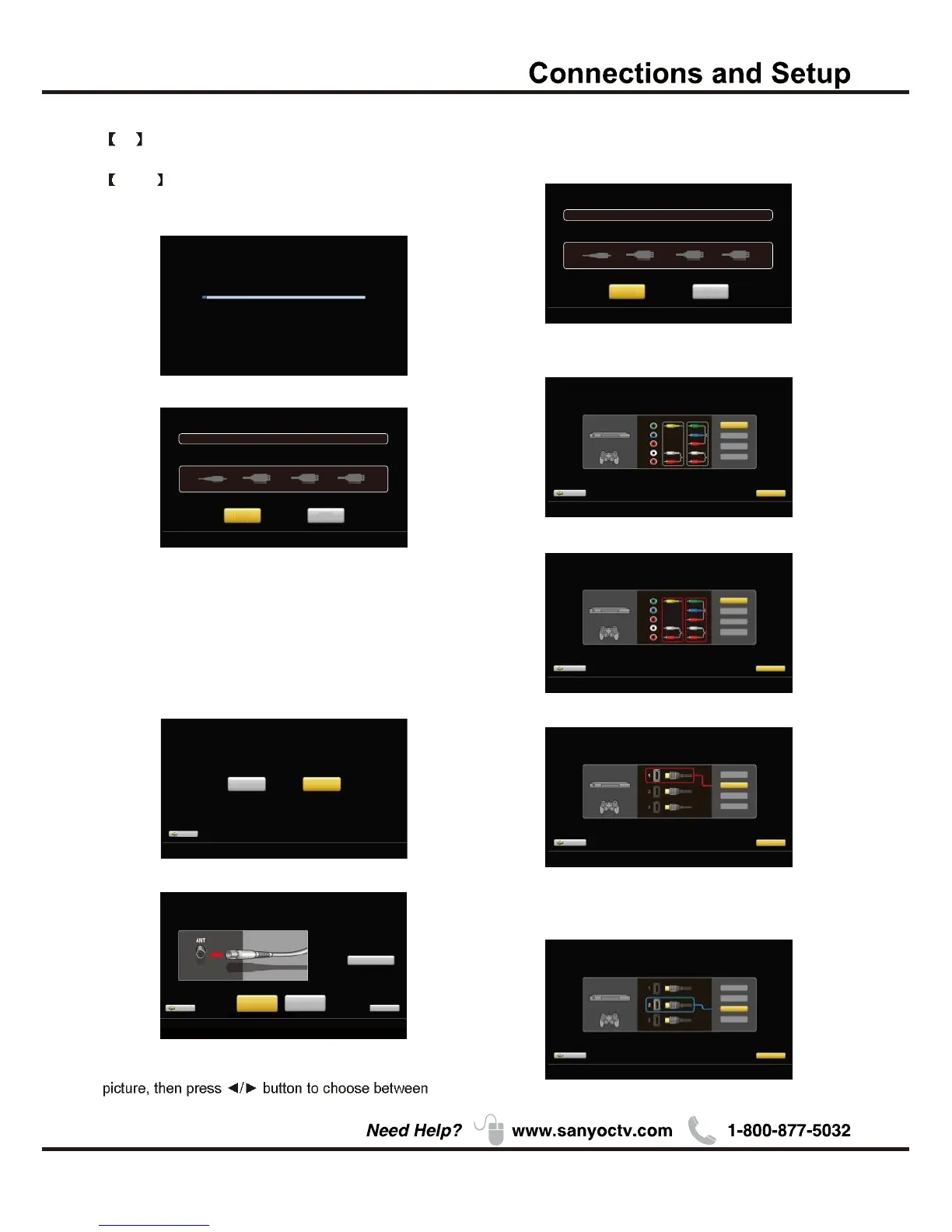
Analog channels:0 Digital channels:0
Channel search will be complete when blue progress bar reaches 100%
(PLEASE DO NOT INTERRUPT THE CHANNEL SEARCH,IT MAY TAKE A WHILE)
Use ARROW keys to highlight your choice and then press ENTER key
.
Analog channels: 0 Digital channels: 0
Input search result:
Video HD MI1 HDMI2/MHL HDMI3
Finish Repeat
Channel search result:
Successfully Completed
Choose Antenna Information to get a high definition
an Air or Cable search.
Air
Search channels form an indoor or outdoor antenna.
Press the Finish button to finalize the Initial Setup and
enjoy watching TV.
NOTE: If you need to do the process again, please
choose Repeat.
Cable
Search channels from the cable provider.
Previous C ont i n ue
Use ARROW keys to highlight your choice and then press ENTER key .
Connection check phase: Video
please turn on the power of apparatus and check connection.
DVD/Blu-ray
GAME
Y
(VID EO )
Pb
Pr
L
R
Com po site C ompo ne nt
Video
HDMI 1
HDMI 2/M HL
HDMI 3
Please choose a connection method.
Previous C ont i n ue
Use ARROW keys to highlight your choice and then press ENTER key .
Connection check phase: Video
please turn on the power of apparatus and check connection.
DVD/Blu-ray
GAME
Y
(VID EO )
Pb
Pr
L
R
Com po site C ompo ne nt
Video
HDMI 1
HDMI 2/M HL
HDMI 3
Neither type of connection could be confirmed.
Previous C ont i n ue
Use ARROW keys to highlight your choice and then press ENTER key .
Connection check phase: HDMI
please turn on the power of apparatus and check connection.
DVD/Blu-ray
GAME
Video
HDMI 1
HDMI 2/M HL
HDMI 3
At least one connection cannot be checked.
Previous C o nt i n ue
Use ARROW keys to highlight your choice and then press ENTER key .
Connection check phase: HDMI
please turn on the power of apparatus and check connection.
DVD/Blu-ray
GAME
Video
HDMI 1
HDMI 2/M HL
HDMI 3
Connection was successful.
If "Step by step" is chosen, options will be more detailed.
Press Continue button to advance.
Use ARROW keys to highlight your choice and then press ENTER key .
Previous
Choose"Quick setup"or"Step by step"
to set up your new television.
Quick setup
(Advanc ed users)
Setp by setp
(R ec om me nd e d)
(Setp by setp chosen)
Looking for a high definition picture?
Pl ease tak e a momen t t o review t he req uire d connections.
Antenna Inf orma tion
Previous
Air
Search Start
Cable
Search Start
Sk ip
Use ARROW keys to highlight your choice and then press ENTER key .
Use ARROW keys to highlight your choice and then press ENTER key
.
Analog channels: 0 Digital channels: 0
Input search result:
Video HDMI1 HDMI2/MHL HDMI3
Next
Repeat
Channel search result:
Successfully Completed
Press
Press Next button to check connection in detail.
Repeat button to do the process again.
Press Continue button to go next.
If any connection is found, then you can see "Connection
was successful." with blue color.
Successfully Completed


 To Next Page