English 44
1 Setting/option switch (see
page 81)
Switch between the Shooting
Screen and the Option Screen.
2
Scene Select menu (see page 45)
3
Resolution menu (see page 50)
4 Focus menu (see page 52)
5
White Balance menu (see page 54)
6 Exposure correction icon (see
page 55)
Adjust the image brightness.
7 HELP display (see page 88)
8 Remaining battery charge
(see page 98)
9 Internal memory icon (see
page 22)
i When two mutually exclusive settings are made, the later setting has
priority, and the related settings are changed accordingly.
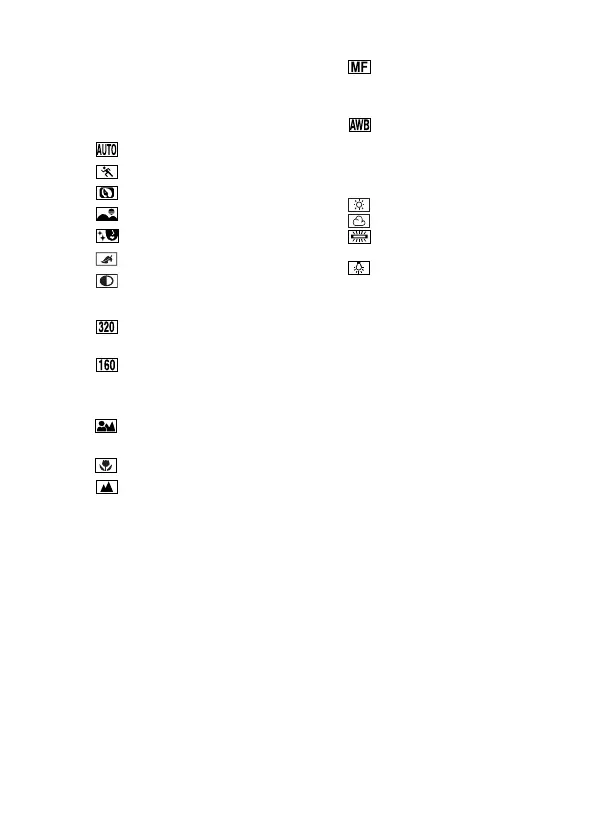
: Full auto icon
: Sports icon
: Portrait icon
: Landscape icon
: Cosmetic icon
: Sepia icon
: Monochrome icon
: 320 × 240 pixel
resolution icon
: 160 × 120 pixel
resolution icon
: Shooting with the auto
focus
: Super macro icon
: Distance photography
: Shooting with manual
focus
: The camera determines
the optimum white
balance settings based
on the ambient light and
weather.
: Fair weather setting
: Overcast setting
: Fluorescent lighting
setting
: White (incandescent)
light setting



 To Next Page