EasyManua.ls Logo

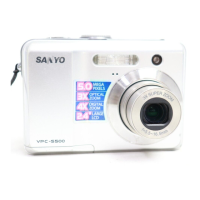
Sanyo VPC-S500EX - User Manual

Sanyo VPC-S500EX
67 pages
Print Icon
To Next Page IconTo Next Page
Loading...
INSTRUCTION MANUAL VPC-S500EX
Digital Camera
Important note
This manual explains how to safely operate
the VPC-S500EX
Please read these instructions carefully
before using the camera.
Keep this manual in a safe place for later
reference.

Table of Contents

Questions and Answers

  • A
    Austin JonesAug 11, 2025
    Why does my Sanyo VPC-S500EX Digital Camera power not turn on?
    • E
      Elizabeth CarterAug 11, 2025
      Your Sanyo Digital Camera might not be turning on due to several reasons. The battery may be completely discharged, requiring a replacement or recharge. Alternatively, the battery might be incorrectly oriented within the compartment; ensure it's inserted in the correct direction. Lastly, verify that the battery cover is completely and correctly closed.
  • J
    juan05Aug 16, 2025
    What to do if Sanyo VPC-S500EX suddenly powers down?
    • L
      Laura KaneAug 16, 2025
      If your Sanyo Digital Camera is suddenly powering down, it could be due to the [Auto Shut Down] function being activated. To resolve this, turn the camera back on and set the [Auto Shut Down] option to [Off]. Alternatively, the battery may be depleted, so try loading a new or fully charged battery.
  • C
    Crystal GonzalesAug 23, 2025
    Why flash does not fire on my Sanyo VPC-S500EX?
    • K
      Kevin GuerraAug 23, 2025
      If the flash on your Sanyo Digital Camera isn't firing, there are several potential causes: * Check if flash off is selected in flash mode, if so, select a different flash mode. * If 10+2 sec. Self-timer is selected in self-timer mode, then select [Single] in the [Capture Mode]. * If the [Capture Mode] is set to [Burst] or [AEB], then select [Single] in the [Capture Mode]. * If the camera is in the (video) mode, switch the mode dial to another mode.
  • J
    Jon PeckAug 29, 2025
    What to do if image is not captured when pressing shutter release button on Sanyo VPC-S500EX?
    • J
      Julia FranklinAug 29, 2025
      If your Sanyo Digital Camera isn't capturing images when you press the shutter release button, it might be because the camera is in the or mode. Try rotating the mode dial to , , , , , or . Another possibility is that the memory is full. In this case, transfer the desired files to your computer and then delete unnecessary files, or use a different memory card.
  • T
    Teresa DunlapSep 4, 2025
    Why continuous shooting is not possible on Sanyo VPC-S500EX Digital Camera?
    • Y
      Yvonne OdonnellSep 4, 2025
      Continuous shooting may not be possible on your Sanyo Digital Camera if the built-in memory or SD/SDHC memory card is full. To resolve this, insert an SD/SDHC memory card with available space or delete unwanted images.

Sanyo VPC-S500EX Specifications

General IconGeneral
BrandSanyo
ModelVPC-S500EX
CategoryDigital Camera
LanguageEnglish

Related product manuals