EasyManua.ls Logo

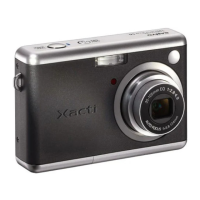
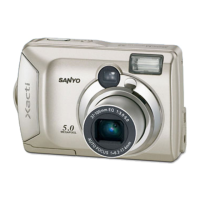
Sanyo Xacti VPC-S5 - User Manual

Sanyo Xacti VPC-S5
142 pages
Print Icon
To Next Page IconTo Next Page
Loading...
VPC-S5
INSTRUCTION MANUAL
Digital Camera
Please read these instructions carefully before using the digital camera. Make
sure to read and understand the section “USING YOUR DIGITAL CAMERA
SAFELY AND CORRECTLY” on pages 5 to 16. Keep this manual in a safe place
for later reference.
Important note
This manual explains how to safely operate the VPC-S5.

Table of Contents

Questions and Answers

  • N
    natashataylorAug 17, 2025
    What to do if Sanyo Xacti VPC-S5 has no power?
    • R
      rwiseAug 17, 2025
      If your Sanyo Digital Camera has no power, it could be due to several reasons. First, the batteries might be dead, in which case you should replace them with new ones. Second, the batteries may not have been inserted correctly; ensure they are properly oriented. Finally, the battery compartment cover might not be fully closed; make sure it is closed properly.
  • A
    anthony98Aug 20, 2025
    Why does my Sanyo Digital Camera flash not operate?
    • M
      Michael MendozaAug 20, 2025
      If the flash on your Sanyo Digital Camera isn't working, there are a few potential causes. First, check if the flash is set to 'flash off' mode and change it to automatic or forced flash. Second, ensure that you are in still image shooting mode. Lastly, the batteries might be dead; try replacing them with new ones.
  • M
    msanchezAug 22, 2025
    What to do if Sanyo Xacti VPC-S5 Digital Camera image is not in focus?
    • M
      Matthew RichardsAug 23, 2025
      If your Sanyo Digital Camera images are not in focus, consider these possibilities: The subject may be too close, so select the appropriate focus setting. The camera might have moved when the shutter was released; hold it steady and gently press the shutter button halfway to lock focus, then fully press to capture. Also, the lens could be dirty, so try cleaning it.
  • N
    nicoleconleyAug 26, 2025
    What to do if Sanyo Xacti VPC-S5 image is too dark?
    • J
      josephdonaldsonAug 26, 2025
      If your Sanyo Digital Camera images are too dark, check these potential causes: The flash might be obstructed; ensure your fingers or other objects aren't blocking it. The subject could be too far away; capture the image within the flash's operational range. Also, if the subject is backlit, try using the forced flash mode.
  • C
    christopher44Aug 28, 2025
    What to do if Sanyo Xacti VPC-S5 Digital Camera says “CARD FULL” or “INTERNAL MEMORY FULL”?
    • A
      amandasmithAug 28, 2025
      If your Sanyo Digital Camera displays a “CARD FULL” or “INTERNAL MEMORY FULL” message, it means there's no more space. If you're using a card, replace it with a new one. You can also erase unwanted images or save desired images to another storage medium before erasing the card memory.
  • A
    Austin JacksonAug 31, 2025
    What to do if Sanyo Digital Camera image is too bright?
    • L
      Lauren SmithAug 31, 2025
      If your Sanyo Digital Camera images are too bright, it could be because the forced flash mode is selected; try using a different flash mode. Alternatively, the subject itself might be too bright, in which case you can use the exposure correction function.
  • A
    Autumn CrawfordSep 2, 2025
    What to do if Sanyo Xacti VPC-S5 zoom operation stops midway?
    • K
      kimberly99Sep 3, 2025
      If the zoom operation on your Sanyo Digital Camera stops midway, it might be because the optical zoom has reached its maximum magnification. This isn't a malfunction; release the zoom switch and press it again. Also, the motion alert icon might be displayed; stabilize the camera using a tripod.
  • R
    Regina AllenSep 5, 2025
    Why does my Sanyo Digital Camera turn off by itself?
    • J
      Jesus FreySep 5, 2025
      Your Sanyo Digital Camera might be turning off by itself because the power save function is activated. Simply turn the camera on again.
  • T
    Thomas BeltranSep 8, 2025
    Why are colors of Sanyo Xacti VPC-S5 Digital Camera images captured indoors not correct?
    • K
      Kaitlyn MarquezSep 8, 2025
      If the colors of your Sanyo Digital Camera images captured indoors aren't correct, it could be due to the ambient lighting. Try capturing the image using the forced flash mode. Also, the white balance setting might be incorrect; ensure it is set correctly.
  • G
    gtranSep 12, 2025
    What to do if Sanyo Xacti VPC-S5 Digital Camera shows “IMAGE IS PROTECTED” message?
    • C
      Chelsea ArcherSep 12, 2025
      If your Sanyo Digital Camera displays the “IMAGE IS PROTECTED” message, it means you're trying to erase data that's protected. Turn off the protect setting for the data.

Summary

Introduction and Safety Guidelines

Important Operational Notes

Key safety guidelines and important notes for operating the VPC-S5.

Safe Camera Usage and Precautions

General Camera Safety

Warnings and precautions for handling, using, and protecting the digital camera.

Battery and Accessory Precautions

Guidelines for safe battery use, AC adapters, and memory cards.

Initial Setup and Operation

Installing Batteries and Card

Step-by-step guide for inserting batteries and memory cards.

Shooting Modes and Techniques

Preparing to Take Pictures

Guidance on date/time settings, camera holding, and autofocus basics.

Capturing Still and Sequential Images

Procedures for setting shooting modes and capturing still/sequential photos.

Customizing Shooting Settings

Guide to modifying resolution, compression, focus, white balance, and exposure.

Image Playback and Management

Viewing Images and Videos

Steps to view still images and video clips, including playback controls.

System Information and Support

Common Questions and Troubleshooting

FAQ and solutions for common camera operational problems.

Sanyo Xacti VPC-S5 Specifications

General IconGeneral
Optical Zoom5x
Digital Zoom4x
Sensor TypeCCD
Image Sensor1/2.5 inch CCD
Optical Sensor Size1/2.5 inch
Video Resolution640 x 480
StorageSD/SDHC card
BatteryLi-ion rechargeable battery
Effective Pixels5.0 megapixels
LCD Screen2.5-inch TFT LCD

Related product manuals