EasyManua.ls Logo

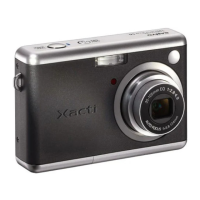
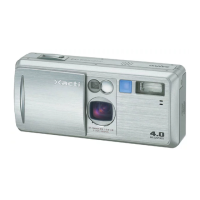
Sanyo Xacti VPC-S1 - User Manual

Sanyo Xacti VPC-S1
157 pages
Print Icon
To Next Page IconTo Next Page
Loading...
INSTRUCTION MANUAL
VPC-S1
Digital Camera
Important note
This manual explains how to safely operate the VPC-S1.
Please read these instructions carefully before using the digital camera. Make sure
to read and understand the section “USING YOUR DIGITAL CAMERA SAFELY
AND CORRECTLY” on pages 7 to 18. Keep this manual in a safe place for later
reference.
SX714/EX, GX, U (VPC-S1 GB) Thu. July, 17/2003

Table of Contents

Questions and Answers

  • G
    gutierrezmichaelAug 20, 2025
    How to fix Sanyo Xacti VPC-S1 Digital Camera with no power?
    • A
      angela88Aug 20, 2025
      If your Sanyo Digital Camera has no power, the batteries may be dead, not correctly inserted, or the battery compartment cover might not be fully closed. Try replacing the batteries, ensuring they are correctly oriented in the compartment. Also, make sure the battery compartment cover is properly closed.
  • K
    Kelly ClarkAug 22, 2025
    What to do if Sanyo Digital Camera doesn't take pictures?
    • M
      Michael WilliamsAug 22, 2025
      If your Sanyo Digital Camera isn't capturing images when you press the shutter, several factors could be at play. First, ensure the camera is powered on. If the power save function is active, press the power button, shutter release, MENU, or SET button. Check if the memory is full, indicated by a red accessing indicator and a '0' display for remaining images; if so, install a new card or erase unnecessary images. Confirm that the flash is enabled in automatic or forced mode, and verify that the camera is set to still image shooting mode. Finally, ensure the batteries are not dead; replace them if necessary.
  • D
    David JohnstonAug 25, 2025
    Why is my Sanyo Xacti VPC-S1 Digital Camera taking dark photos?
    • A
      Ashley MorganAug 25, 2025
      If images from your Sanyo Digital Camera are too dark, it could be due to a few reasons. Ensure that your finger or another object isn't blocking the flash. The subject might be too far away, so try capturing the image within the flash's operational range. If the subject is backlit, use the forced flash mode or the exposure correction function to improve the image brightness.
  • C
    christophersteeleAug 26, 2025
    How to fix blurry photos on Sanyo Xacti VPC-S1 Digital Camera?
    • K
      Kelly YangAug 26, 2025
      If your Sanyo Digital Camera images are out of focus, the subject could be too close; try moving the camera further away or setting it to macro mode. Camera movement during shutter release can also cause blur, so hold the camera steady and gently press the shutter button halfway to lock focus before fully pressing it. Lastly, a dirty lens can affect focus, so ensure the lens is clean.
  • E
    elizabethmitchellAug 28, 2025
    Why are my photos too bright on Sanyo Xacti VPC-S1 Digital Camera?
    • E
      Edward SchmidtAug 28, 2025
      If your Sanyo Digital Camera is producing images that are too bright, it could be due to the forced flash mode being selected; try using a different flash mode. Alternatively, the subject might be too bright, in which case you should use the exposure correction function.
  • K
    Kaitlin AndersonAug 29, 2025
    Why no playback image appears on Sanyo Xacti VPC-S1?
    • S
      Susan HarrisonAug 30, 2025
      If no playback image appears on your Sanyo Digital Camera, ensure that the main switch is set to [Ø].
  • M
    Michael SolisAug 31, 2025
    Why does my Sanyo Xacti VPC-S1 Digital Camera turn off by itself?
    • Z
      zbrownAug 31, 2025
      If your Sanyo Digital Camera is turning off by itself, it is likely due to the power save function. To resolve this, simply press the power button, shutter release button, MENU button, or SET button once to reactivate the camera.
  • M
    Monica RobertsSep 2, 2025
    How to fix incorrect colors in indoor photos on Sanyo Xacti VPC-S1?
    • R
      Richard CaseySep 2, 2025
      If the colors of images captured indoors with your Sanyo Digital Camera are not correct, it could be due to the ambient lighting. Try capturing the image using the forced flash mode. Alternatively, the white balance setting may be incorrect, so adjust it to the correct setting.
  • R
    Ryan WhiteSep 4, 2025
    What does beep-beep-beep mean on Sanyo Digital Camera?
    • A
      Alejandra PerezSep 4, 2025
      If your Sanyo Digital Camera emits a warning tone (beep-beep-beep) and you cannot use the self-timer, the batteries are likely consumed. Install new batteries to resolve this issue.
  • A
    Anne HarrisSep 6, 2025
    Why is there no image on LCD monitor of Sanyo Xacti VPC-S1?
    • F
      Felicia WilsonSep 6, 2025
      If no image is displayed on the LCD monitor when capturing an image with your Sanyo Digital Camera, ensure that the main switch is set to [Õ].

Sanyo Xacti VPC-S1 Specifications

General IconGeneral
Effective Pixels5.0 MP
Optical Zoom3x
Digital Zoom4x
Camera TypeCompact
Focal Length6.3 - 18.9 mm
Focal Length Equivalent to 35mm Camera38 - 114 mm
Focus AdjustmentAutomatic
Minimum Focus Distance10 cm
Display TypeLCD
Flash TypeBuilt-in
Exposure MeteringMulti-segment
Max Shutter Speed1/1000 sec
Continuous Shooting Speed1.5 fps
Self Timer Delay10 sec
Sensor TypeCCD
Image Sensor1/2.5 inch CCD
Video Resolution640 x 480 pixels
StorageSD card
Optical Sensor Resolution5.0 MP
Optical Sensor Size1/2.5 inch
Light SensitivityISO 100
Shooting ModesAuto
White BalanceAuto
Exposure Compensation±2 EV
Storage MediaSD card
Connector TypeUSB
Battery TypeLithium-ion rechargeable
Video Recording640 x 480

Related product manuals