Application Programs
Toggling between Weight Units
With this application program you can toggle the display of a weight value back and forth
between two weight units (see table below).
Example: Toggle weight unit from pounds [lb] (application) to grams [g] (basic unit)
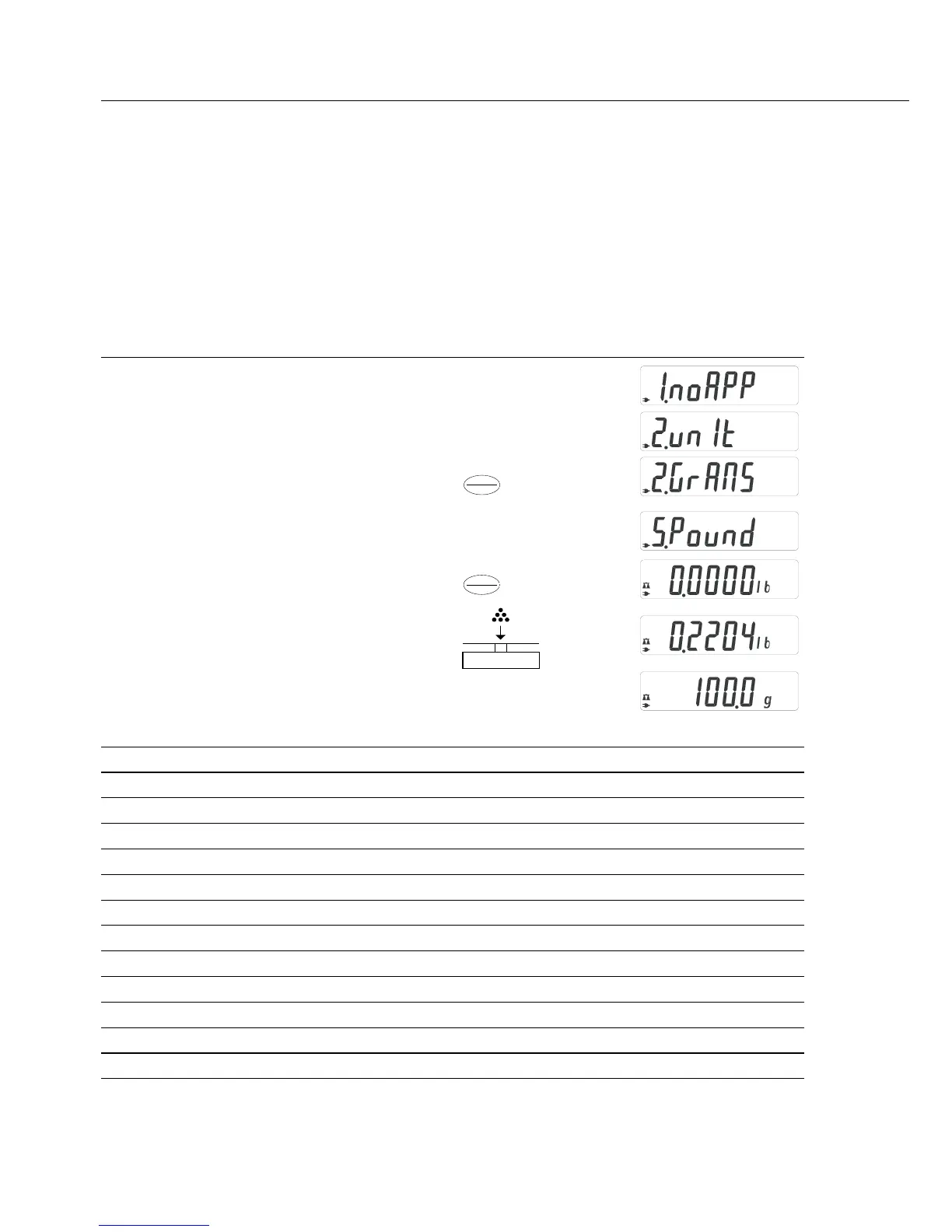
Step Key (or instruction) Display
1. Select application program w > 2 sec
2. Select Toggling between Weight Units v
3. Confirm unit
4. Select weight unit; in this example: v repeatedly
“5. Pounds” (see table below)
5. Confirm weight unit (pounds)
6. Place sample on balance/scale
7. Toggle weight unit v
Menu code Unit Conversion factor Display
1. user
1
) Grams 1.00000000000 o
2.grams (fact. setting ELT models) Grams 1.00000000000 g
4.carat (fact. setting GD502) Carats 5.00000000000 o
5.Pound
2
) Pounds 0.00220462260 lb
6.ounce
2
) Ounces 0.03527396200 oz
7.tryo
2
) Troy ounces 0.03215074700 ozt
8.tl.hon
2
) Hong Kong taels 0.02671725000 tlk
9.tl.sin
2
) Singapore taels 0.02645544638 tl
10.tl.ta
2
) Taiwanese taels 0.02666666000 tl
11.grai
2
) Grains 15.4323583500 GN
12.peny
2
) Pennyweights 0.64301493100 dwt
15.tl.ch
2
) Chinese taels 0.02645547175 tl
22.pdoz
2
) lb/oz 0.03527396200 lb:oz
23.newt
2
) Newtons 0.00980665000 N
1
) User-defined conversion can be loaded in balance with RS-232 or USB program option.
2
) Not on model GD502
8
Enter
CF
Enter
CF


 To Next Page