ESPT JARUEN DE KO ESPT JARUEN DE KO
03025/03026
- 03 -
19
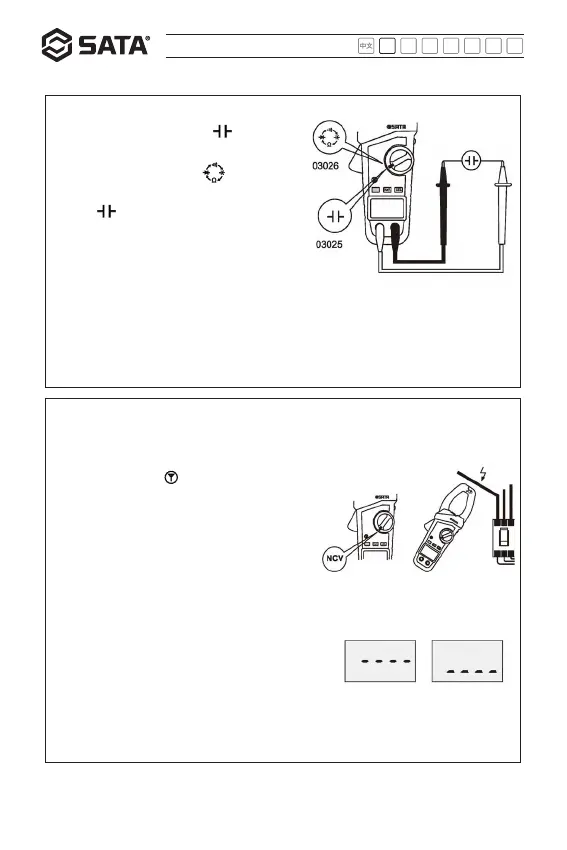
Capacitance measurement
03025: Set the meter to “ ” , and
measure the capacitance with the probe.
03026: Set the meter to “ ” , press
and hold the function switching button
until “ ” appears on the screen, and
then measure the capacitance with the
probe.
Note: 1. A reading not to be zero is normal at capacitance position. Because input circuits
of the probe and meter has the distributed capacitance of a small value. Subtract this
value or use the “REL” measurement mode during the measurement.
2. Before measurement, check that the capacitor to be measured has been fully discharged.
3. When the measured capacitance is large, it may take a long time to obtain a stable
reading.
Note: 1. Measurement range: 60V~1000V,
frequency: 50Hz~60Hz.
2. The meter head “ ” is the best position for
measurement.
3. Before use, measure a known voltage to
verify that the meter functions properly.
4. The indication of the electric field strength
is affected by factors such as the voltage,
measurement distance and insulation layer of
the measured conductor.
* In case of contactless conductivity measurement,
the measured electric field strength is
represented by the number of strips located in
the middle of the screen and the beeper speed.
The greater the number of middle strips, the
faster the beeper speed, indicating the stronger
the electric field, and vice versa.
Strong
Non-contact AC voltage measurement, only limited to 03026


 To Next Page