CONTROL PANEL INSTALLATION
31
Connection of service computer
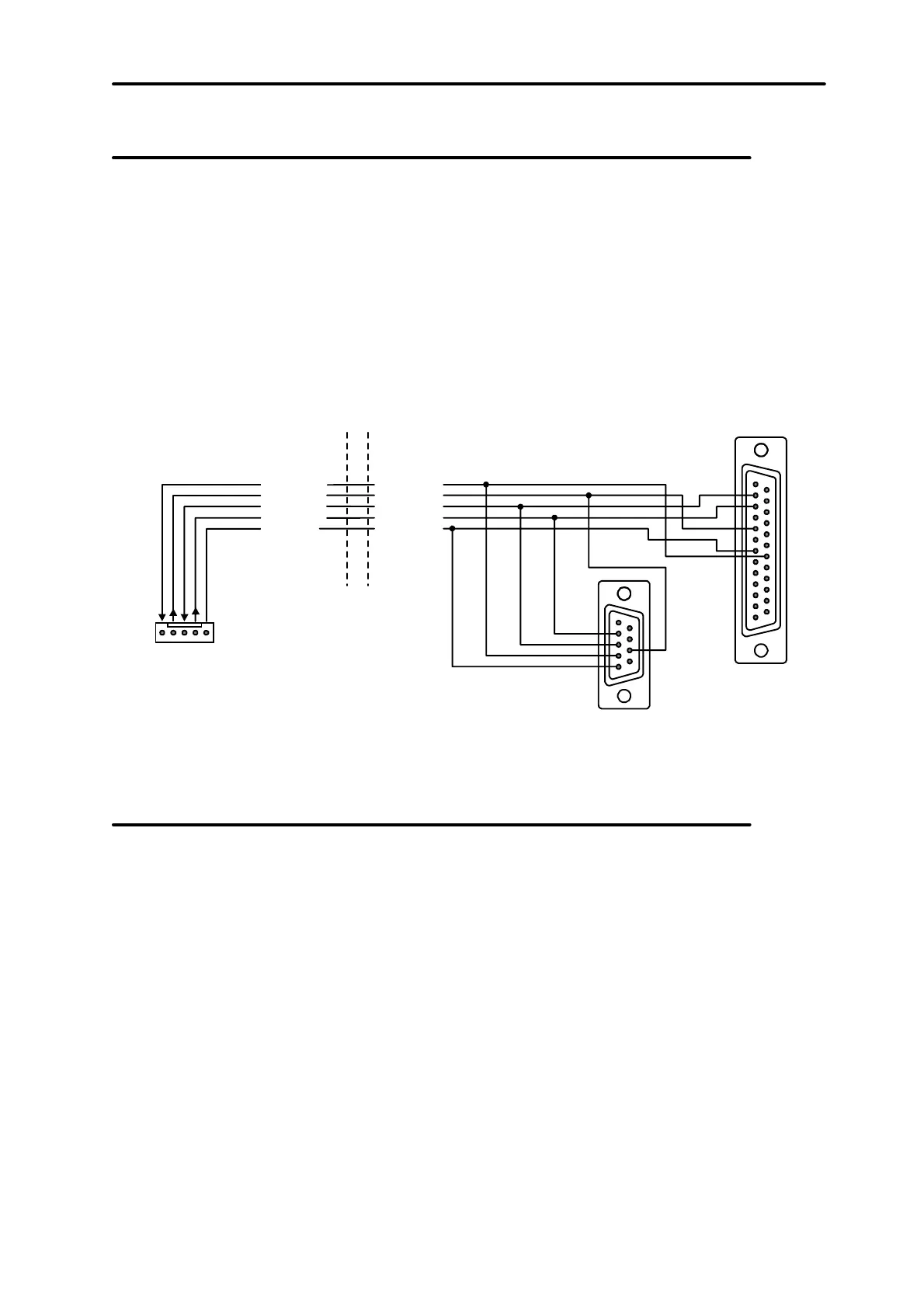
In case of control panel CA-64 programming with the use of a computer and the
“Downloading” function via control panel RS-232 port, the computer should be
connected according to Figure 24. It is possible to connect the computer by means of
the cable used for programming of CA-10 control panels. But there is here a certain
inconvenience: if the control panel uses the telephone line when exchanging data
with the computer (monitoring, messaging), the message “Caution! Control panel
does not answer” may appear in DLOAD64 program. This effect will not occur when
the connections are made in accordance with Figure 24, because the control panel
informs the computer on a temporary pause in servicing the RS-232 port via an
additional wire.
DSR cont.p.
RTS cont.p.
RXD cont.p.
DTR comp.
CTS comp.
TXD comp.
RXD comp.TXD cont.p.
COM GND
SERIAL PORT
RS 232
2
3
4
5
8
2
3
5
7
20
(view of connector
at the control panel board)
Fig. 24. Connection of a computer to the control panel serial port.
Connection of external modem
The control panel CA-64 may be programmed via the telephone line with the use of
external modem. A baud rate of 300 bauds is used for programming via the modem
integrated in the control panel. For this baud rate, reading of all control panel settings
and programming new ones may teke tens minutes. Additionally, programming via
internal modem is not accessible by means of a cellular telephone (GSM or DCS)
due to the baud rate established in cellular telephony. Connecting the external
modem eliminates all these limitations. Higher baud rate, when an external modem is
connected, makes possible DLOAD64 running at the same speed as when the
computer is connected directly to the control panel (RS-232 to computer COM).
Modem should be properly prepared before connecting it to the control panel:
connect it to the computer and set and store proper operation mode using the
Terminal type program. Proceed as follows:
1) Check whether the modem is connected to the terminal – modem should answer
OK after writing at© (if modem does not answer, try ate1© ; if there is no answer
again, check the modem cabling to the computer and check whether COM port is
properly selected in settings of the program of Terminal type).
2) Check the settings of parameters determining modem operation mode. After the
command at&v©, modem shows the list of parameters for programming. Setting
of just few parameters is important for correct operation of the control panel – in


 To Next Page
 Loading...








