13. Loosen the union for the drainage line on the bottom of the condensate
separator.
14. Remove the o-ring and dispose of in an environmentally sound
manner.
15. Disassemble pipelines on the separator heads.
16. Remove the o-rings and dispose of in an environmentally sound
manner.
17. Unscrew the hexagon nut.
18. Unscrew the socket head cap screws on the separator head.
19. Pull the condensate separator away from the cooler insert.
20. Remove all gaskets, ring gaskets and o-rings and dispose of in an
environmentally sound manner.
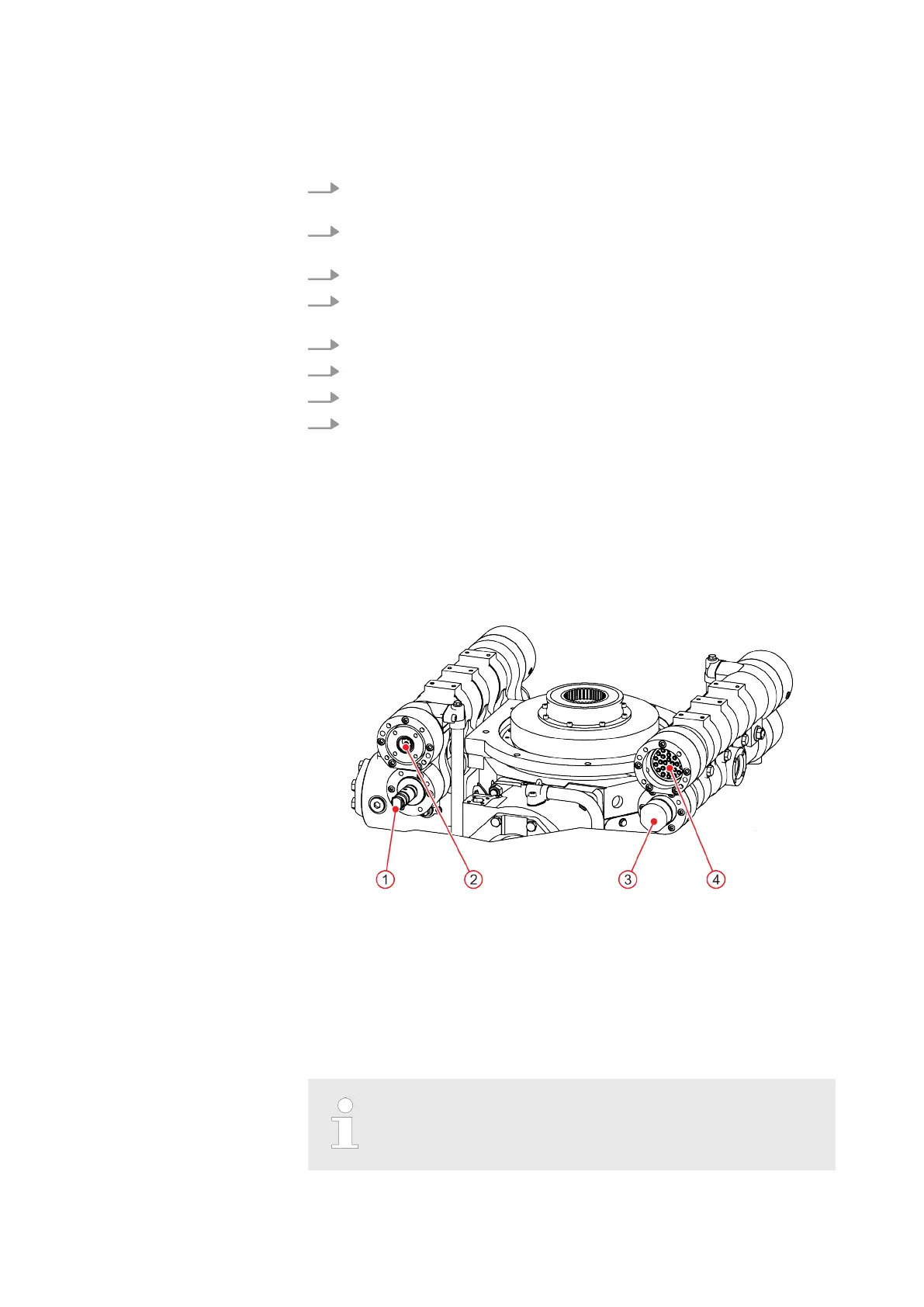
4.1.11.2 Remove and clean the cooler inserts.
Fig. 20: Extracting cooler inserts towards the compression stage 1 cylinder
1 Cooler insert compression stage 1
2 Cooler insert compression stage 4
3 Cooler insert compression stage 3
4 Cooler insert compression stage 2
Always turn cooler inserts clockwise when installing and
removing them.
MAINTENANCE
WP5000 Basic WA 41013675 en GB 20190916 | 53


 To Next Page