11
1. Getting Started
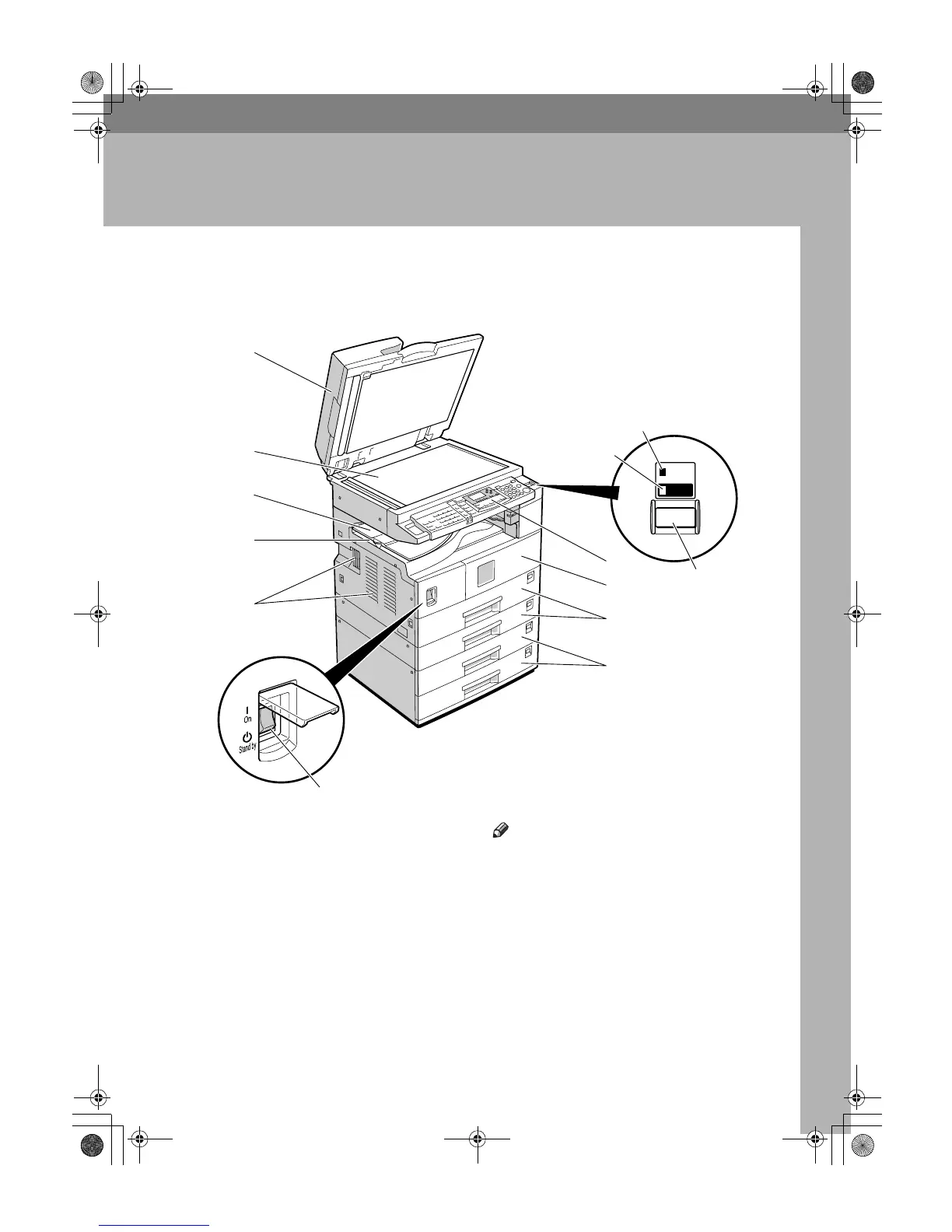
Guide to Components
1.
Exposure glass cover (optional),
ADF (optional), or ARDF (optional).
See p.13 “External Options”
(The illustration shows the ARDF.)
2.
Exposure glass
Place originals here face down.
3.
Internal tray 2 (1 bin tray) (option-
al)
The indicator lights when paper is deliv-
ered to internal tray 2. If internal tray 2
has not been installed, the indicator does
not light. See p.13 “External Options”.
Note
❒ When paper larger than 11" × 17" is
delivered, release the 1 bin tray stand,
and then pull out the tray extension.
4.
Internal tray
Copied, printed paper or fax messages
are delivered here.
5.
Ventilation holes
Prevents overheating. Do not obstruct
the ventilation holes by placing objects
near them or leaning things against them.
If the machine overheats, a fault might
occur.
On
Main
Power
1
2
3
5
4
6
7
8
9
10
11
12
13
AAI057S
KirC2_ENzenF_FM.book Page 11 Monday, September 22, 2003 10:47 AM



 To Next Page