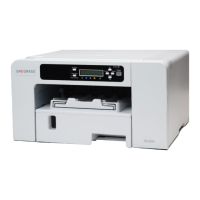
Need help?
Do you have a question about the Sawgrass SG500NA and is the answer not in the manual?
Overview of available manuals and guides for the printer.
Key warnings, user notes, and important information for safe operation.
Details on identifying printer region and model-specific variations.
Lists available units and options for different printer models.
Identifies and describes the main parts of the printer.
Details about optional trays and accessories for paper handling.
Explains the keys and indicators on the printer's control panel.
Instructions for turning the printer on and off, and energy saver mode.
Step-by-step guide for initial printer setup and installation.
Guidelines for choosing a suitable location and environment for the printer.
Specifications and precautions for connecting the printer to a power source.
Instructions for unpacking the printer and verifying supplied items.
Procedures for attaching and detaching printer options like trays.
Guidance on loading sublimation transfer paper and handling precautions.
Step-by-step instructions for installing ink cartridges.
Connecting the power cord and performing the initial printer startup.
Methods for connecting the printer to a computer via USB or Ethernet.
Minimum hardware and OS requirements for using the printer software.
Recommended design software for optimal print quality and color output.
Instructions for downloading, installing, and configuring printer software.
How to remotely monitor and configure the printer using Web Image Monitor.
How to view printer status and information via the Web Image Monitor.
Checking ink levels, replacing cartridges, and handling precautions.
Checking waste ink levels and procedures for replacing the unit.
Instructions for cleaning the printer exterior and power cable plug.
Precautions for moving the printer short distances or long distances.
Guidelines for storing the printer for long periods and proper disposal.
Procedures for canceling print jobs from the printer or computer.
Steps to take when the printer fails to start printing.
Resolving issues with paper not feeding, jamming, or feeding multiple sheets.
Troubleshooting tips for unsatisfactory print quality like streaks or blotches.
Explains display messages, Web Image Monitor errors, and status indicators.
Addresses issues related to ink levels and waste collection unit status.
Resolving errors related to temperature, network, and maintenance failures.
Information on where to inquire, recommended consumables, and printer options.
 General
| Operating System Compatibility | Windows, Mac |
|---|---|
| Number of Ink Colors | 4 |
| Type | Sublimation |
| Print Technology | Dye Sublimation |
| Max. print size | 8.5" x 14" |
| Supported Media Sizes | 4" x 6", 5" x 7", 8" x 10" |
| Connectivity | WiFi, USB 2.0 |
| Ink Cartridges | Sublimation Ink Cartridges |
| Ink Type | Dye Sublimation Ink |
| Dimensions (W x D x H) | 20.2" x 14" x 6.1" |
| Media Size | 4x6 inches to 8.5x14 inches |

 To Next Page