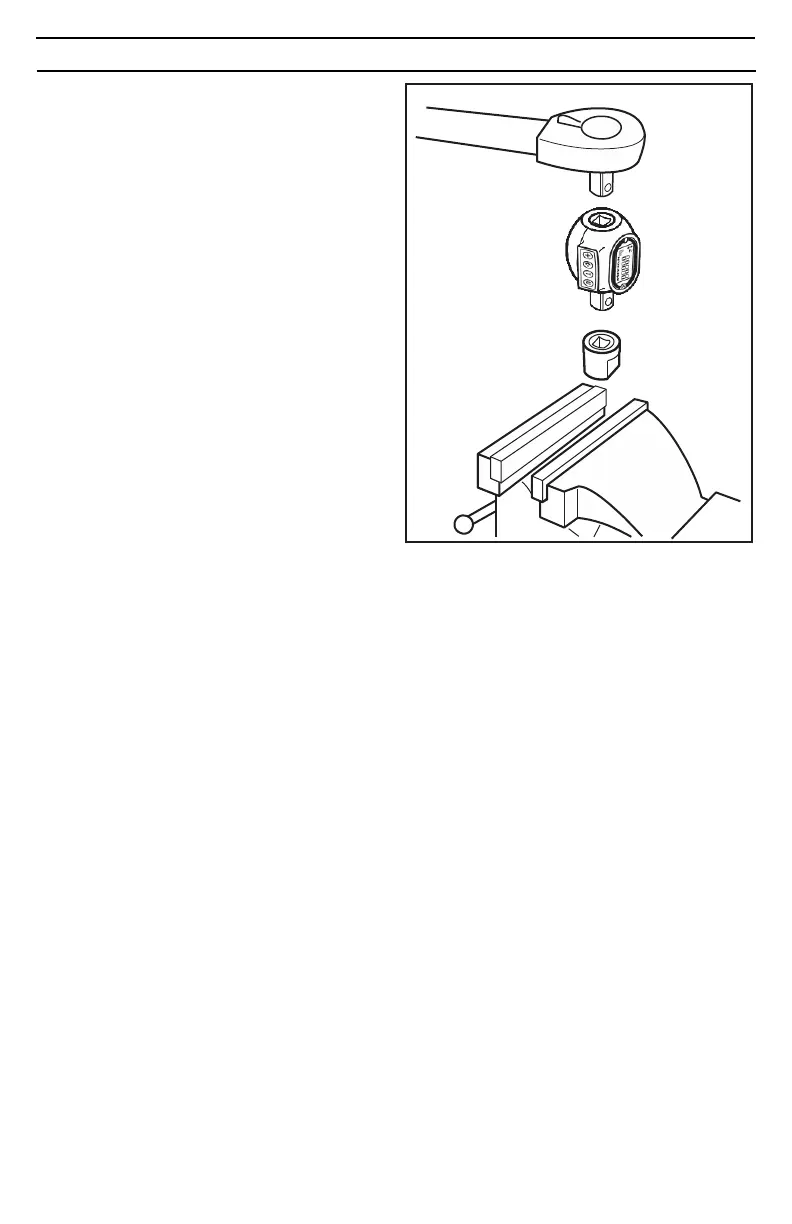
CALIBRATING A TORQUE WRENCH USING DIGITAL ADAPTER
1. Set your torque wrench to a value of approxi-
mately 25% of its maximum capacity. For
example, if your torque wrench has a maximum
capacity of 150 lb-ft, set it to 40 lb-ft.
2. Program the digital torque adapter for a torque
value that matches the torque wrench setting.
In our example, you would set the adapter for
40 lb-ft. Ensure the adapter is in the “peak”
mode as this will make it easy to reference
actual torque versus the torque indicated on
the wrench.
3. Connect the pre-set torque wrench and the
your calibration adapter (not inculded) to the
digital torque adapter. Secure the calibration
adapter in a bench vise. Ensure the calibration
adapter is securely tightened in the vise.
4.Turn the torque wrench smoothly and steadily,
applying torque to the calibration adapter until
your torque wrench reaches the preset value,
either by “clicking” (micrometer style torque
wrench), or displaying the desired setting
(digital or dial torque wrench).
5. Read the peak torque value shown on the digi-
tal torque adapter. Adjust your torque wrench
and repeat the procedure until the trque
wrench and digital torque adapter show identi-
cal torque values.


 To Previous Page