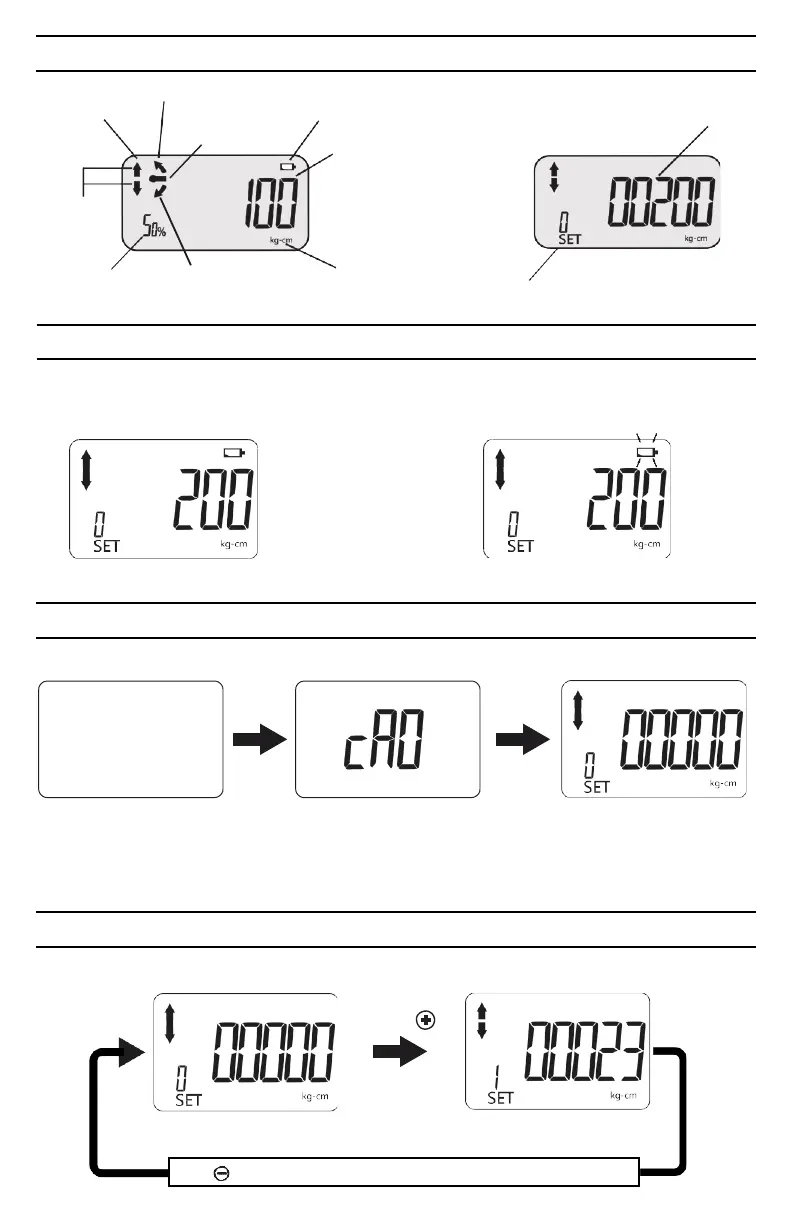
LCD DISPLAY INDICATORS
Peak Hold
Trace
CCW
Auto/Manual
Low battery icon
Torque value
Preset target torque
Percentage of
CW
preset torque
Unit of
measure
Preset number
LOW BATTERY VOLTAGE INDICATION
When battery voltage drops below 2.6
volts, a low battery warning icon will
appear on the LCD display.
When the battery voltage drops below 2.4 volts,
the low battery warning icon will begin to flash,
indicating that immediate battery replacement is
required.
Battery voltage under 2.6V
Battery voltage under 2.4V
POWERING ON DIGITAL TORQUE ADAPTER
Press Mode button to turn digital torque adapter on and activate auto-zeroing process.
CAUTION:
Auto-zeroing process Normal mode
(Preset number 0 shown)
Make sure the displayed applied torque value is zero during the auto-zeroing period. Otherwise a
torque offset will be included.
SELECTING MEMORY PRESETS
Select 1 of 10 user programable memory presets.
Press
Normal mode
(Preset number 0 shown)
Press to scroll through ten (10) user programable memory presets.


 To Next Page