SELECTING UNITS OF MEASURE
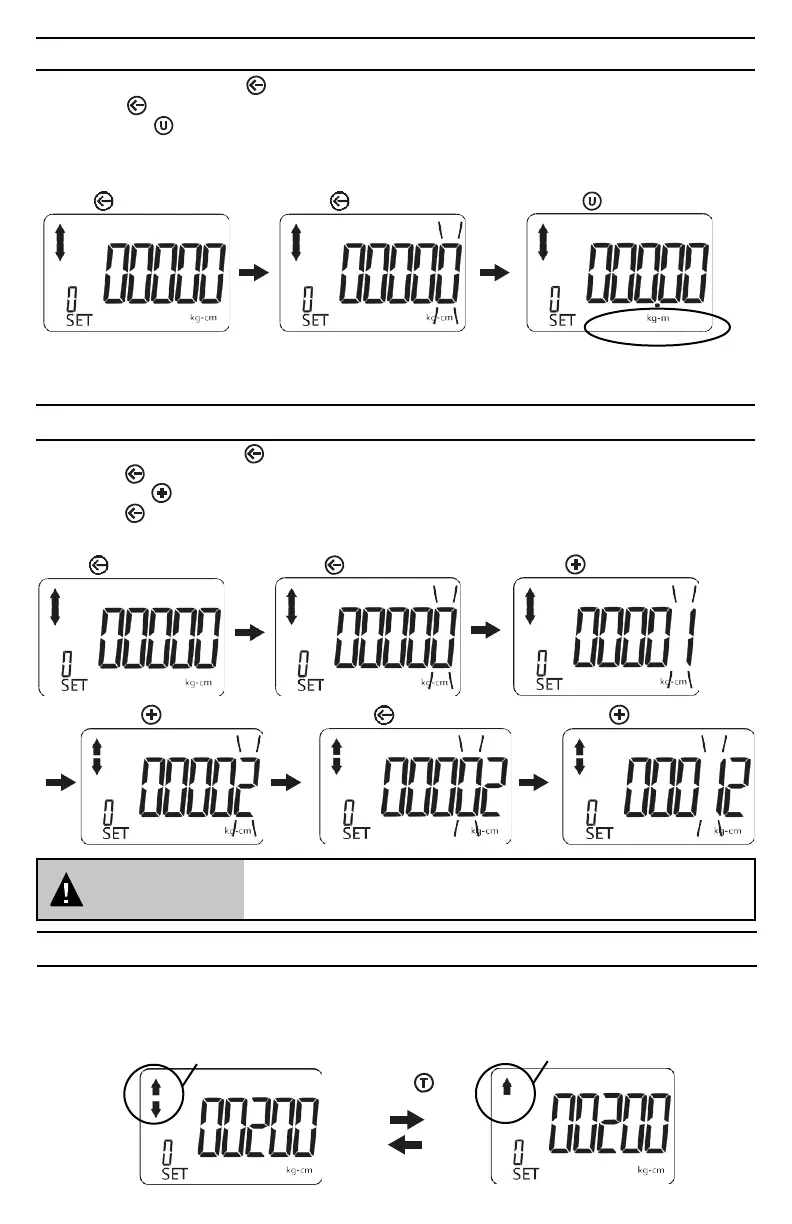
1. With the unit on, press the (Digit shift) key to display the “normal mode” screen.
2. Press the (Digit shift) key to the activate the “set torque value” screen (far right digit flashes).
3. Press the the (Units) key to toggle the Units of measure indicator until the desired unit of mea-
sure is displayed.
4. Five different unit selections are available: kg-cm, k-gm, in-lb, ft-lb, and N-m.
Press Press Press
NOTE:
When you change units, any target torque setting you have already entered will now be displayed in
the new unit value.
SETTING PRESET VALUES
1. With the unit on, press the (Digit shift) key to display the “normal mode” screen.
2. Press the (Digit shift) key to the activate the “set torque value” screen (far right digit flashes).
3. Press the the key until the desired first digit value is displayed (0 through 9).
4. Press the (Digit shift) key to move to the next higher digit position.
5. Repeat steps three (3) and four (4) as needed to enter the desired target torque value.
Press Press Press
Press
Press
Press
ATTENTION
If the value of the presetting being programmed exceeds 120% of
the rated maximum torque capacity of the adapter, the value will be
automatically reset to zero.
SELECTING PEAK HOLD/TRACKING MODES
In Track mode - The display will register “real-time” torque as it is applied. This is useful when you
are able to observe the digital display while applying torque to a fastener. Watching the torque value
increase can assist you in applying torque evenly and safely, especially as you approach your target
torque setting.
Tracking Mode
Peak Hold Mode
Press


 To Next Page