TRACKING MODE OPERATION
In Tracking mode, the display will register torque as it is applied in real-time. This allows you to
observe the digital display while applying torque to a fastener. Watching the torque value increase
can assist you in applying torque evenly and safely, especially as you approach your target torque
setting.
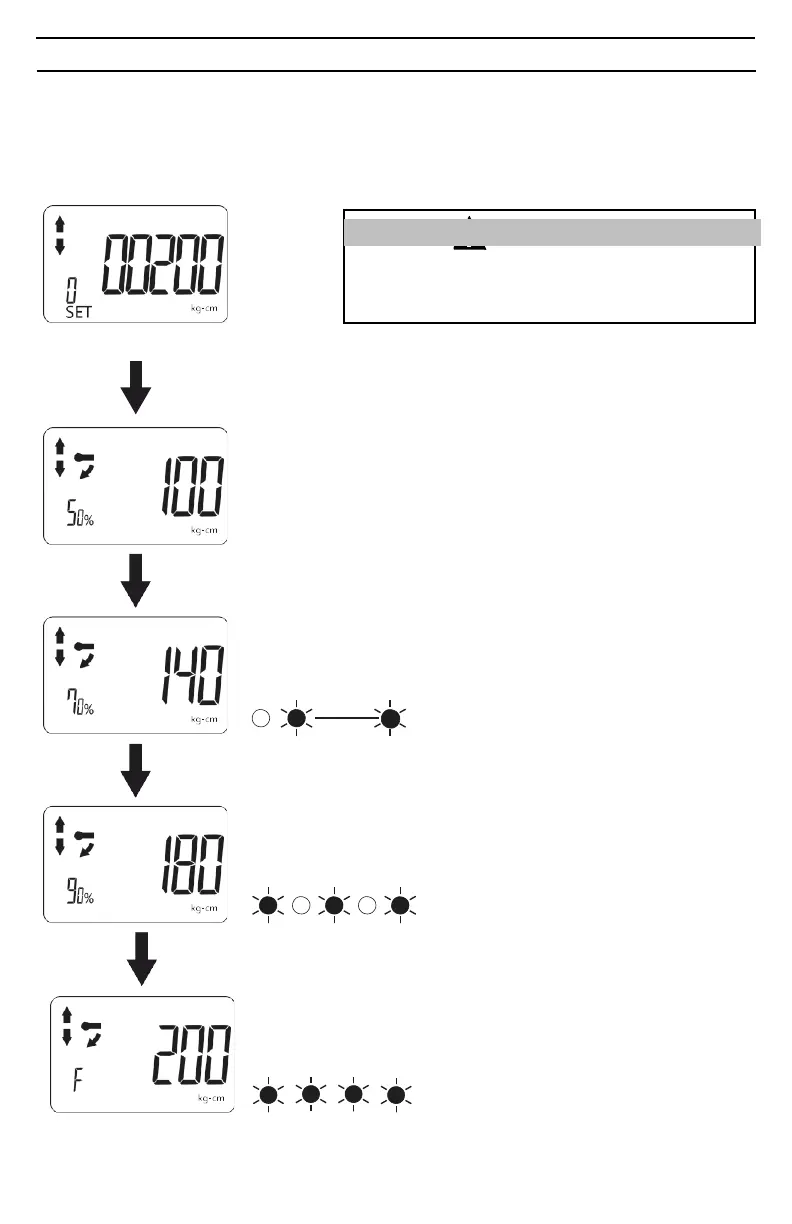
Tracking Mode
Select pre-setting: 200 kg-cm
ATTENTION
If the value of the selected presetting is zero, a default
value of 120% of the rated torque capacity of the adapt-
er will automatically be loaded as the target torque
Apply torque to reach preset torque value
(200 kg-cm in this example)
At 50% of Target torque:
• Percentage of preset torque value is displayed
Apply
torque
At 70% of target torque:
• Percentage of preset torque value is displayed
• Buzzer sounds: Bi---Bi---Bi---
• Red LED flashes:
Apply
torque
At 90% of target torque:
• Percentage of preset torque value is displayed
• Buzzer sounds: Bi-Bi-Bi-Bi
• Red LED flashes:
Apply
torque
At 100% of target torque:
• Percentage of preset torque value is displayed
• Buzzer sounds: BiBiBiBiBiBiBi
• Red LED flashes:
• Vibration alert activates


 To Next Page