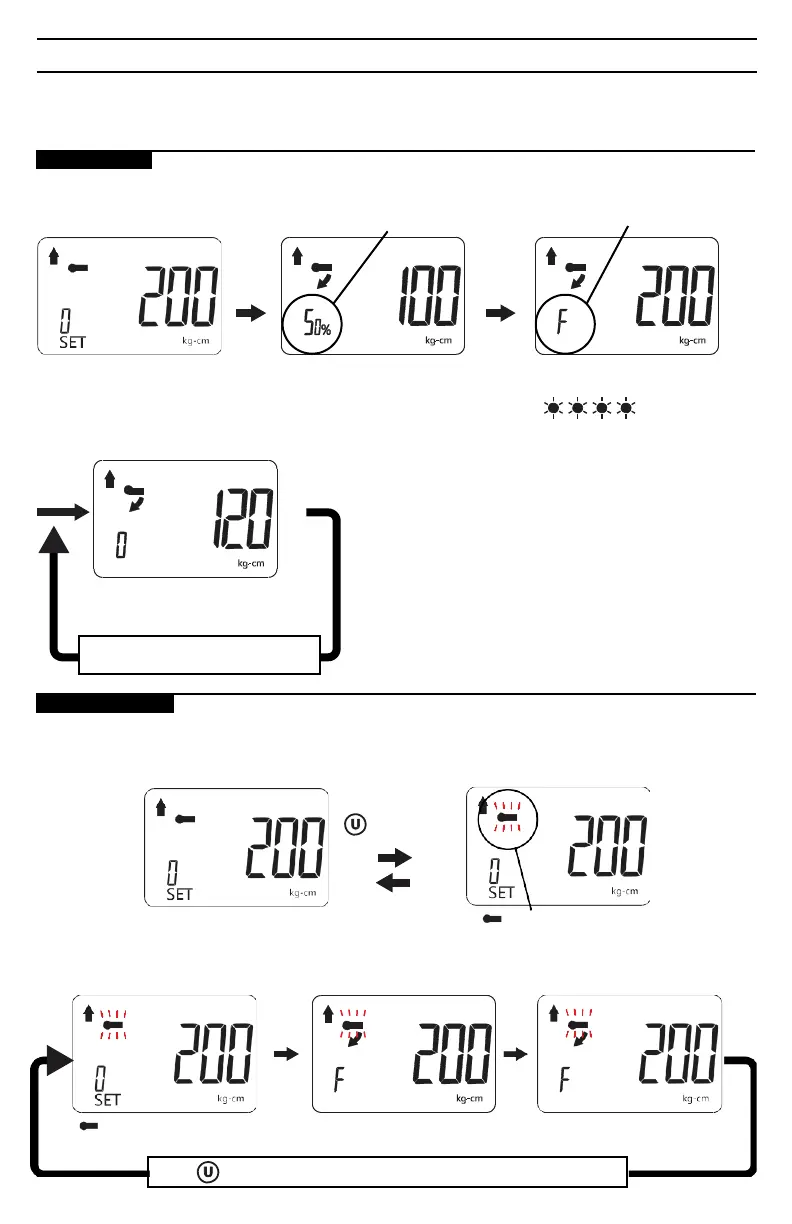
PEAK HOLD MODE OPERATION
In Peak hold mode, the digital display shows the maximum torque applied, which can be helpful for
verifying that the correct torque was applied when the digital display is not visible during use. This
mode is also handy when using the adapter to calibrate a torque wrench.
AUTO MODE:
Peak Hold Mode
Apply
torque
Percent of Target torque
applied is displayed.
Apply
torque
Continue applying torque
until preset torque value
is achieved.
Select pre-setting: 200 kg-cm
(in this example)
Release torque to zero-out torque
reading and then apply torque again.
Release
torque
Buzzer sounds: BiBiBiBiBiBiBi
Red LED flashes:
Vibration altert activates
Unit auto clears and updates to
display new peak value attained.
MANUAL MODE:
Toggle screen from Auto mode to Manual mode.
Auto mode
Press and hold
for 2 sec.
Manual mode
Icon will blink
Manual mode
Fully release
applied torque.
Display retains peak
torque achieved.
Apply
torque
Icon blinking
Press to manually clear currently displayed peak torque value.


 To Next Page