12
Setting the daily timer
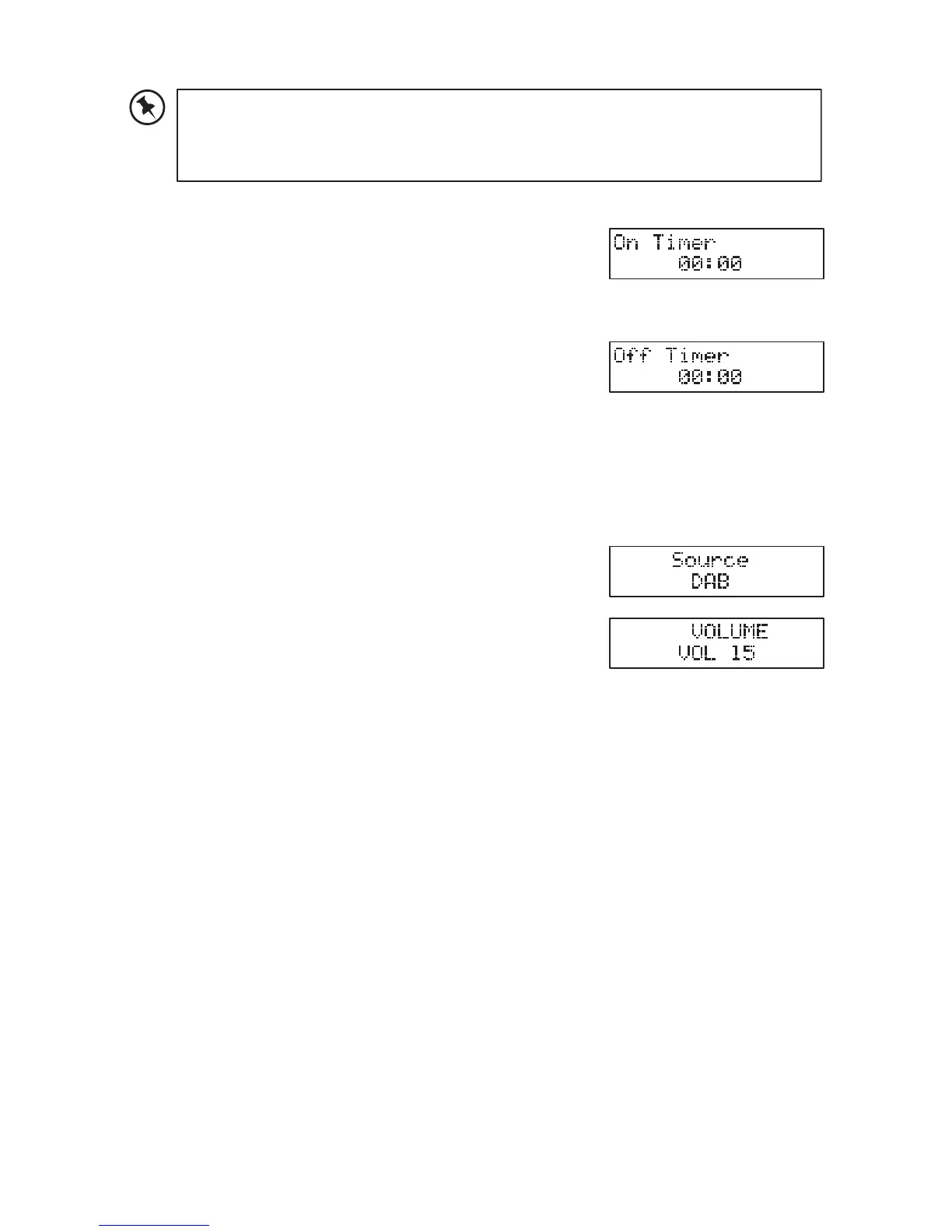
1. Press and hold TIMER on the remote control
until the display shows “On Timer”, and the hour
digitsash.
2. Press I◄◄ I ►► to adjust the hour digits, and
then press TIMERtoconrm.Theminutedigits
willashonthedisplay.
3. Press I◄◄ I ►► to adjust the minute digits, and
then press TIMERtoconrm.
4. when On Timer Clock set, the display will show
“OffTimer”andthehourdigitswillash.
5. Press I◄◄ I ►► to adjust the hour digits, and
then press TIMERtoconrm.Themunitedigits
willashonthedisplay.
6. Press I◄◄ I ►► on the remote control to adjust
the minute digits, and then press TIMER to
conrm.
7. Finally Press I◄◄ I ►► to select DAB, FM,
DICS or USB mode, then press TIMER to
conrm.Thedisplaywillshow“VOL#”andash.PressI◄◄ I ►► to
adjust the volume, and then press TIMERtoconrm.
8. Press TIMER to select "Timer On", wait for a while “◷”icon will show on
the display to indicator the timer is on.
9. The Timer setting is now complete.
To cancel the daily timer
Press TIMER on the remote control repeatedly to select Timer Off mode.
The “◷” indicator will disappear from the display.
Setting the sleep timer
Use the sleep timer to turn the system off after a certain number of minutes
in play mode. By setting the sleep timer, you can fall asleep to music and
know that your system will turn off by itself rather than play all night.
1. To set the sleep timer press SLEEP on the remote control repeatedly
to view the different timer settings. The number of minutes shown will
display in this sequence:
general operation
powering ON/OFF
Scan Time
00:00:00” and synchronize to the current local time if you can receive a DAB signal in your
location. After approximate one minute, it will switch to STANDBY mode.
t Press on the unit or press ON/STAND-BY on the remote control to switch the unit to
ON mode.
t Press to switch the unit back to STANDBY mode.
t
completely.
t When the unit is idle for approximately 15 minutes, it will automatically switch to standby.
t
selecting modes
Press MODE repeatedly to switch between DAB, FM, CD, USB, AUX and Bluetooth modes.
adjusting the volume
t Turn the VOLUME +/– dial on the unit or press VOLUME +/– on the remote control to
adjust the volume.
t
MUTE on the remote control. Press MUTE again
or press VOLUME +/– on the remote control or turn VOLUME +/– to resume normal
listening.
auto setting the clock
The clock can be updated automatically if you can receive a DAB signal in your location.
In order to synchronise to the current local time you must leave it on the DAB station for a
short period of time.
manually setting the time
1. During Standby mode, press and hold CLOCK on the remote control. The hour digits
2. Press to adjust the hour digits, and then press CLOCK
3. Press to adjust the minute digits, and then press CLOCK
4. The time is now set.
15
MODE repeatedly on the unit or press
CD, USB, TUNER/DAB, AUDIO IN,
BLUETOOTH on the remote
If you cannot received any DAB signal, you can manually set the
time. Once DAB signal is received, the time will be automatically
updated.
If you cannot received any DAB signal, you can manually set the time. Once DAB signal is
received, the time will be automatically updated.
setting the daily timer
1. Press and hold TIMER on the remote control until the
2. Press to adjust the hour digits, and then press
TIMER
display.
3. Press
to adjust the minute digits, and then press
TIMER
4.
5. Press to adjust the hour digits, and then press
TIMER
display.
6. Press
on the remote control to adjust the minute
digits, and then press TIMER
7. Finally Press to select DAB, FM, DISC or USB mode,
then press TIMER
to adjust the volume, and then
press TIMER
9. The Timer setting is now complete.
8. Press TIMER to select "Timer On",wait for a while “ ” icon will show on the display to
indicator the timer is on.
to cancel the daily timer
Press TIMER on the remote control repeatedly to select mode. The “ ” indicator
will disappear from the display.
setting the sleep timer
By setting the sleep timer, you can fall asleep to music and know that your system will turn
1. To set the sleep timer press SLEEP on the remote control repeatedly to view the
90 80
OFF 10 20 30 40
70 60 50
2.
display will show “SLEEP #”, e.g. “SLEEP 10
10 minutes, “SLEEP 20
3. Press SLEEP
back to previous screen.
16


 To Next Page