5
Product overview
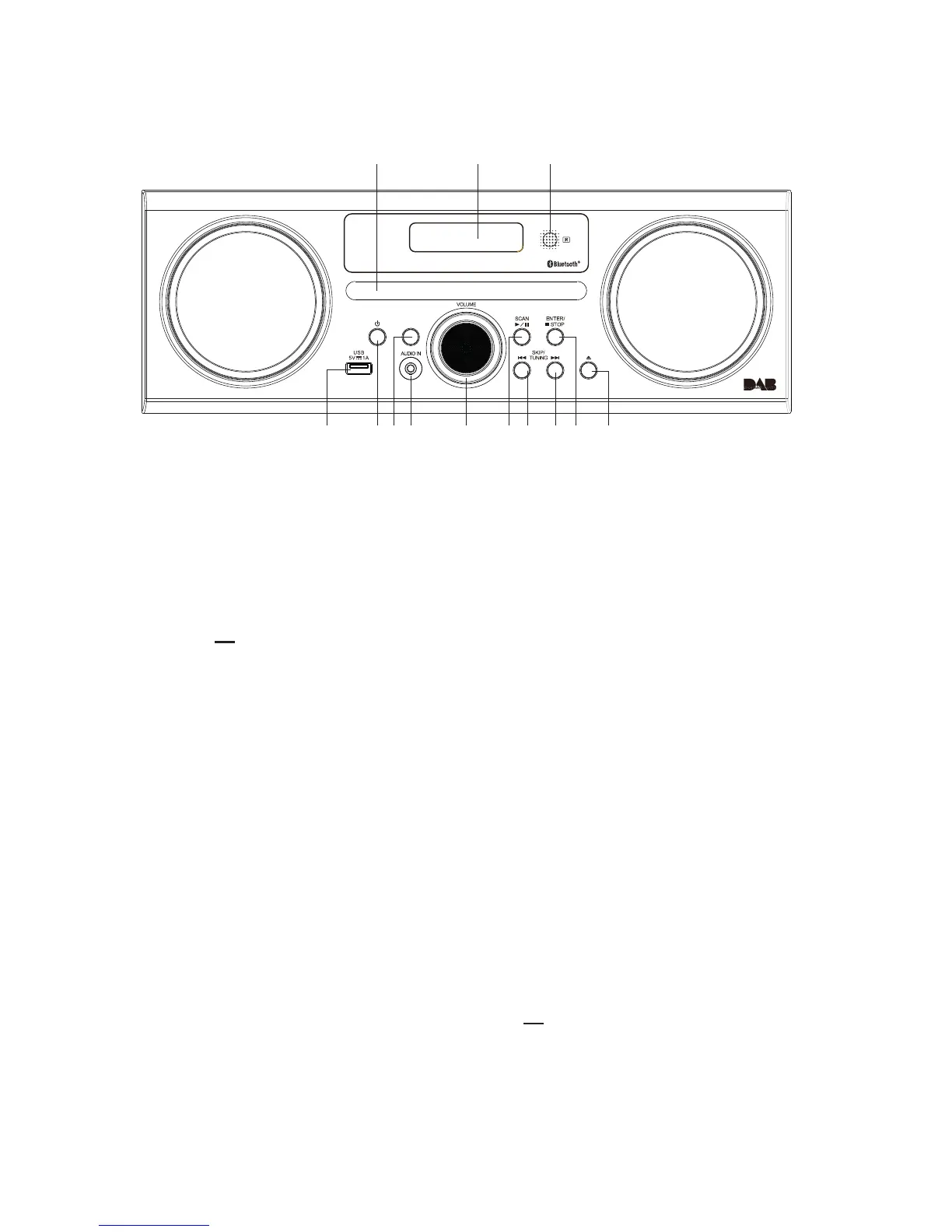
Front view
1. Disk tray
2. Display
3. Remote Control Sensor
Receive signal from the
remote control.
4. USB … 5V 1A Charging Port
• For charging external devices.
• For MP3 playback.
5. STANDBY Button
Switch the unit between the
ON and STANDBY modes.
6. MODE Button
Switch between DAB, FM,
CD, USB, AUX and
Bluetooth modes.
7. AUDIO IN Socket
Connects to an external
audio device.
8. VOLUME +/– Dial
Increase or decrease the
volume.
9. SCAN/►/II Button
Play/pause/resume playback.
Auto-scan in DAB/FM mode.
10. SKIP/TUNE SEARCH I◄◄
Button
Skip backwards to the
beginning of the track or to
the previous track.
Allow fast reversing of the
current track.
Search for a radio station
going backwards through
accessible radio frequencies.
11. SKIP/TUNE SEARCH I►►
Button
Skip forwards to the next track.
Allow fast forwarding of
the current track.
Search for a radio station
going forwards through
accessible radio frequencies.
12. ENTER Button
■ Stop playback
13. ▲open/close disk Button
3
4 5 6 7 8 9 1110
21
12
product overview
front view
1. Disk tray
2. Display
3. Remote Control Sensor
Receive signal from the remote control.
4. USB 5V 1A Charging Port
t'PSDIBSHJOHFYUFSOBMEFWJDFT
t'PS.1QMBZCBDL
5. STANDBY Button
4XJUDIUIFVOJUCFUXFFOUIF0/BOE
45"/%#:NPEFT
6. MODE Button
4XJUDICFUXFFO%"#'.$%64#"69BOE
Bluetooth modes.
7. AUDIO IN Socket
$POOFDUTUPBOFYUFSOBMBVEJPEFWJDF
8. VOLUME +/– Dial
Increase or decrease the volume.
9. SCAN/ Button
t1MBZQBVTFSFTVNFQMBZCBDL
t"VUPTDBOJO%"#'.NPEF
10. SKIP/TUNE SEARCH Button
t4LJQCBDLXBSETUPUIFCFHJOOJOHPGUIF
track or to the previous track.
t"MMPXGBTUSFWFSTJOHPGUIFDVSSFOUUSBDL
t4FBSDIGPSBSBEJPTUBUJPOHPJOHCBDLXBSET
UISPVHIBDDFTTJCMFSBEJPGSFRVFODJFT
11. SKIP/TUNE SEARCH Button
t4LJQGPSXBSETUPUIFOFYUUSBDL
t"MMPXGBTUGPSXBSEJOHPGUIFDVSSFOUUSBDL
t4FBSDIGPSBSBEJPTUBUJPOHPJOHGPSXBSET
UISPVHIBDDFTTJCMFSBEJPGSFRVFODJFT
12. ENTER Button
StopQMBZCBDL
PQFODMPTFEJTL#VUUPO
8


 To Next Page