14
Oncethescanhasnishedtheunitwillselecttherstalphanumerically
found station. to explore the found stations, press I◄◄ I ►►.
Full scan
The full scan will search for the entire DAB Band III channels. After the
scanhasnished,therstalphanumericallyfoundstationwillbeautomati-
cally selected.
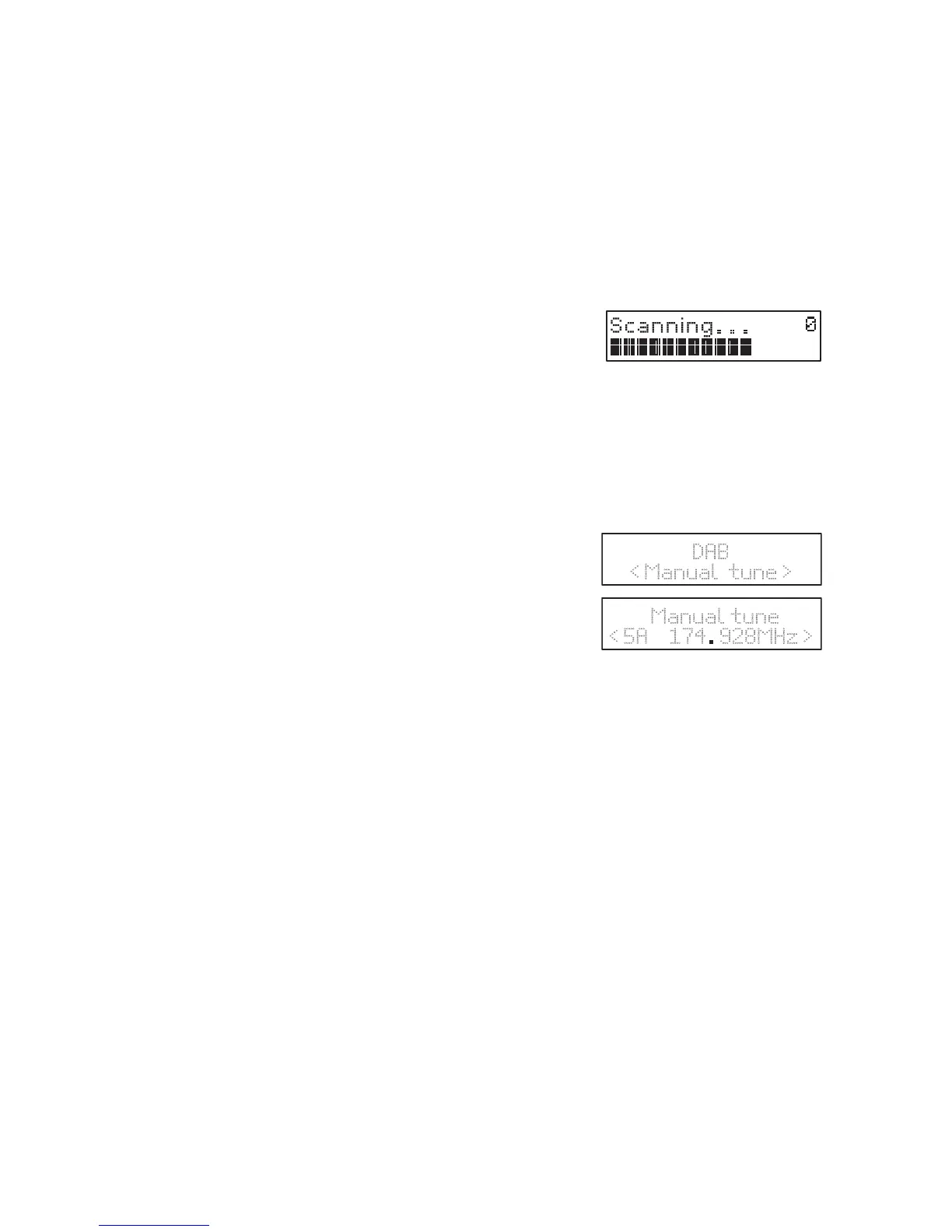
1. To activate auto scan, press ►/II/SCAN and the display will show
“Scanning … ” and a progressing slide bar.
2. All the stations that have been found will be
stored automatically. To explore and listen to
the found stations, press I◄◄ I ►► to select.
ThenpressENTERconrmintostations.
Manual tuning
As well as the auto tune function, you can manually tune the receiver. This
can help you when aligning your aerial or when adding stations that were
missed while auto tuning.
1. Press ENTER to select Manual tune.
2. Press I◄◄ I ►► to cycle through the DAB
channels, which are numbered from 5A to 13F.
3. After your desired channel number is selected,
press ENTERtoconrm.Thedisplaywillshow
the multiplex.
4. Press MENU again to add selected channel to station list.
Secondary services
You may see a “>” symbol after the name of the station, this indicates that
there are secondary services available to that station. These secondary
services contain extra services that are related to the primary station. e.g. a
sports station may want to add extra commentaries. The secondary ser-
vices are inserted directly after the primary station in the station list.
To select the secondary station, press MENU when the “>” appears in the
display before the station name. When the secondary service ends, the unit
will automatically switch back to the primary station.
Preset stations
You can store up to 30 of your favourite stations to the memory. This will
enable you to access your favourite stations quickly and easily.
1. Tostoreaprset,youmustrstgbedlisteningtothestationthatyou
would like to save, press and hold MEMORY. The display will show
“Preset Store <#: (Empty)>”.
DAB operation
time, the unit will automatically enter into the DAB mode and perform auto scan function.
During the scan the display will show “Scanning… ” together with a slide bar that
indicates the progress of the scan and the amount of stations that have been found so far.
explore the found stations, press .
full scan
1. To activate auto scan, press /SCAN and the display will
show “Scanning … ” and a progressing slide bar.
2. All the stations that have been found will be stored
automatically. To explore and listen to the found stations,
press
to select.Then press ENTER conrm into stations.
manual tuning
As well as the auto tune function, you can manually tune the receiver. This can help you
when aligning your aerial or when adding stations that were missed while auto tuning.
1. Press MENU to display the menu.
2. Press
to cycle through the DAB channels, which are
numbered from 5A to 13F.
3. After your desired channel number is selected, press
ENTER to conrm. The display will show the multiplex.
4. Press MENU again to add selected channel to station list.
secondary services
You may see a “>” symbol after the name of the station, this indicates that there are
secondary services available to that station. These secondary services contain extra
services that are related to the primary station. e.g. a sports station may want to add extra
commentaries. The secondary services are inserted directly after the primary station in the
station list.
To select the secondary station, press MENU when the “>” appears in the display before
the station name. When the secondary service ends, the unit will automatically switch
back to the primary station.
18
DAB
< Manual tune >
Manual tune
< 5A 174 928MHz >
MENU on the remote
Press ENTER to select Manual tune.
DAB operation
time, the unit will automatically enter into the DAB mode and perform auto scan function.
During the scan the display will show “Scanning… ” together with a slide bar that
indicates the progress of the scan and the amount of stations that have been found so far.
explore the found stations, press .
full scan
1. To activate auto scan, press /SCAN and the display will
show “Scanning … ” and a progressing slide bar.
2. All the stations that have been found will be stored
automatically. To explore and listen to the found stations,
press
to select.Then press ENTER conrm into stations.
manual tuning
As well as the auto tune function, you can manually tune the receiver. This can help you
when aligning your aerial or when adding stations that were missed while auto tuning.
1. Press MENU to display the menu.
2. Press
to cycle through the DAB channels, which are
numbered from 5A to 13F.
3. After your desired channel number is selected, press
ENTER to conrm. The display will show the multiplex.
4. Press MENU again to add selected channel to station list.
secondary services
You may see a “>” symbol after the name of the station, this indicates that there are
secondary services available to that station. These secondary services contain extra
services that are related to the primary station. e.g. a sports station may want to add extra
commentaries. The secondary services are inserted directly after the primary station in the
station list.
To select the secondary station, press MENU when the “>” appears in the display before
the station name. When the secondary service ends, the unit will automatically switch
back to the primary station.
18
DAB
< Manual tune >
Manual tune
< 5A 174 928MHz >
MENU on the remote
Press ENTER to select Manual tune.


 To Next Page
 Loading...