8
30. TUNER/DAB Button
switch to TUNER or DAB operating mode.
31. ►/II Button
Start and pause playback in bluetooth mode.
32. I►► Button
Skip forwards to the next track in bluetooth mode.
33. ►/II Button
Start and pause playback in CD or USB mode.
34. ■ Stop Button
Stop playback in CD or USB mode.
35. Display Buttons
Display information in DAB mode.
36. MENU Buttons
MENU in DAB mode.
37. Display Button
switch between station names, program type, radio text and
frequency in FM mode.
38. SCAN Button
Auto-scan in FM mode.
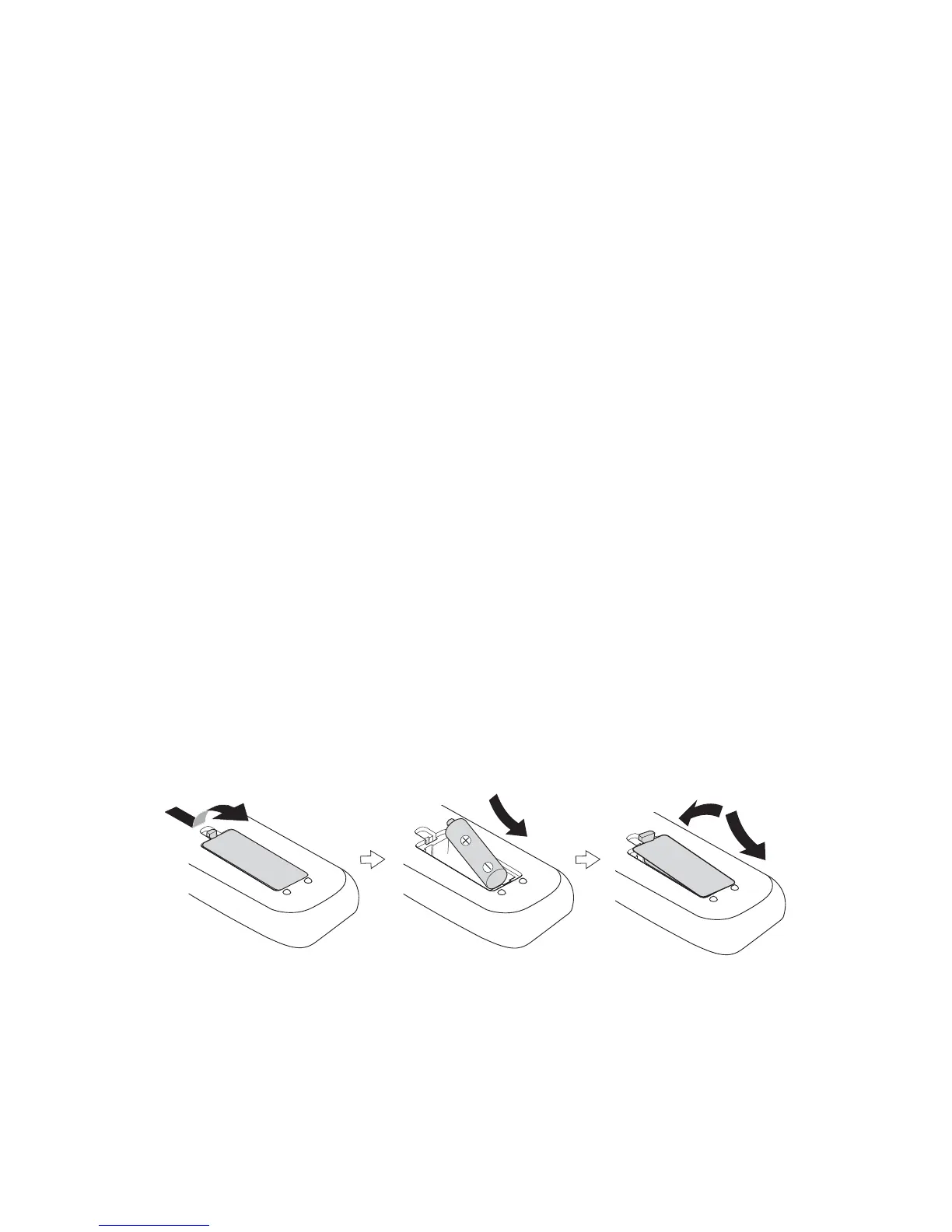
Battery replacement for the remote control
The remote control requires a LR6 1.5V AA/AM3 battery.
1. Open the battery cover.
2. Insert the supplied battery according to the direction indicated in the
battery compartment. When inserting or removing the battery, push it
towards the (–) battery terminals.
3. Close the cover.
battery replacement for the remote control
The remote control requires a LR6 1.5V AA/AM3 battery.
1. Open the battery cover.
2. Insert the supplied battery according to the direction indicated in the battery compartment.
When inserting or removing the battery, push it towards the (–) battery terminals.
3. Close the cover.
Handling the Battery
t Improper or incorrect use of batteries may cause corrosion or battery leakage, which could
t Install the battery correctly in the battery compartment. Normally the battery’s positive
polarity (+) will face up.
t Use only the battery type indicated in this manual.
t Do not dispose of the used battery as domestic waste. Dispose of it in accordance with
local regulations.
t Small button cell batteries such as the one used in the remote control are easily swallowed
by young children and this is dangerous. Keep loose button cells away from young children
and make sure that the battery is secure in the remote control. Seek medical advice if you
believe a battery cell has been swallowed.
11


 To Next Page