www.scheer-heizsysteme.de
MH-SERIES
operation
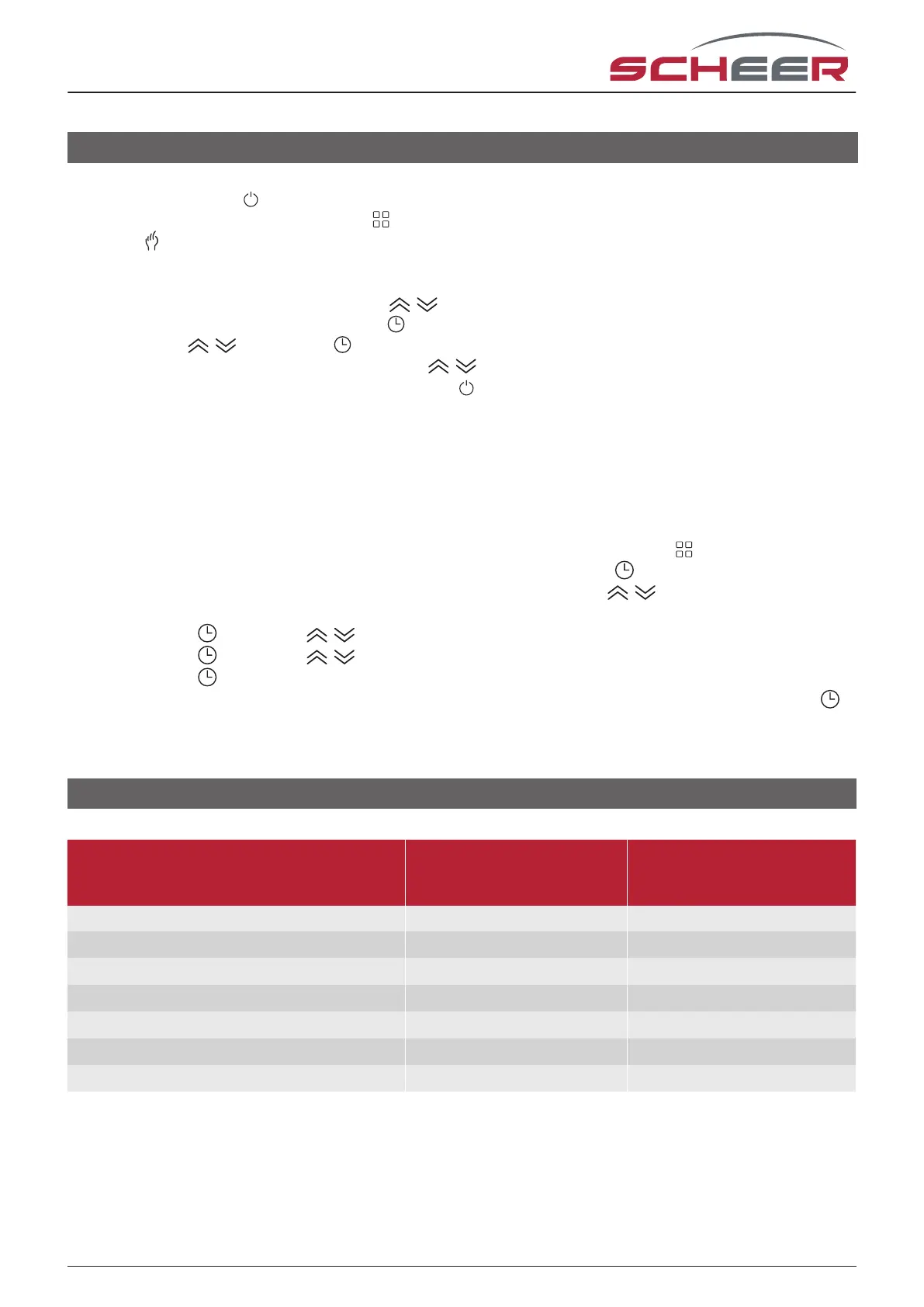
1. Power on/o: Press to turn the thermostat on/o.
2. Manual/ Time program mode: Touch to change between manual mode and program mode. In manual
mode, will show in the bottom left of the screen. In programmable mode, the period icon will show on
the right side.
3. Setting Temperature: In the time program mode the temperature can only be controlled by the set hea-
ting program. In the manual mode, press to set the desired temperature.
4. Adjusting/Setting the Clock: Touch the to set minute, hour and weekday (1 = Monday, 2 = Tuesday etc.)
by using the arrows. Press once more to conrm and exit.
5. Locking your Thermostat: Press and hold the for 5 seconds to lock/unlock your thermostat. In item
3 of the device parameters, you can select full lock( included).
6. Adjusting/setting the Program Schedules: When Wi-Fi connection is made, your thermostat will automa-
tically accept the program schedule made via the APP on your device (see below for detailed instructions)
To set the program schedules through your thermostat (NOT via your smartphone/tablet) simply follow the
instructions as below:
Please note: Setting the programme schedule through your thermostat can only be carried out if there is
no Wi-Fi connection between your thermostat and smartphone/tablet
7. Setting / adapting the time program on the thermostat: The time program can only be set on the device
if there is no active WLAN connection and time program mode is activated. Touch to change between
manual/ time program mode. In program mode, touch and hold the icon until the weekday schedule
settings appear (1 2 3 4 5 will show along the top of the screen). Use the arrows to adjust the „on“
time.
Press the icon and use the arrows to set the o time (2nd period).
Press the icon and use the arrows to set the temp. Repeat this process for periods 3 - 6.
Press the icon once more to enter the Saturday schedule settings (6 will show along the top of the
screen). Repeat the above process to set the periods as well as temp. as well as Sunday schedule. Press
once more to conrm and exit.
Default settings for program schedule
heating
periode
weekday
(Monday-Friday)
(1 2 3 4 5)
Weekend
(Saturday)
6
Weekend
(Sunday)
7
time temperature time temperatur time temperatur
period 1 06:00 AM 20°C 06:00 AM 20°C 06:00 AM 20°C
period 2 08:00 AM 15°C 08:00 AM 20°C 08:00 AM 20°C
period 3 11:30 AM 15°C 11:30 AM 20°C 11:30 AM 20°C
period 4 01:30 PM 15°C 01:30 PM 20°C 01:30 PM 20°C
period 5 05:00 PM 22°C 05:00 PM 20°C 05:00 PM 20°C
period 6 10:00 PM 15°C 10:00 PM 15°C 10:00 PM 15°C
A separate schedule may be set for weekdays (Mon - Fri) and for weekends (Sat or Sun).
13



 To Next Page