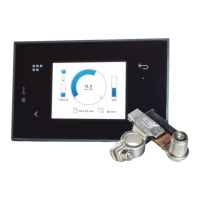
The MB-BOX, manufactured by Scheiber, is a comprehensive and scalable home automation solution designed for integration into land vehicles and boats. It serves as a central hub for managing installation data, controlling equipment, and performing maintenance operations remotely and globally via a dedicated application.
Function Description:
The MB-BOX centralizes various data points from an installation, enabling users to monitor and control different aspects of their vehicle or boat. It supports multiple communication protocols and interfaces, allowing for a wide range of connected devices and functionalities. The system is designed to provide remote access and control, facilitating maintenance and operational management from anywhere in the world through its associated application.
Important Technical Specifications:
- Reference: 36.159xx.00
- Power Supply: 9-32 V DC
- Processor: 1.2GHz
- Storage: 8GB eMMC (options for 16GB and 32GB)
- RAM: 1GB
- Operating System: Linux
- Connectivity:
- 1 Ethernet port
- 3 USB ports (2x USB 2.0, 1x USB-C, and 1x USB A on front panel; note: the two USB ports on the front panel cannot be used simultaneously)
- 2 independent CAN networks (4 connectors, Micro-Fit type)
- LTE-M1 communication
- GNSS (GPS)
- Bluetooth 5.0
- Wi-Fi: 2.4 GHz, 5.0 GHz IEEE 802.11 b/g/n/ac
- Inputs/Outputs:
- 1 analog input with wake-up function (0 – 32VDC)
- 1 NPN type digital input with wake-up function
- 1 output 0.5A
- Firmware Version: V8.00 or higher
- Environmental Conditions:
- Indoor use
- Altitude: up to 2000m
- Operating Temperature: 0 to +50°C
- Relative Humidity: 0 to 93% - non-condensing
- Protection Index: IP20
- Dimensions (LxWxH): 150 x 95 x 25 mm
- Fixing Distance: 128x87mm
- Weight: 0.25 Kg
- Standards: EN 60945
- Electrical Characteristics:
- Nominal Voltage: 9-32 VDC
- Own Consumption: 45 mA
- 2.4GHz Wi-Fi Connected: 180mA @12V
- GPS Reception: 204 mA @12V
Usage Features:
The MB-BOX integrates with a user-friendly application, offering both embedded and remote services.
- Embedded Services:
- Customer application
- Configurations and settings management
- Software updates
- Maintenance functionalities
- Data storage
- Remote Services:
- Client application, dashboard, and remote control
- Remote configurations and settings
- Remote software updates
- Remote maintenance
- Provision of data in the cloud via an API
- Remote data storage
The application interface, compatible with web browsers (Chrome recommended), provides a dashboard for monitoring various parameters such as battery levels (on-board, leisure, motor, VHF), tank levels (front fuel, back fuel, pure water), lighting controls, and temperatures (square, port cabin, starboard cabin). It also features an alarms section that displays active alarms at the top of the list, including quarry bilge pump, VHF battery, port fire extinguisher, starboard fire extinguisher, and forward bilge pump.
Interaction with the application:
- Login Screen: Allows users to connect to their boat using email and password.
- Dashboard: Provides an overview of key system parameters. Users can mark items as "favorites" for quick access on the home page.
- Navigation: Swipe down to refresh data, slide right for menu display, and slide left for access settings.
- Data Refresh States: The application indicates the last data update time (e.g., "Data updated 10 days ago"). If data is outdated, an orange banner prompts the user to "Power up" the installation and refresh the data.
- ON/OFF Controls: Dedicated pages for controlling various equipment like fridge, deck lights, and kitchen refrigerator.
The MB-BOX features several indicators and buttons for direct interaction:
- "Power ON" button: A short press switches the MB-BOX on or performs a soft reset. A long press exports logs to a USB key.
- "SW-WIFI" button: A brief press (<5s) resets Wi-Fi configuration parameters to factory mode (SSID: scheiber-01, Password: scheiber). A long press (>5s) performs various actions depending on the Wi-Fi status:
- If Wi-Fi is disabled: Lights the Wi-Fi LED, configures Wi-Fi in server mode, activates the Wi-Fi interface, and configures its IP address.
- If Wi-Fi is activated in server mode: Turns off the Wi-Fi LED and disables the Wi-Fi interface.
- If Wi-Fi is activated in hotspot mode: Turns off the Wi-Fi LED, configures Wi-Fi in server mode, restarts the Wi-Fi interface, configures its IP address, and lights the Wi-Fi LED.
- "SW-ON-OFF" (powerOFF button at the bottom): One press turns off the MB-BOX. It restarts if a Wake-Up entry is active in the installation.
- ON/OFF light: Fixed light for ~15 seconds during bootloader loading, then flashing during initialization.
- LTE LED: Flashing indicates LTE network search. Fixed light indicates MB-BOX is connected to the LTE network.
- Wi-Fi indicator: ON when Wi-Fi is activated. Flashing light indicates Hotspot mode activated.
- Mode LED: Flashes green when CAN BUS 0 is active. Flashes red when CAN BUS 1 is active.
Maintenance Features:
The MB-BOX is designed for remote maintenance operations. The system's ability to centralize data and provide remote access allows for diagnostics and troubleshooting without physical presence. Software updates can be performed remotely, ensuring the system remains current and secure. The warranty covers failures and masked-failures for two years, with repairs and replacements made upon presentation of the invoice. However, the warranty does not cover misuse, wrong installation, unauthorized repairs, damage from improper use (e.g., incorrect fuses), use in unsuitable environments, or physical damages from handling/transport. Calibration and verification due to normal aging of components are also not covered. Freight for warranty returns is charged to the customer.

 Need help?
 General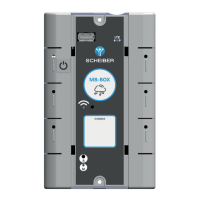

 To Next Page