L’innovation française depuis 1965
P. 6
L’innovation française depuis 1965
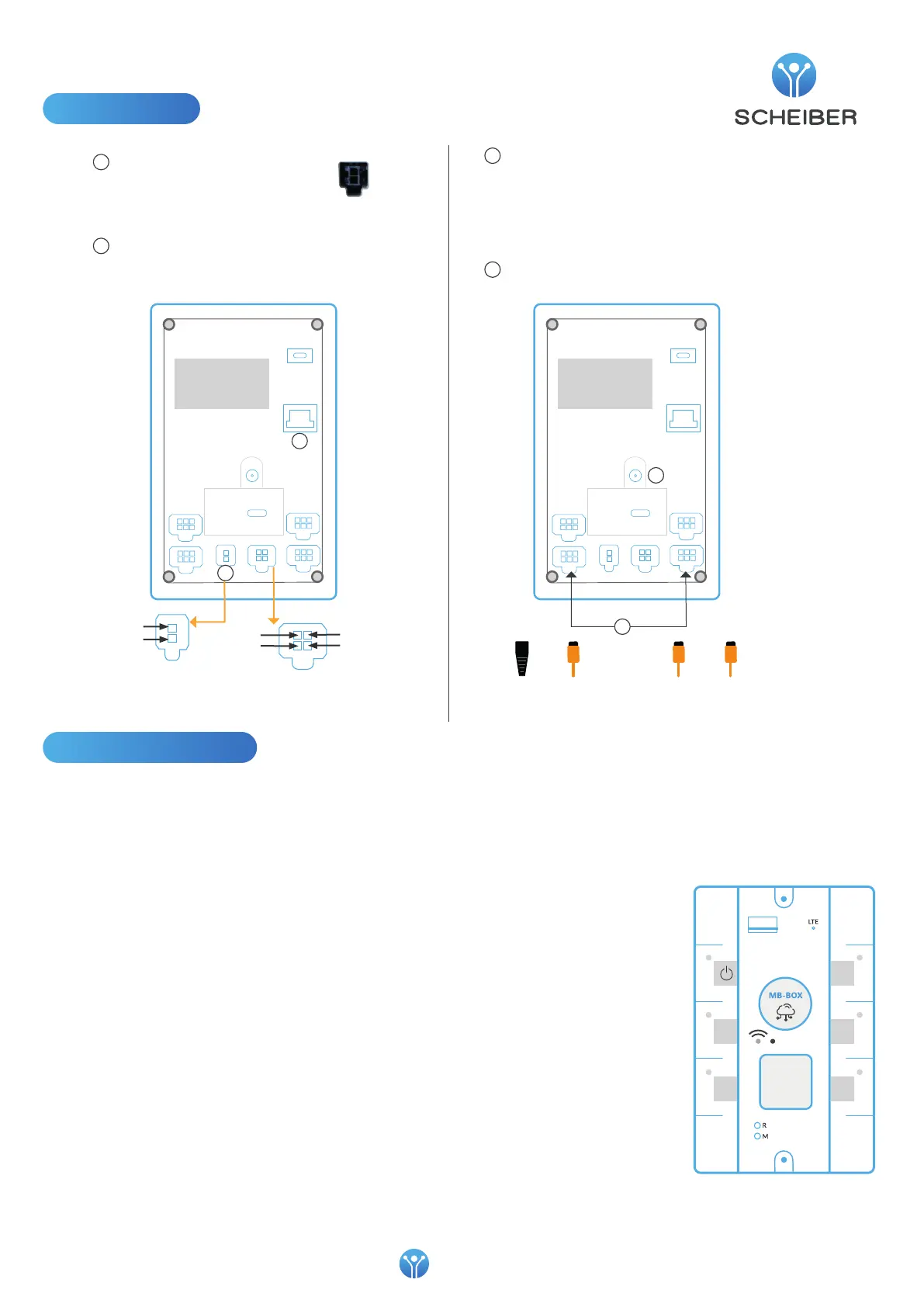
Connection
1
Connect power
• by an external power supply
using the 2-way connection:
Connect the ETHERNET port to the screen or
the HUB of your installation
or
120Ω
termination
CAN
cable
2
3
4
Connect 2 right CAN connectors to the SCHEIBER network
Connect 2 CAN connectors to the partner network
The 2 networks CAN1 and CAN0 are distinct.
Screw the GPS antenna (optional)
2
3
4
"Power ON" button, a short press on this button
switches on the MB-Box or performs a soft reset if
the MB-Box is already on. A long press on Power ON
exports logs to a USB key.
"SW-WIFI" button,
When pressing the SW-WIFI button briey (<5s), the
MB-Box resets the WIFI conguration parameters to
factory mode:
SSID=scheiber-01
Password = scheiber
During a long press (>5s) on the SW-WIFI button, the
MB-Box performs the following actions:
If WIFI is disabled:
Lighting of the WIFI LED in xed mode
Conguring WIFI in server mode
Activation of the WIFI interface
Conguring the IP address of the WIFI interface
If WIFI is activated in server mode:
Turning o the WIFI LED
Disabling the WIFI interface
If WIFI is activated in hotspot mode:
Turning o the WIFI LED
Conguring WIFI in server mode
Restarting the WIFI interface
Conguring the IP address of the WIFI interface
Lighting of the WIFI LED in xed mode
Edit this section
SW-ON-OFF (powerOFF button at the bottom)
The "Power o" button, one press turns o the MB-
Box, it restarts if a Wake-Up entry is active in the
installation.
1- ON/OFF light, xed light for about 15 seconds
when loading the bootloader, then ashing during the
initialization phase
2- LTE LED, ashing:
LTE network search
on ---- ----
| | | |
o -------- -------- --------
MB-Box connected to the LTE network
on -------- -------- --------
| | | |
o ---- ----
3- Wi-Fi indicator,
the indicator is ON when Wi is activated
ashing light: Hotspot mode activated
4- Mode LED, the LED ashes green when the CAN
BUS 0 is active, the LED ashes red when the CAN BUS
1 is active.
Indicators and buttons
SW-ON-OFF
Mode
SW-WIFI
indicator ON/OFF
SCHEIBER networkPartner network
GROUND
+BAT
1
GROUND
Analog
input
Digital input (-)
On/O output
Power ON
CAN
cable
CAN
cable


 To Next Page