54
Overview
SP 500 / 750-15 / 750-18 / 1000 / 1250 Operation Manual
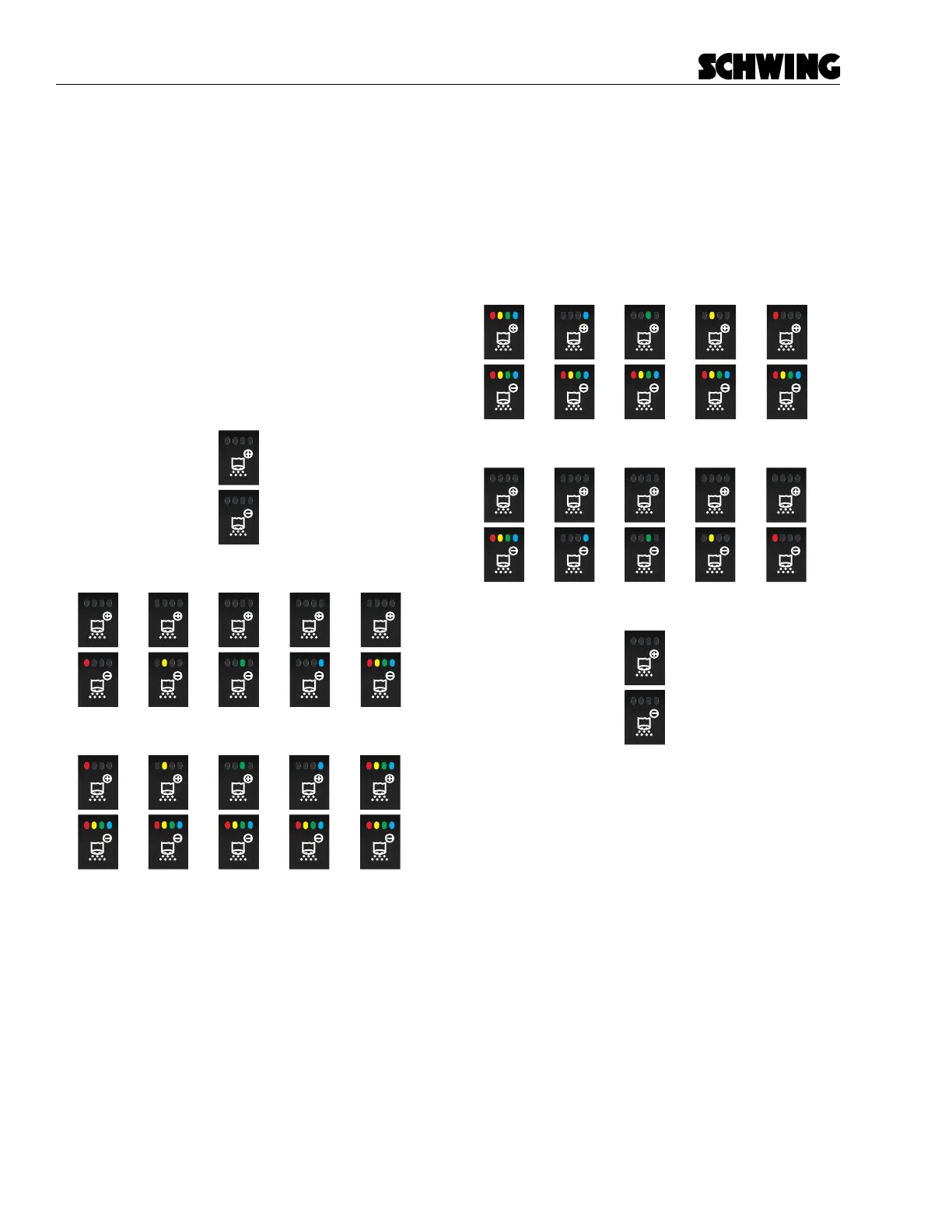
Stroke Limiter (+)
The stroke limiter buttons controls the amount of strokes
per minute the concrete pump is outputting. Press once
to increase strokes per minute by 10%. The Red LED
on the Stroke Limiter (-) button will illuminate. Each
press of the button will illuminate the next LED indicator.
When the entire Stroke Limiter (-) button LED’s are lit,
the stroke limiter is at 50% output. Pressing the Stroke
Limiter (+) a fth time, will illuminate the Red LED light
on the Stroke Limiter (+) button. When all the button
LED’s are lit, the Stroke Limiter is at 100% output. You
can also press and hold the Stroke Limiter (+) button
to continually ramp up the strokes per minute in 10%
increments.
Press=1
Output =10%
Press=2
Output =20%
Press=3
Output =30%
Press=4
Output =40%
Press=5
Output =50%
Press=6
Output =60%
Press=7
Output =70%
Press=8
Output =80%
Press=9
Output =90%
Press=10
Output =100%
Press=0
Output =0%
Stroke Limiter (-)
Press once to decrease strokes per minute by 10%. You
can also press and hold the Stroke Limiter (-) button to
continually ramp down the strokes per minute setting.
If the current output is at 100%. Pressing the Stroke
Limiter (-) button once, will turn the Blue LED on the
Stroke Limiter (+) button o. Each press of the button
will change the LED lighting as shown below.
Press=9
Output =10%
Press=8
Output =20%
Press=7
Output =30%
Press=6
Output =40%
Press=5
Output =50%
Press=4
Output =60%
Press=3
Output =70%
Press=2
Output =80%
Press=1
Output =90%
Press=0
Output =100%
Press=10
Output =0%



 To Next Page