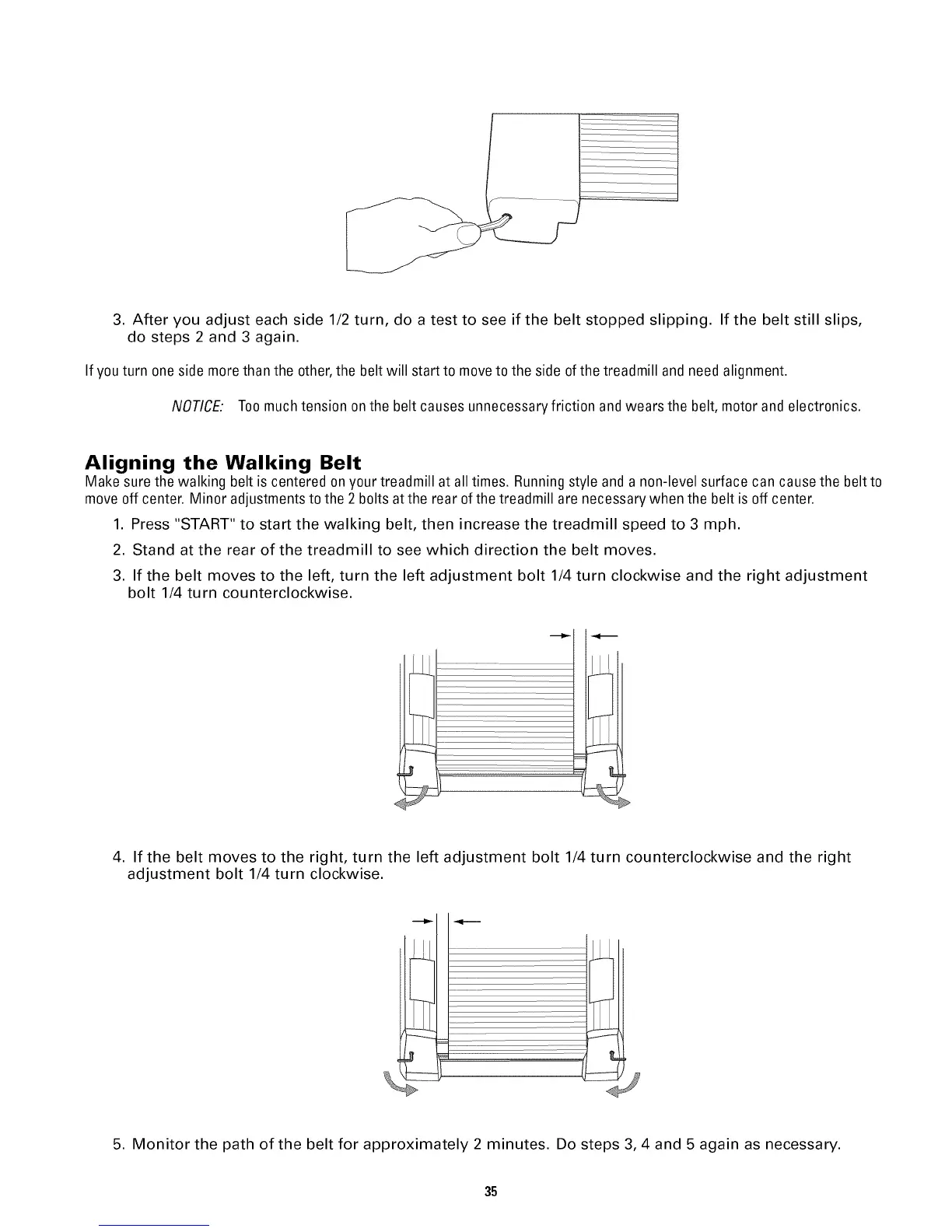
3. After you adjust each side 1/2 turn, do a test to see if the belt stopped slipping. If the belt still slips,
do steps 2 and 3 again.
If youturn one side more thanthe other,the belt will start to moveto the side of the treadmill and need alignment.
NOTICE: Toomuch tension on the belt causes unnecessaryfriction andwears the belt, motor and electronics.
Aligning the Walking Belt
Make sure the walking belt is centered on your treadmill at all times. Running style and a non-level surface can cause the belt to
move off center. Minor adjustmentsto the 2 bolts atthe rear of the treadmill are necessary when the belt is off center.
1. Press "START" to start the walking belt, then increase the treadmill speed to 3 mph.
2. Stand at the rear of the treadmill to see which direction the belt moves.
3. If the belt moves to the left, turn the left adjustment bolt 1/4 turn clockwise and the right adjustment
bolt 1/4 turn counterclockwise.
4. If the belt moves to the right, turn the left adjustment bolt 1/4 turn counterclockwise and the right
adjustment bolt 1/4 turn clockwise.
--___z.j..
5. Monitor the path of the belt for approximately 2 minutes. Do steps 3, 4 and 5 again as necessary.
35


 To Next Page