20
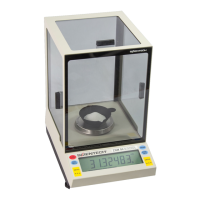
To enter the RS-232 configuration mode via the front panel, proceed as follows:
1. Turn the balance off using the ON/OFF switch. Display blanks.
2. Hold the SEND switch down while turning the
balance on using the ON/OFF switch.
OK and the current baud rate, br300, br600, br1200, br2400, br4800,
br9600, or br19,200 is displayed.
3. BAUD RATE SELECTION (9600 is default).
Press the SEND switch until the desired
baud rate is displayed. Then press the
ZERO switch.
OK SAVEd is displayed followed by OK and the chosen baud rate.
4. LOCAL CONTROL SELECTION (LC on is
default). “LC on” means that the front panel
switches control the balance. To enable a
computer to control the balance, “LC oFF”
must be selected.
Press the MODE switch. OK and the current front panel control setting , LC on or LC oFF is
displayed.
Press the SEND switch to choose between
on or off. Then press the ZERO switch.
OK SAVEd is displayed followed by OK and the chosen setting.
5. PROTOCOL or HANDSHAKE SELECTION
(Pr on is default).
Press the MODE switch.
OK and the current software protocol setting, Pr oFF or Pr on is
displayed.
Press the SEND switch to choose between
on or off. Then press the ZERO switch.
OK SAVEd is displayed followed by OK and the chosen setting.
6. PARITY SELECTION (PA nonE is default).
Press the MODE switch. OK and the current parity setting, PA EVEn, PA odd, or PA nonE is
displayed.
Press the SEND switch to choose between
EVEn, odd, or nonE. Then press the
ZERO switch.
OK SAVEd is displayed followed by OK and the chosen setting.
7. AUTO SEND SELECTION (AS oFF is
default). “AS on” means the balance will
automatically send the display contents over
the RS-232 interface at the selected time
interval placed into register 89. This time
interval may be inputted via the optional
keyboard or through Type 4 RS-232
commands. Refer to these sections for
instructions. A time and date stamp may also
be sent at the same time (see Type 4 RS-232
Commands section). The auto send selection is
not functional if the send-when-stable
command is on (see Selectable Filter section).
Press the MODE switch. OK and the current auto send setting, AS oFF or AS on is displayed.
Press the SEND switch to choose between
on or off. The press the ZERO switch.
OK SAVEd is displayed followed by OK and the chosen setting.
8. CONTINUOUS SEND SELECTION (CS oFF
is default). “CS on” means the balance will
automatically send the weight reading over the
RS-232 interface at the baud rate selected.
Display readings are updated every 200
milliseconds. The continuous send selection is
not functional if the send-when-stable
command is on (see Selectable Filter section).
Press the MODE switch.
OK and the current continuous send setting, CS oFF or CS on is
displayed.
Press the SEND switch to choose between
on or off. Then press the ZERO switch.
OK SAVEd is displayed followed by OK and the chosen setting.


 To Next Page