2 Editing the Text
After completing the shift to cus-
tomize mode, a flashing cursor
shows the letter that can be edited by
selecting a letter starting from “A”.
The letter selection method is
described below. The time allowed
for editing is limited to 60 sec.
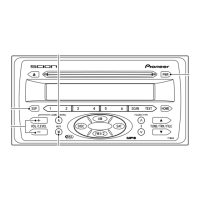
1 Press the VOL/LEVEL + or - but-
tons to change the flashing letter
by displaying other letters one by
one. The letters will change con-
tinuously if you press and hold
the + or - button.
List of the letters and numbers
that can be selected.
• Upper case letters (A to Z)
• Lower case letters (a to z)
• Numbers 0 to 9, spaces, sym-
bols (!”# and so on)
2 With the character that you want
to select displayed, press the
AUDIO CONTROL button to
select it.
After selecting the character, the
cursor moves to the right so you
can edit the next character. After
you select the 12th character, the
entire line starts flashing.
To delete a selected character,
press the MUTE button. After you
delete a character the cursor
shifts left so you can edit the pre-
vious character. If you delete all of
the text, you can edit from the
first character.
3 After you are finished selecting
the text for the line, press and
hold down the AUDIO CONTROL
button.
The selected text string is regis-
tered as the Welcome Screen.
The customize mode ends and the
registered text string is displayed
for 6 sec.
3 New Message Display
The next time the ACC is switched
on, the text edited by the user will be
displayed.
NOTICE
To prevent the battery from
being discharged, do not
leave the car audio on longer
than necessary when the
engine is not running.
NOTICE
• If the unit leaves the cus-
tomize mode during editing,
repeat procedure 1 from
Step 2.
• If the edit is registered with
no new text, the original
Welcome Screen, “Scion” ,
will be restored.
19


 To Next Page