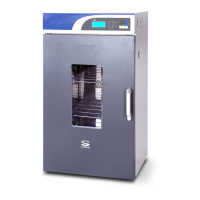
The SciQuip Oven-HT series is a range of blast air ovens designed for various applications in biochemistry, chemical pharmacy, medical sanitation, agriculture, and environmental protection. These ovens utilize dry heat to inhibit microorganism oxygenation and protein denaturation, affecting electrolyte concentration to effectively kill residual microorganisms. They are ideal for thermal denaturation and induration of specimens, as well as drying, sterilization, and baking operations for items like food, electronic components, and building materials.
Key Features:
The Oven-HT series boasts a comprehensive set of features for precise and reliable operation:
- Programmable Control: Individualized 10 segments and 18-step preset programs allow for temperature preset timing, reciprocating, stepped, and ladder-like temperature profiles.
- Safety and Insulation: A sound heat insulation design and a transparent glass door meet European security standards.
- Advanced Functionality: Includes automatic power-on and power-off, timing operation, clock indication, power-off recovery, parameter recall and encryption, temperature indication and correction, RS-232 interface, and a built-in microprinter.
- Protection Systems: Features a monitoring timer, independent exceeding guard, adjustable over-temperature protector, and independent protectors for electric leakage and overcurrent.
- Self-Diagnosis: Incorporates self-diagnosed techniques such as power cut alarm, sensor failure alarm, and upper and lower temperature limit exceeding alarms.
- Temperature Control: Utilizes a highly responsive thermal sensor and an environmental scanning microprocessor chip. Three-dimensional heating technology ensures solid temperature uniformity within the working chamber.
- Airflow and Cleanliness: A sound airway structure and gentle airflow circulation design contribute to temperature uniformity. The unique chamber design guarantees sample cleanliness.
- Construction: Features a mirror stainless steel chamber, electro-polished stainless steel shelves, and a toughened glass internal door.
- Aesthetics: Presents a luxurious and elegant profile with an aesthetic design.
- Air Ventilation Adjustment: Equipped with an adjustable air ventilation system to discharge excess humidity evaporation. The air vent is located on the back wall, and can be opened by turning a knob clockwise on the right sidewall, or closed by turning it anti-clockwise.
Technical Specifications:
The Oven-HT series comes in three models: Oven-80HT, Oven-140HT, and Oven-230HT, differing primarily in volume and dimensions.
- Volume (L):
- Oven-80HT: 80 L
- Oven-140HT: 140 L
- Oven-230HT: 230 L
- Heating Mode: Back Heating for all models.
- Programmable Control: Standard (9 segments/18 steps) for all models.
- Temperature Range: Ambient +5 to 300 °C for all models.
- Temperature Accuracy: 0.1 °C for all models.
- Temperature Uniformity: < ± 2.5% (@max temperature) for all models.
- Display: LED for all models.
- Alarm: Enabled for all models.
- Timer (min): 1-999 for all models.
- Settings: Digital for all models.
- Grids Included:
- Oven-80HT: 2 (max 13)
- Oven-140HT: 2 (max 17)
- Oven-230HT: 2 (max 21)
- Grid Size (mm) (WxD):
- Oven-80HT: 319 x 330
- Oven-140HT: 385 x 405
- Oven-230HT: 475 x 485
- Chamber Dimensions (mm) (WxDxH):
- Oven-80HT: 375 x 365 x 550
- Oven-140HT: 450 x 440 x 685
- Oven-230HT: 520 x 540 x 800
- Exterior Dimensions (mm) (WxDxH):
- Oven-80HT: 565 x 495 x 960
- Oven-140HT: 640 x 570 x 1095
- Oven-230HT: 720 x 670 x 1290
- Packing Dimensions (mm) (WxDxH):
- Oven-80HT: 650 x 590 x 1130
- Oven-140HT: 720 x 670 x 1255
- Oven-230HT: 800 x 720 x 1450
- Net/Gross Weight (kg):
- Oven-80HT: 58/98
- Oven-140HT: 70/104
- Oven-230HT: 104/150
- Power (W): 220V 50/60Hz for all models.
Usage Features:
The control panel features several buttons and indicators for intuitive operation:
- Change/Confirm button (Set): Displays clock time. Hold for 3 seconds to change parameters, press again to confirm.
- Increase button (Up arrow): Increases parameter by one digit. Holding it down continuously increases the value.
- Decrease button (Down arrow): Decreases parameter by one digit. Holding it down continuously decreases the value.
- Program button (P): Sets program control parameters.
- Temperature button (Thermometer icon): Displays preset temperature. Press again to confirm changes.
- Time button (Clock icon): Displays operating time. Press again to display preset time.
- Operating button (C/K/S):
- Constant temperature mode: Starts/stops operation.
- Programme control mode: Starts operation, press again to keep status, hold for 3 seconds to stop.
- Temperature exceeding alarm indicator (ALARM): Lights up and buzzer sounds when real temperature exceeds upper or lower limits.
- Heating indicator (HEATING): Lights up when heater is connected, twinkles when real temperature is close to preset value.
- Real temperature Indicator (PV): Lights up when screen displays real temperature.
- Temperature setting Indicator (SV): Lights up when screen displays preset temperature.
- Time indicator (TM): Lights up when screen displays operating time, twinkles when screen displays preset time.
- Operating status indicator (RUN): Lights up when equipment is functioning.
- Status keeping indicator (HOLD): Lights up in program control mode when equipment is in temperature keeping state.
- Refrigeration indicator (COLD): Lights up when refrigerating system is working (though this is a blast air oven, this indicator might be present for common control board designs).
Control Modes:
The equipment offers two operating modes:
- Constant Temperature Control: Allows setting a single target temperature and holding it.
- Programme Control: Enables complex temperature profiles with multiple segments, including slope (temperature ascending/descending) and retaining (temperature holding) parts. Up to 9 program segments can be set.
Setting Parameters:
- Temperature Parameter: Press the temperature button to view real value, press again to view and adjust preset parameter using increase/decrease buttons.
- Time Parameter: Press the time button to view operating time or preset time delay switch-on, press again to view and adjust preset timing parameter (minutes) using increase/decrease buttons. A parameter of "0" for timing means continuous operation.
- Control Mode Selection: Hold the "Change/Confirm" button for 3 seconds, enter password "1", then use increase/decrease buttons to switch between "Ctr=" (constant temperature) and "CtrP" (programme control).
- Delayed Start: Set a delay time (parameter "ddtl") for automatic switch-on.
- Temperature Exceeding Alarm (ALH): Set an upper limit alarm value. If the real temperature reaches this value, heating output is cut off. This value must be larger than the preset temperature.
- Deviation Alarm (ALHC): Set a deviation value. If the real temperature deviates from the setting temperature by more than this value, the equipment alarms and cuts off heating. Setting ALHC to "0" disables this alarm.
- Clock Setting: Adjust hour and minute values for the internal clock.
- Cycle Time (PLC): In program mode, set the number of cycles (1-99) for the program to repeat.
Operation and Switch Off:
- After setting parameters, press the "Operating" button to start. The red RUN indicator will light up.
- The red heating indicator (or it will twinkle) indicates normal heating operation.
- To change parameters during operation, press "Operating" to stop, then adjust.
- Operation stops when the preset time is reached. The operating indicator turns off.
- To fully switch off, turn the main switch on the right side of the equipment.
Maintenance Features:
- Regular Cleaning: The chamber requires regular cleaning.
- Troubleshooting Guide: The manual provides a table of "Encountered symptoms," "Possible cause," and "Debugging" steps for common malfunctions, including:
- Power on without display (e.g., power supply not connected, fuse broken, power box circuit malfunction).
- Equipment entering temperature exceeding alarm state (e.g., unreasonable parameter setting, heating system malfunction).
- Real temperature lower than setting temperature, activating lower temperature deviation alarm (e.g., equipment not yet stable, alarm value too small, heater abnormal).
- Screen display issues (e.g., high-frequency disturbance, display circuit block).
- Professional Service: For complex issues or malfunctions, users are advised to contact the manufacturer for repair service or refer to professionals.
- Fuse Replacement: Instructions are provided for replacing a broken fuse with one of the same specification.

 Need help?

 To Next Page
 General