Press "
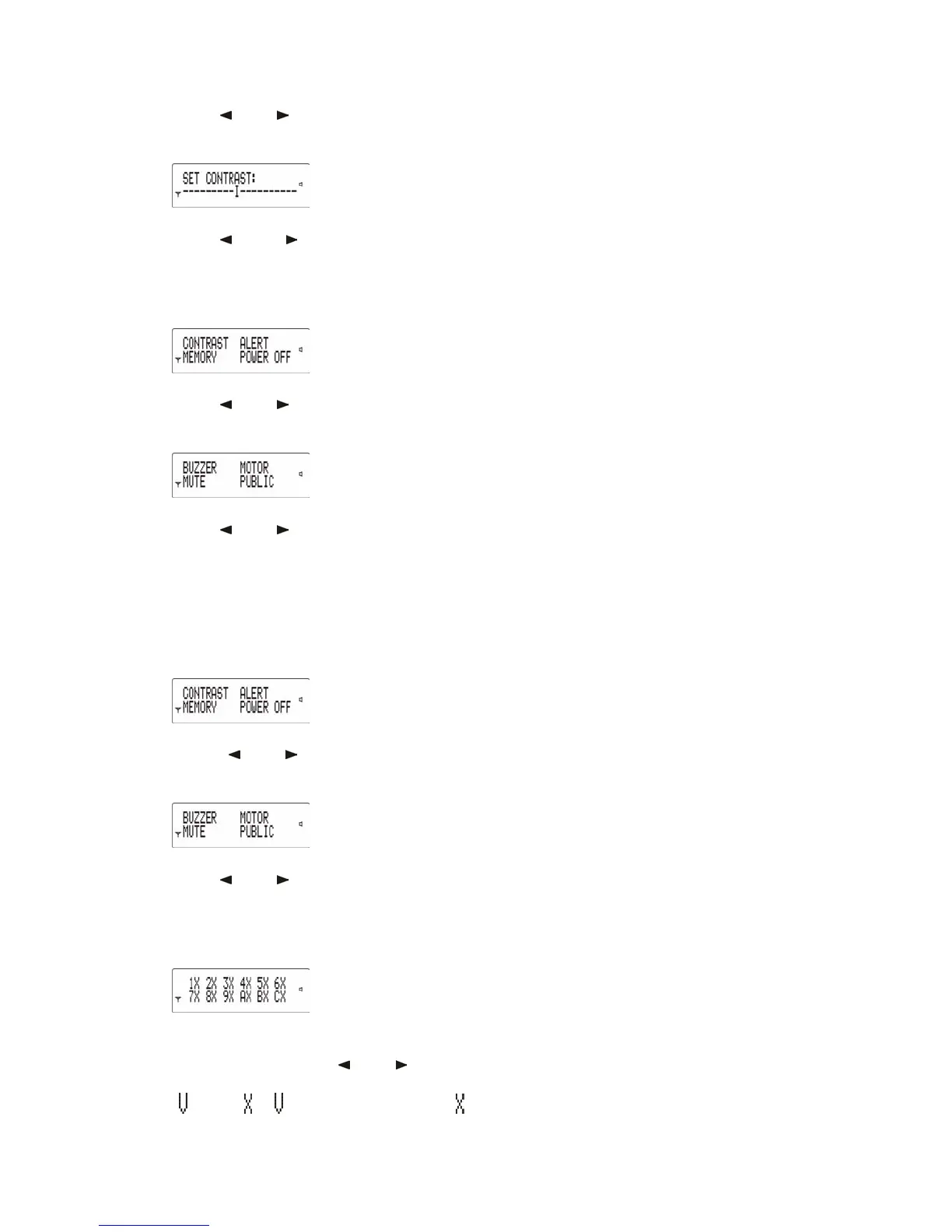
" or " " to select CONTRAST,
then press Read key to enter "SET
CONTRAST":
Press "
" or " " to adjust LCD contrast,
then press Read key to confirm.
4.6 Alert Mode Setting
Press Selection key to enter Setup menu:
Press "
" or " " to select ALERT, then
press Read key to enter the relevant
Setup status:
Press "
" or " " to select alert modes of
BUZZER, MOTOR or MUTE, then press
Read key to confirm.
Note: the pager may have been pre-programmed in one mode only. If in doubt, check
with your dealer.
4.7 Public Message Alert Mode Setting
Press Selection key to enter Setup menu:
Press "
" or " " to select ALERT, then
press Read key to enter the relevant
Setup menu:
Press "
" or " " to select PUBLIC, then press
Read key to enter Public Message Alert
Mode Setting:
(If the public message folders have been disabled by your dealer, the screen
will be blank when PUBLIC is selected).
The number of folders provided is subject to
operator’s offer. Press "
" or " " to select
folder. Press Read key to toggle between
"
" and " ". " " represents alert on. " "



 To Next Page