WASHERS_J
I
It-·
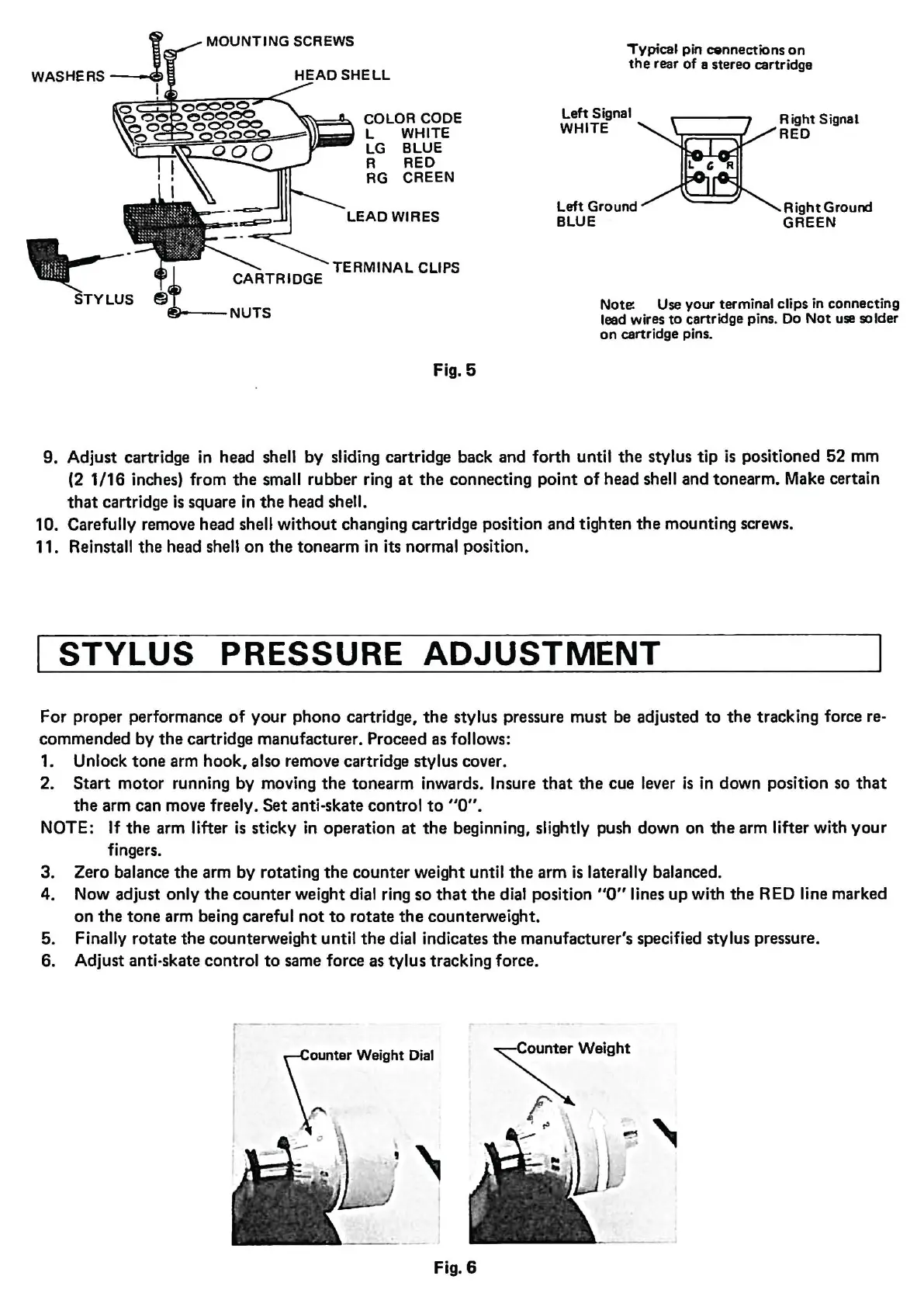
STYLUS
MOUNTING SCREWS
COLOR CODE
L
WHITE
LG
BLUE
R RED
RG
CREEN
LEAD
WIRES
TERMINAL CLIPS
Fig. 5
Tvpical
pin
cennections
on
the
rear
of
a stereo cartridge
Left Signal
WHITE
Left Ground
BLUE
Right Signal
RED
A
ight
Ground
GREEN
Note: Use your terminal clips in connecting
lead wires
to
cartridge pins. Do
Not
use solder
on
cartridge pins.
9.
Adjust cartridge in head shell
by
sliding cartridge back and
forth
until
the
stylus tip
is
positioned
52
mm
(2
1/16
inches) from
the
small rubber ring
at
the
connecting
point
of
head shell and tonearm. Make certain
that
cartridge
is
square
in
the
head shell.
10. Carefully remove head shell
without
changing cartridge position and tighten
the
mounting screws.
11. Reinstall
the
head shell
on
the
tonearm in its normal position.
STYLUS
PRESSURE
ADJUSTMENT
For proper performance
of
your
phono cartridge,
the
stylus pressure must be adjusted
to
the
tracking force re-
commended by
the
cartridge manufacturer. Proceed as follows:
1. Unlock
tone
arm
hook,
also remove cartridge stylus cover.
2.
Start
motor running by moving
the
tonearm inwards. Insure
that
the
cue lever
is
in down position so
that
the
arm can move freely.
Set
anti-skate control
to
"O".
NOTE: If
the
arm lifter
is
sticky in operation
at
the
beginning, slightly push down on
the
arm lifter with
your
fingers.
3. Zero balance
the
arm
by
rotating
the
counter weight until
the
arm
is
laterally balanced.
4. Now adjust only
the
counter
weight dial ring
so
that
the
dial position "O" lines
up
with
the
RED line marked
on
the
tone
arm being careful
not
to
rotate
the
counterweight.
5. Finally rotate
the
counterweight until
the
dial indicates
the
manufacturer's specified stylus pressure.
6.
Adjust anti-skate control
to
same force as
tylus
tracking force.
\-unter
Weight
Dial
"
~Weight
f'
•
r'
~,
I
Fig. 6


 To Next Page
 Loading...