CARTRIDGE
STVLu
·s REPLACEMENT
Cartridge stylus life with most diamond styli
is
approximately
500
hours.
Follow cartridge manufacturer's instructions for replacement
of
stylus when necessary.
ELECTRICAL CONNECTIONS
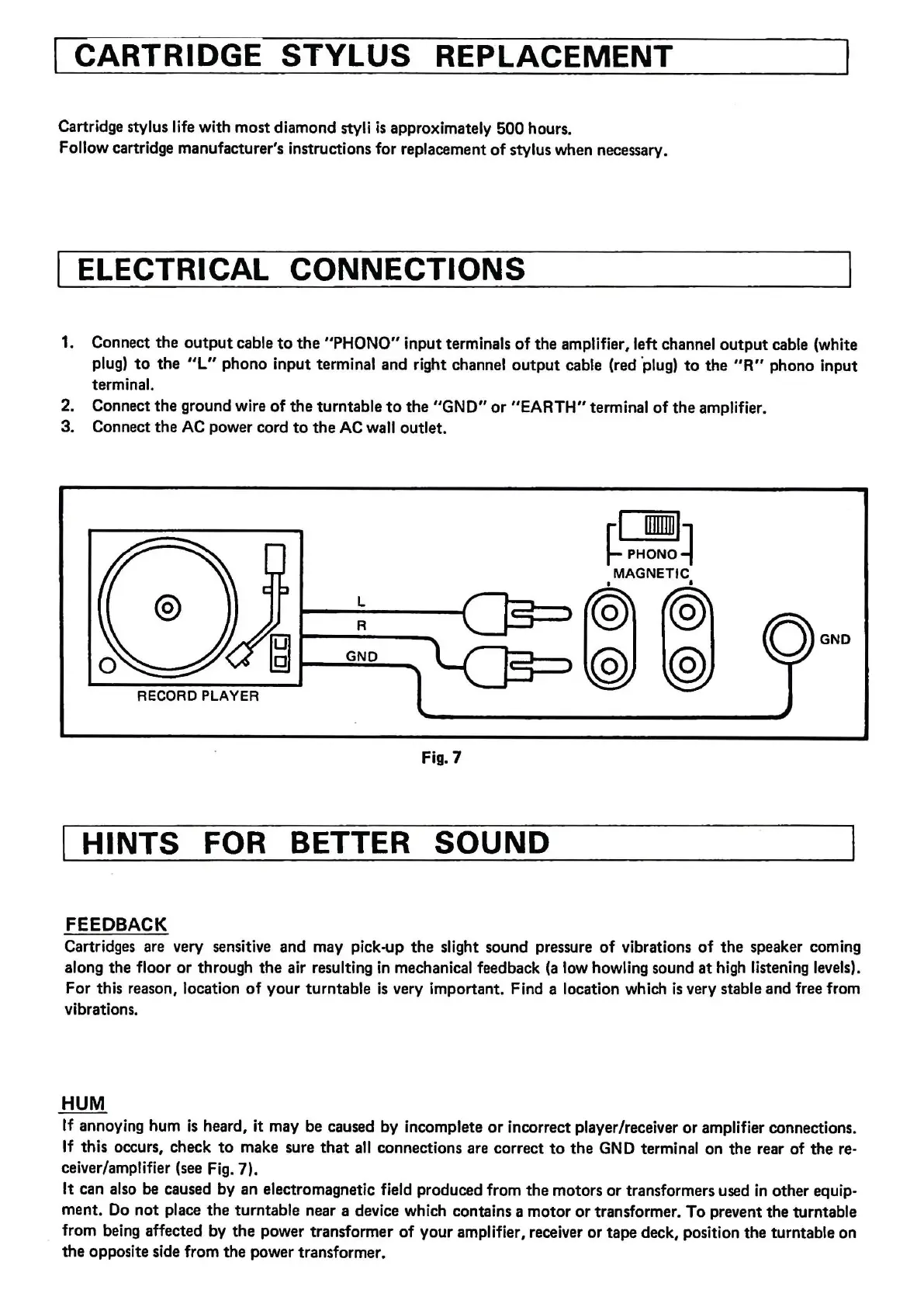
1. Connect the
output
cable
to
the
"PHONO" input terminals
of
the amplifier, left channel
output
cable (white
plug)
to
the
"L"
phono input terminal and right channel
output
cable (red ·plug)
to
the
"R"
phono input
terminal.
2. Connect the ground wire
of
the
turntable
to
the
"GND"
or
"EARTH"
terminal
of
the
amplifier.
3. Connect
the
AC
power cord
to
the
AC wall outlet.
~S!!!~
MAGNETIC
I
L
R
GNO
RECORD PLAYER
fig. 7
HINTS FOR BETTER SOUND
FEEDBACK
Cartridges are very sensitive and may pick-up
the
slight sound pressure
of
vibrations
of
the
speaker coming
along
the
floor
or
through
the
air resulting in mechanical feedback
(a
low howling sound
at
high listening levels).
For this reason, location
of
your turntable
is
very important. Find a location which
is
very stable and free from
vibrations.
HUM
If annoying hum
is
heard, it may be caused by incomplete
or
incorrect player/receiver
or
amplifier connections.
If this occurs, check
to
make sure
that
all connections are correct
to
the
GND terminal on the rear
of
the
re-
ceiver/amplifier (see Fig. 7).
It can also be caused by
an
electromagnetic field produced from
the
motors
or
transformers used in other equip-
ment. Do
not
place
the
turntable near a device which contains a motor
or
transformer.
To
prevent the turntable
from being affected by
the
power transformer
of
your amplifier, receiver
or
tape
deck, position the turntable on
the opposite side from
the
power transformer.


 To Next Page
 Loading...