TB-9017 Page 1 of 6
© 2015 DESCO INDUSTRIES, INC.
Employee Owned
SCS - 926 JR Industrial Drive, Sanford, NC 27332 • (919) 718-0000 • Website: StaticControl.com
Analog Surface Resistance Megohmmeter Kit
Operation and Maintenance
July 2015
USER GUIDE TB-9017
Made in the
United States of America
Figure 1. SCS 701 Analog Surface Resistance
Megohmmeter Kit.
Description
The 701 Analog Surface Resistance Megohmmeter Kit
includes a hand-held megohmmeter and accessories.
The kit has been specically designed for evaluating
the resistive characteristics of static control surface
materials and testing installed surfaces as specied in
ESD Association Standards.
The Tester has four test functions which allow the user
to measure the resistance of a static control surface
at either of two test voltages, verify proper Tester
performance, and check the electrical continuity of the
test set-up.
Figure 2. SCS 701 Analog Surface Resistance
Megohmmeter Kit, controls, connectors and indicators.
Controls, Connectors, & Indicators
Before attempting any operation of the Tester, become
familiar with each control. A thorough understanding of
how the Tester operates will help avoid mistakes and
prolong its useful life.
1. Main Selector Switch: The main function selector
switch allows the selection of desired test function.
2. TEST Button: This button engages the Tester and
activates the test function selected.
3. OHMS Scale: This scale is used in conjunction
with the SURFACE TEST functions to indicate the
amount of resistance measured.
4. CONTINUITY Scale: This scale indicates the total
resistance of the test setup (meter, leads, weights,
and calibration plate) in the CONTINUITY TEST
function.
5. BATTERY Scale: This scale indicates the charge
level of the main battery of the Tester in the
BATTERY TEST function by verifying the open
circuit output test voltage.
6. Test Jacks: These jacks are used to connect the
Tester to the test leads.
7. Mechanical Zero Adjust: This control is used to zero
the pointer.
Operating Instructions
Warning:
• Turn off the Tester before connecting or
disconnecting test leads, or before moving test
weights.
• Do not use this Tester with any accessories not
specically designed to be used with this product.
• Do not use this Tester to measure live circuits.
Caution: The test weights included in this kit are
heavy, exercise care in handling. Note: The following
procedures should be followed each time the Tester is
used.
Battery Test: Place the Tester on a table top or other
stable surface. Set the main selector switch to BATTERY
TEST. Press TEST and hold for 15 seconds. The pointer
should come to rest in the green area of the BATTERY
scale. If the pointer is in the red area to the left of
100V, replace the battery and retest. If the pointer is in
the red area to the right of 100V, the tester may need
recalibration.
Figure 3. Analog Surface Resistance Megohmmeter Kit,
continuity test.

 Need help?
 General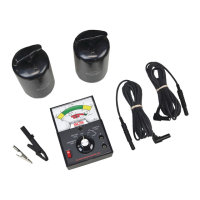

 To Next Page