TB-9024 Page 4 of 7
© 2017 DESCO INDUSTRIES, INC.
Employee Owned
SCS - 926 JR Industrial Drive, Sanford, NC 27332 • (919) 718-0000 • Website: StaticControl.com
Using Reference with Impedance
Measurements
The Reference function helps to set limits at which
an audio alarm sounds to indicate that the measured
impedance is below the specified limit. Unlike a regular
multi meter, the Ground Pro Meter allows you to specify
an exact impedance value at which the instrument will
provide an audio indication. In Impedance mode, press
the Ref. button. You should see a screen similar to the
one in Figure 11 with the REF indicator on. The top line
of the display shows the current impedance value (in
this example it is an open circuit) and the bottom line
shows the reference level. Adjust the reference level by
using the Up and down arrow buttons. Now when the
impedance is below the reference value, you should
hear a beep. The reference value is set for a particular
range – you may need to readjust it for a different
range. The reference value will be saved in the internal
memory.
EMI Measurements
High frequency noise or ElectroMagnetic Interference
(EMI) on a ground causes equipment malfunction and
damage to sensitive components. The Ground Pro
Meter measures high-frequency noise on a ground in a
wide frequency and dynamic range.
High-frequency noise is measured in two different units
— volts and dBµV. The latter is a logarithmic measure
of voltage where 0 dBµV is referenced to 1 µV.
In order to measure ElectroMagnetic Interference (EMI)
on a ground, press the ElectroMagnetic Interference
(EMI) button. The screen will show the average value
of the high-frequency signal in Volts on the bottom
display line and the magnitude of the envelope peak of
the signal (i.e. transients or spikes) on the top line. By
pressing the ElectroMagnetic Interference (EMI) button
one more time you can switch to dBµV units, as shown
above.
dB
µ V
µ V
dB
0 2 4
AVG PEAK
EMI
Peak EMI in dBuV
V
Average EMI in dBu
Relative peak value
Average EMI in V
Relative peak value
V
Peak EMI in V
V
0 2 4
AVG PEAK
Figure 12. EMI Measurement screen
O hm s
R ef
Normal
measurements
screen
0 106 82 4
Threshold
Impedance
in Ohms
106 84
REF
Figure 11. Impedance measurements screen
0 1 06 82 4
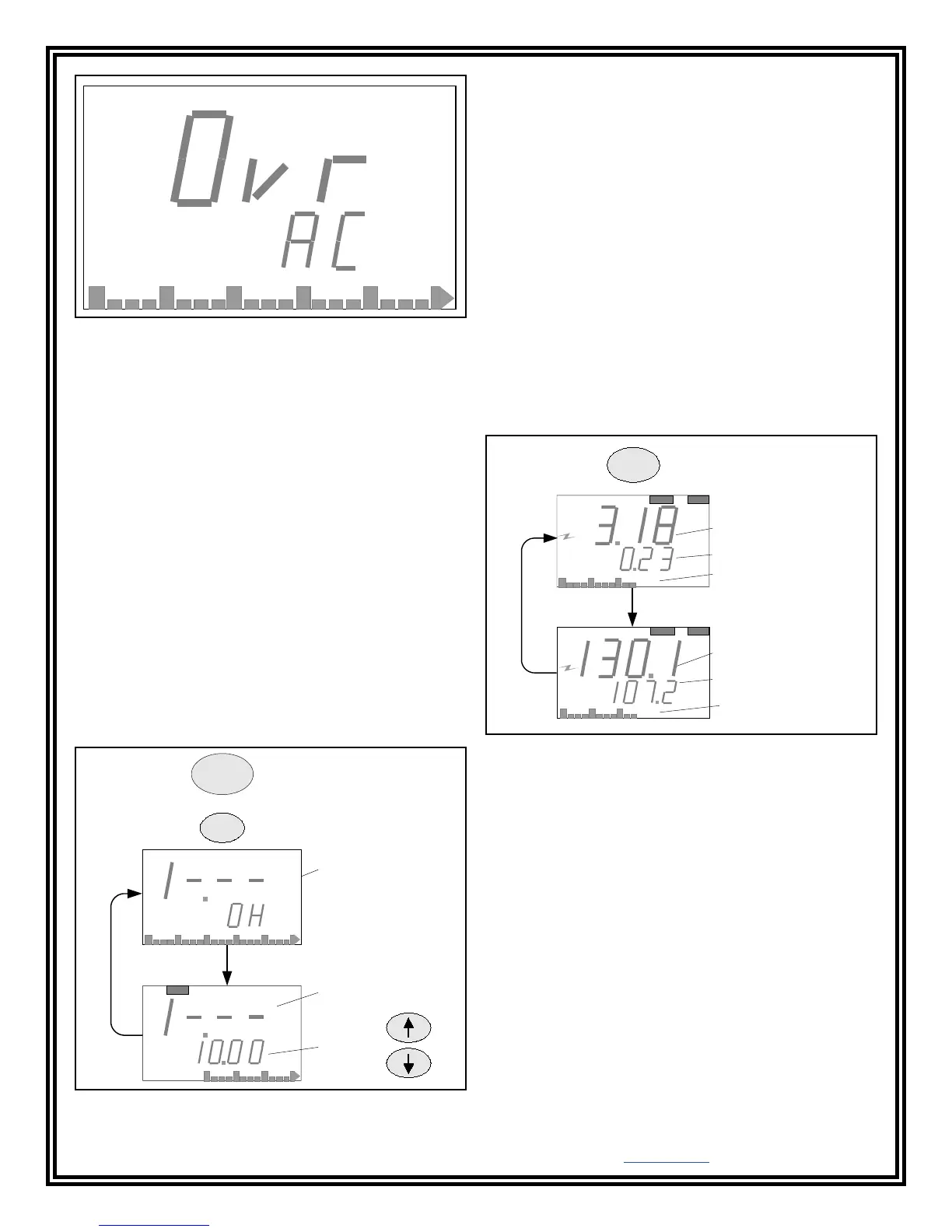
Figure 10. AC voltage screen.
Auto Scale
The Ground Pro Meter uses auto scaling in
ElectroMagnetic Interference (EMI) mode. No scale
switching is necessary.
Using Reference with EMI
Reference mode is helpful if you wish to hear an audio
alarm whenever the EMI signal exceeds a certain level.
In order to use this mode, depress the REF button
while in any of the EMI screens. You should see the
REF indicator at the top of the display. The bottom
line of the display will now show the reference value of
the peak signal. Adjust the reference level using the
Up and Down arrow buttons. Now whenever the peak
value of the EMI signal exceeds this reference level, an
audio alarm will sound.
By pressing the REF button again, you can adjust the
reference level for the average signal as shown below.


 To Next Page