18 19
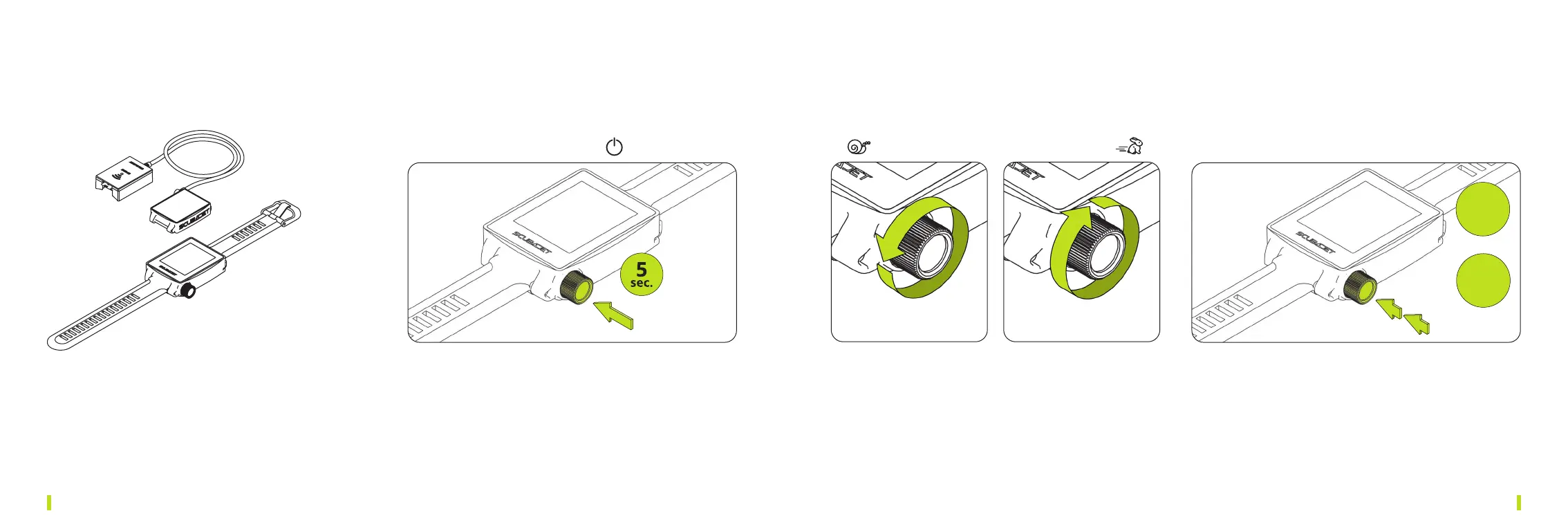
5.3. HOW TO USE THE REMOTE CONTROL
1×RemoteControllerPRO
1×SSCBTLink
With your SCUBAJET SUP Package you will receive
a remote control and the SSC BT link.
RL
ON/OFF
STEP1
0%
speed
STEP2
2×click
1
Toturnon/otheremotecontrolpressthebutton
for 5 seconds.
2 Turn it right to speed up or turn it left to slow down.
3 Activiate/Deactivate the menu after setting the speed to 0%
and press the button twotimes.
You can adjust the menu settings with the button.
Scroll to the item and click to change.


 To Next Page