20 21
5.4. DISPLAY REMOTE CONTROLLER 5.5. MENU REMOTE CONTROLLER
To access settings menue page, set the speed to 0% and press the button on the right two
times. Double-click again to return to regular display.
100%
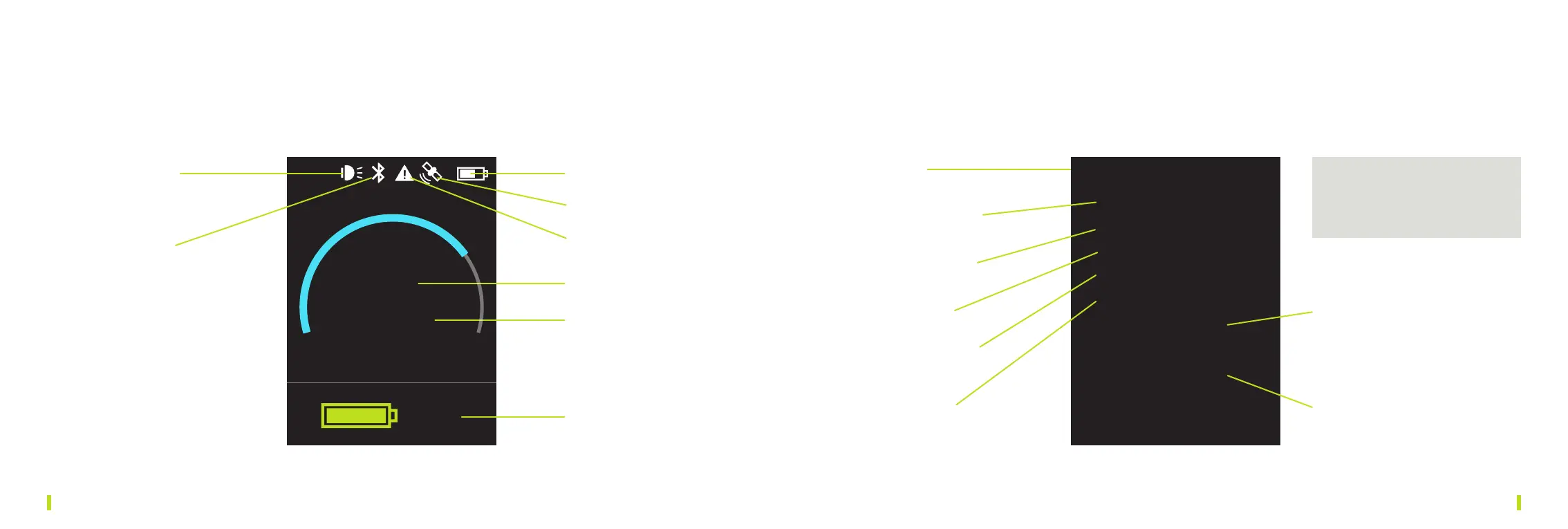
1 LED Status 1 Settings
2 Brightness: 0–100%
3 Units: metric or US
4 Display: 0°/180°
5 Battery: 200 or 400 Wh
6 Software Version
7 Light:on/o
2 Bluetooth
4 GPS
5 Remote battery status
6 Power
7 Remaining runtime
8 SCUBAJET battery status
Settings
> <
Brightness 80%
Units metric
Display 0°
Battery 200 Wh
Info
Light o
Send Track
Debug o
You can go through the menu and
change the settings by turning the
button on the Remote Controller.
3 Motorcontroller
problem
73%
1h 20 min
8 Debug:on/o


 To Next Page