26 27
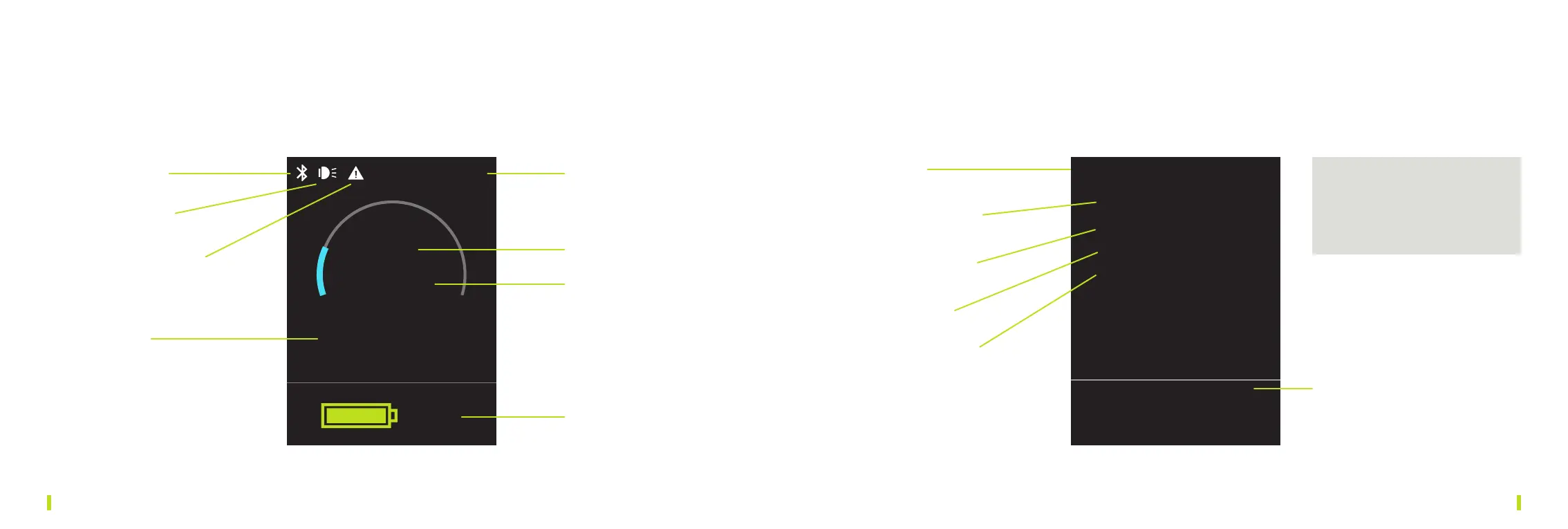
6.3. DISPLAY DIVE CONTROLLER PRO
100%
59.5m
20%
1h 10 min
15
°C
1 Bluetooth 1 Settings
2 Brightness: 0–100%
3 Units: metric or US
4 Display: 0°/180°
5 Battery: 200 or 400 Wh
6 Software Version
2 LED Status
4 Water temperature
5 Power
6 Remaining runtime
7 Depth
8 Battery charge status
Settings
> <
Brightness 80%
Units metric
Display 180°
Battery 200 Wh
Scuba Dive Adapter V1.19 (NW:3)
BT MAC: FC-88-7A-FC-F6-5F
SCUB: NW:0xFB V1.3
MOT:V3.66, NW:68 [ ]
You can go through the menu
and change the settings by
pressing the left or right button
on the Dive Controller.
6.4. MENU DIVE CONTROLLER PRO
To access settings menue page, double-click both triggers simultaneously while the
SCUBAJET is on. Double-click again to return to regular display.
3 Motorcontroller
problem


 To Next Page