1.
Turn the display on/off: press power on/off key to turn on. Long press power on/off
key to turn off. Note: the display will turn off automatically after 10 minutes of
inactivity.
Switch electric assist level: press “+”and “-”keys to cycle electric assist levels.
Switch display mode: press “i” key to cycle display modes between odometer
(ODO), maximum speed (MAX), average speed (AVG), and trip time (TIME).
Walking mode: press and hold “-” key. Release to exit walking mode. (Note: walking
mode activates the bike’s motor at a steady 3.7mph (6km/h) so that you can walk
alongside it).
Turn on the headlight: long press “+” key for 2 seconds. Long press again to turn the
headlight off. (Note: turning on the headlight also puts the display into nighttime
mode with reduced screen brightness).
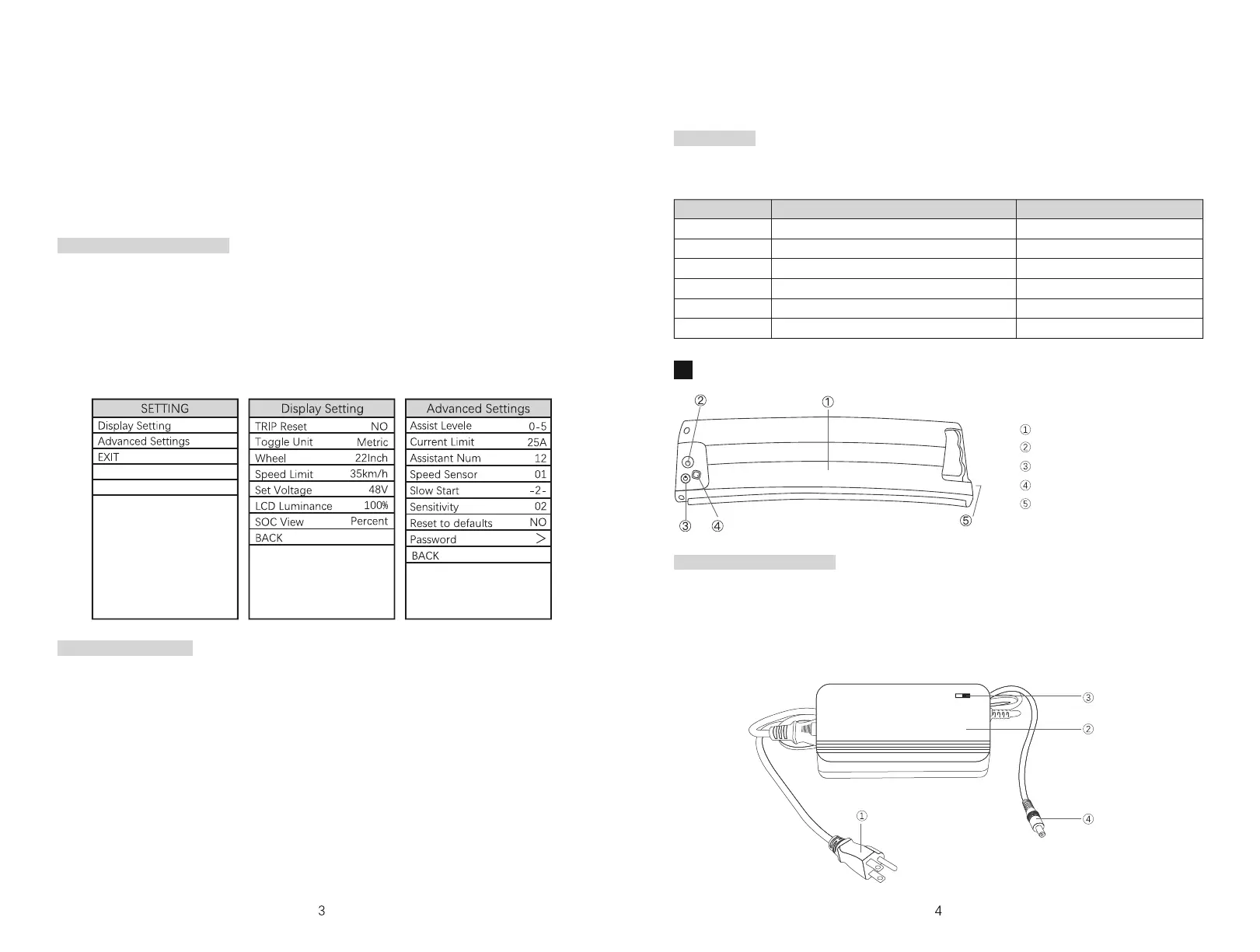
Long-press “ + ” and “ - ” keys simultaneously to enter the settings interface. Note: the
settings interface will time out after 1 minute of inactivity and return to the normal
display mode.
While in the settings interface, use the “+” and “-” keys to navigate and the “i” key to
select the highlighted option. When finished, follow the prompts to save the updated
settings and exit the settings interface.
2.
3.
4.
5.
Changing display settings
If the bike detects a fault, an error code will be shown on the display. Contact
support@sdream.bike for additional information.
Error codes
There are two ways to check battery power:
Press the battery status button. The color of the battery status indicator displays
the remaining battery life as follows: Green: 100%-80%, yellow: 80%-20%, red: less
than 20%.
Use the battery level indicator on the LCD display.
Checking battery power
The power-on password is a 4-digit code that can be required when powering on the
e-bike for additional security. Please note that a password does not replace other
security measures such as a bike lock.
The password is OFF by default. To turn on the password, access the Password
Settings page by selecting “Password” in the Advanced Settings menu. From here, you
can toggle the power-on password ON or OFF.
To enable a power-on password, choose ON and press the “ i ” button to confirm.
Then, enter the current password by using the “ + ” and “ - ”buttons to change the
number and pressing the “ i ” button to confirm digits one by one. Note: the default
password is “1212”.
Power-on Password
To change the password, select “Reset Password” from the Password Settings page.
You will be prompted to enter the current password (note: the default password is
“1212”), and then enter and re-enter your new password.
Error codes
Display “21”
Display “22”
Display “23”
Display “24”
Display “25”
Display “30”
Fault Description
Current Abnormality
Throttle Abnormality
Motor Phase Abnormality
Motor Hall Signal Abnormality
Brake Abnormality
Communication Abnormality
Trouble Shooting
Check the controller
Check the throttle
Check the motor module
Check the motor module
Check the brakes
Check the controller
Battery and charging
Battery
Charging jack
Battery status button
Battery status indicator
Battery keyhole
1.
2.
Power Plug
Charger Shell
Indicator
Charging Plug



 To Next Page
 Loading...