Battery and charging
Current electric assist level (0-5) or walking mode indicator when in walking mode
Current speed
Total trip distance. Note: restarts after reaching the maximum value of 999.9.
Headlight indicator
Current battery power level (1-5). When the battery is fully charged, the 5 LED bars
are all on. If only one bar is on and flashing, battery power is very low and should
be charged immediately.
Getting to know the display
User settings:
To enter the settings screen, long-press Mode (M) key for 3 seconds within 10
seconds of powering the display on. The settings screen will time out after 10
seconds of inactivity and return to the normal display mode.
In the settings interface, use the Plus ( ) key and Minus ( ) key to navigate and the
Mode (M) key to select the highlighted option. Select KM or MILE to switch between
metric and imperial speed and distance units, and EXIT to exit.
Data reset:
Long press Mode (M) key for 3 seconds to enter the data reset interface. Short
press Mode (M) key to bring up the confirmation window, and short press again to
clear the data and return to the main interface. The data reset screen will time out
after 5 seconds of inactivity and return to the normal display mode.
1.
2.
Advanced settings
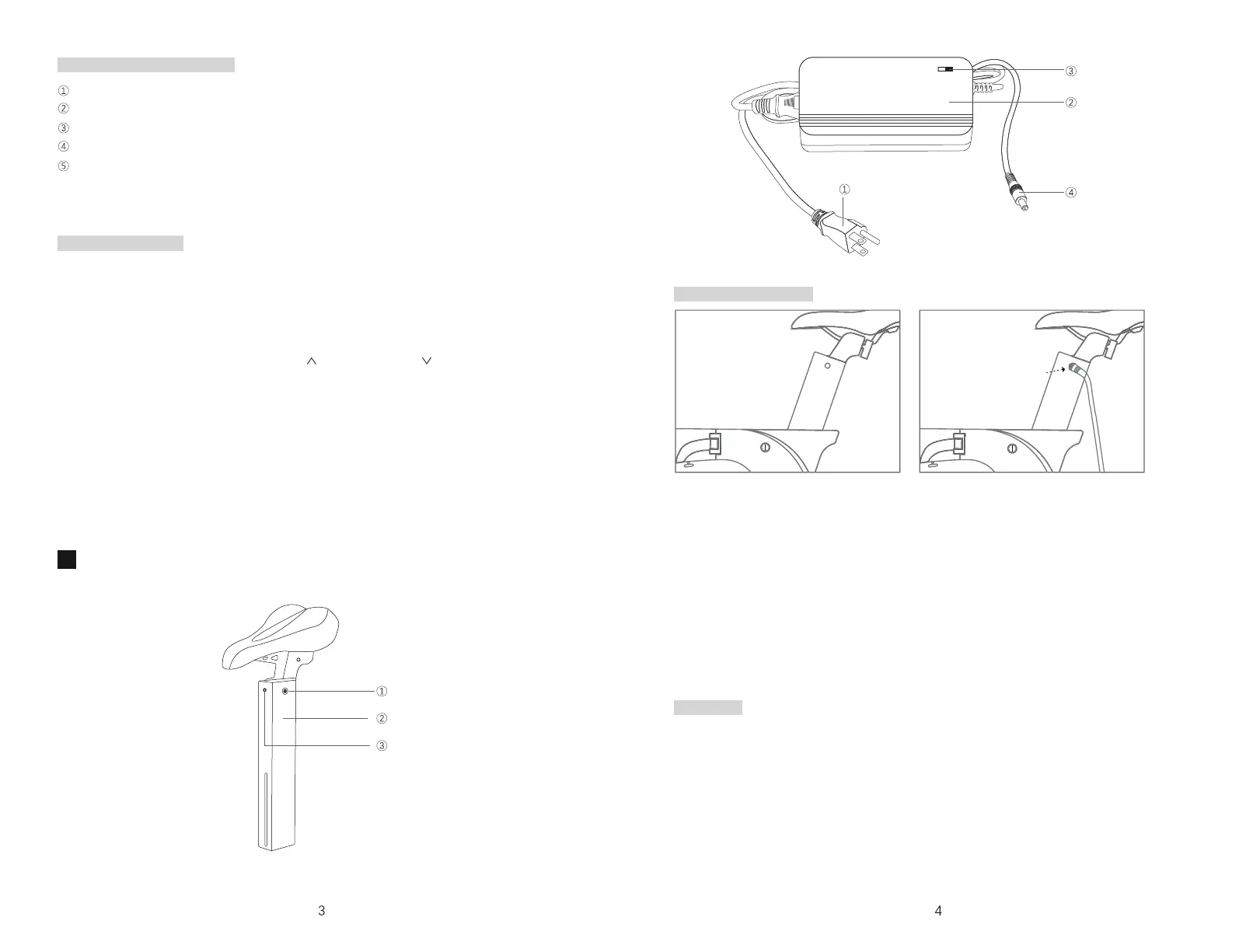
The battery can be charged on the bike or removed for charging. To remove the
battery, loosen the seat post clamp, then slowly pull the battery from the bike frame.
To charge the battery, follow the steps below:
Locate the charging port on the left side of the battery.
Connect the charging plug to the battery's charging port.
Connect the power plug to a power socket of the specified voltage.
The indicator light on the charger will remain Red while charging.
When the indicator on the charger turns Green, the battery has been fully charged.
It takes ~3-8 hours to fully charge the battery.
After the battery is fully charged, unplug the charger from the socket first, then
disconnect from the battery charging port.
Charging the battery
Warnings
Charging hole
Battery case
Battery button
Power Plug
Charger Shell
Indicator
Charging Plug
1.
2.
3.
4.
5.
6.
Ensure all connectors are fully plugged in prior to charging
Use only the original charger supplied with your e-bike or a genuine SDREAM
replacement. Use of an aftermarket charger may cause a battery fault and reduce
battery life.
Keep the charger and battery in a cool, dry place away from direct sunlight and
other sources of heat. Keep away from children.
During charging, make sure the charger is in a location with good airflow. The
charger may feel warm during charging. This is normal as long as the temperature
does not exceed 131°F/55°C.
1.
2.
3.
4.


 To Next Page
 Loading...