5
| Page 37 | SEABOB Operator's Manual |
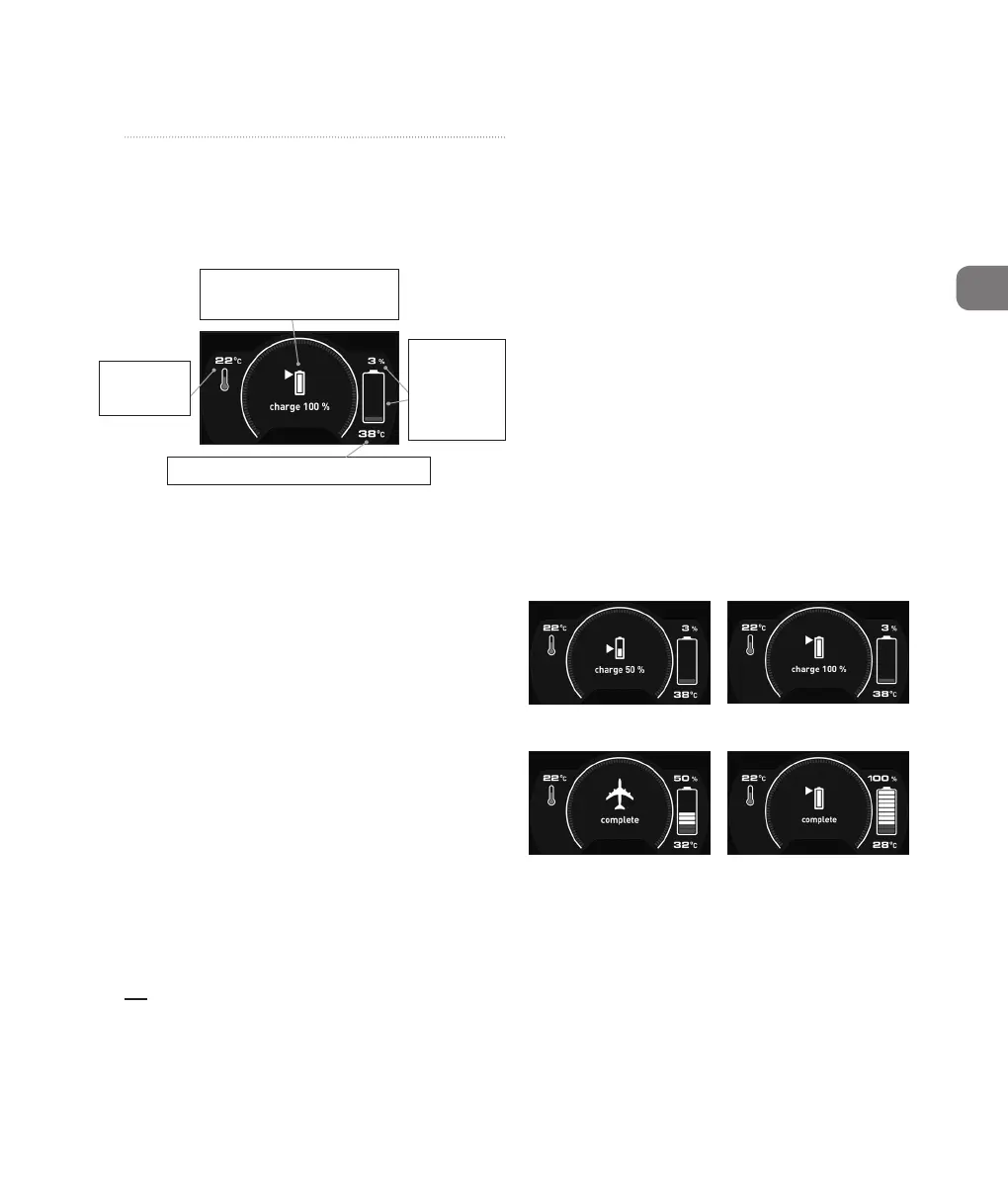
Water
temperature
Charge symbol
(selected charging process)
Battery temperature (in °C)
Battery
charge state
(in % of full
charge state)
5.3.8 Charge display
After the charger is connected to the SEABOB and then
to a power source, the system first performs a system
check and then automatically switches to the Charge
mode. The charge display appears. It is not possible to
switch on the motor during the Charge mode.
1. The charge state is shown by individual bars in the
battery symbol on the right-hand side of the display
(1 bar = 10 % charge state). The number of bars indi-
cates the charge state. When all bars are shown in the
battery symbol, the SEABOB is fully charged.
2. The numerical display of the charge state (in % of
full charge state) is shown above the battery symbol.
The battery temperature (in °C) is displayed under the
battery symbol.
3. The current water temperature (in °C) is shown at the
top left of the display.
4. Tap the green button to select partial charging of the
SEABOB for Air Transport / Storage. A partially filled
charge symbol will appear in the center of the display
with an arrow to indicate partial charging ("charge
50 %").
5. Tap the red button to select full charging of the
SEABOB for operation. A completely filled charge
symbol will appear in the center of the display with
an arrow to indicate full charging ("charge 100 %").
Tip: When an active charger is connected, programming
is preset to full charging (for operation).
6. If programmed to partial charging for Air Transport /
Storage, an aircraft symbol will appear when the cor-
rect partial charge state has been reached.
7. If programmed to full charging, all bars are displayed
in the battery symbol. The SEABOB is fully charged
and ready for operation.
8. To save energy and to reduce maintenance charging,
the display turns itself off automatically 10 minutes
after charging is completed ("complete"). By pressing
any button, the display can be switched on again (for
another 10 minutes).
9. If, when programmed to partial charging, the charger
is disconnected from the device when the airplane
symbol is displayed, the system switches to the Off
mode and switches off for transport, in particular air
transport, or storage.
10. If the charger is disconnected from the device when
programmed to full charging and the SEABOB is fully
charged, the system switches off to the Sleep mode
and is ready for operation.
Starting full charging for
operation
Partial charging for Air Trans-
port / Storage complete
Full charging for operation
complete
Starting partial charging for Air
Transport / Storage


 To Next Page