Seagate BarraCuda Product Manual, Rev. D 20
3.4 Drive mounting
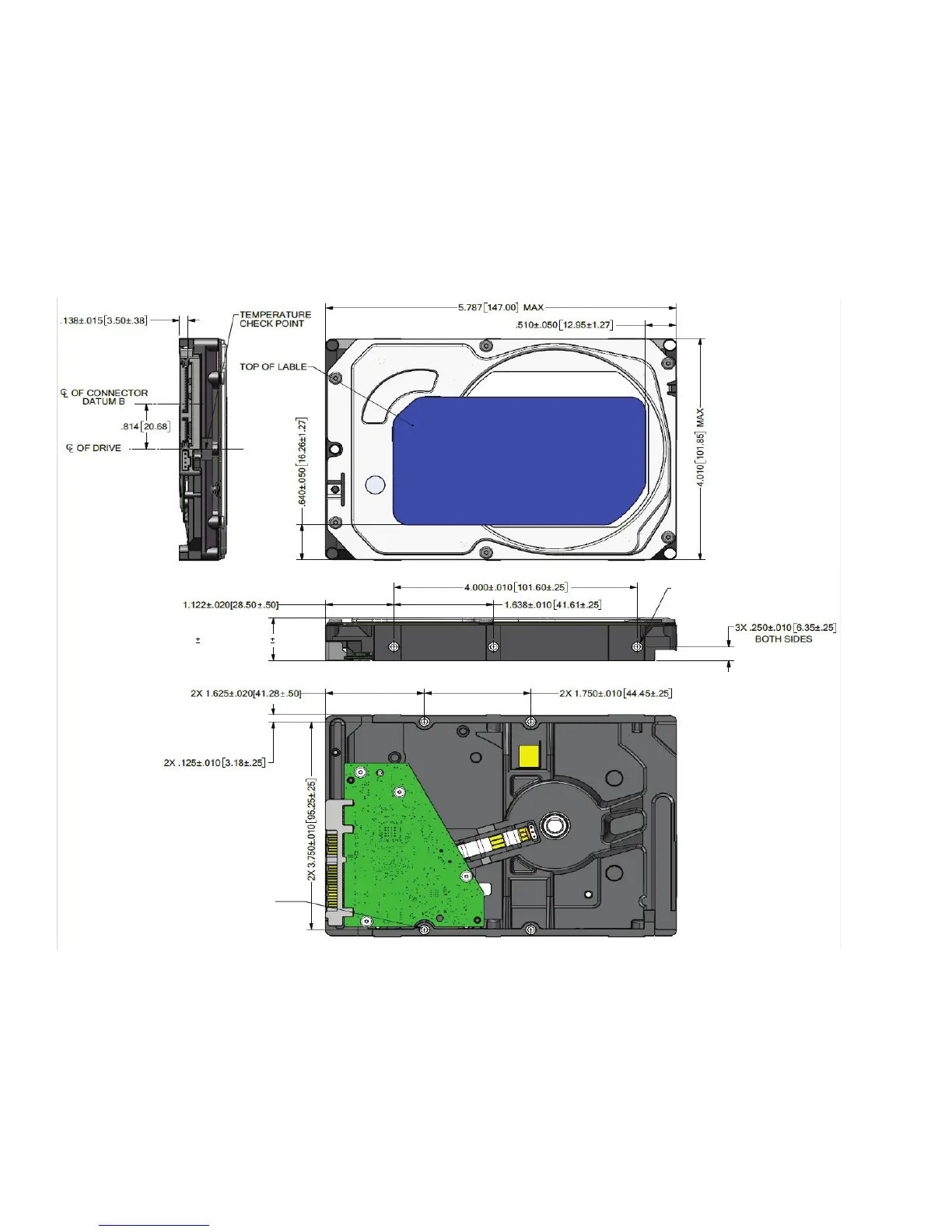
Users can mount the drive in any orientation using four screws in the side-mounting holes or four screws in the bottom-mounting
holes. Refer to
Figure 3 for drive mounting dimensions. Follow these important mounting precautions when mounting the drive:
• Allow a minimum clearance of 0.030 inches (0.76mm) around the entire perimeter of the drive for cooling.
• Use only 6-32 UNC mounting screws.
• The screws should be inserted no more than 0.140 inch (3.56 mm) into the bottom or side mounting holes.
• Do not overtighten the mounting screws (maximum torque: 6 inch-lb).
Figure 3 Mounting dimensions (1-disk models)
Max: .795" or 20.20 mm
Alterntive: .783" .012" or 19.90 0.30 mm
4X 6-32 UNC-2B
3 MINIMUM THREAD DEPTH
0.14 MAXIMUM FASTENER
PENETRATION
3X 6-32 UNC-2B
3 MINIMUM THREAD DEPTH
0.14 MAXIMUM FASTENER
PENETRATION BOTH SIDES





 To Next Page