IV.
WiFi Connection
to
Smartphone/Tablet
(cant'
d)
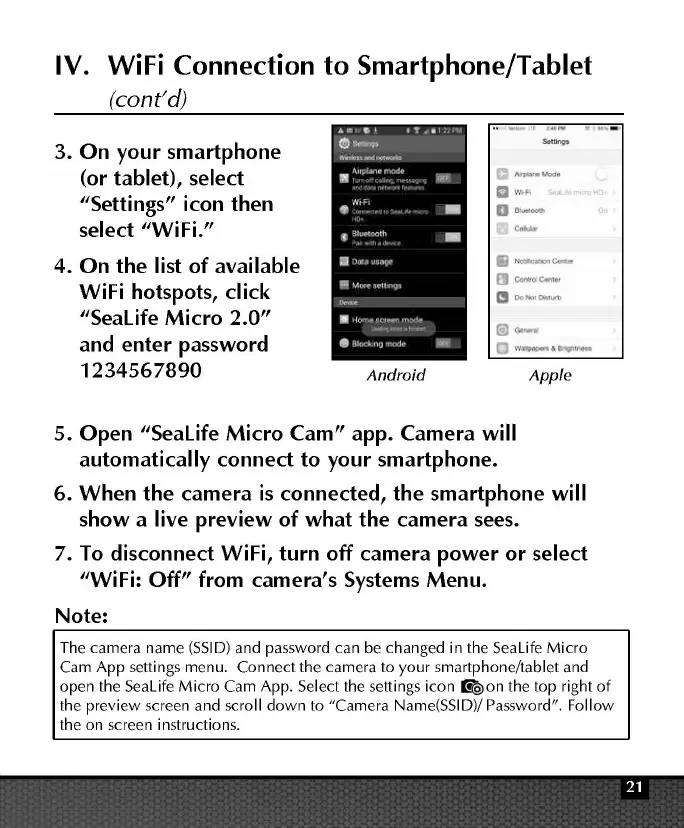
3.
On
your smartphone
(or
tablet), select
"Settings"
icon then
select "WiFi."
4.
On
the
list of available
WiFi hotspots, click
"Sealife
Micro
2.0"
and
enter
password
1234567890
Android
II-"'""'
eJ
COfl'ltd'C4trler
1!1
00!001~
1
~
Apple
5.
Open
"Sealife Micro Cam" app. Camera will
automatically
connect
to your smartphone.
6. When
the
camera
is
connected,
the
smartphone will
show a live preview of
what
the
camera
sees.
7.
To
disconnect WiFi, turn off
camera
power
or
select
"WiFi: Off"
from camera's Systems Menu.
Note:
The
camera
name
(SSID)
and
password
can
be
changed
in
the
Sealife
Micro
Cam
App settings menu.
Connect
the
camera
to
your smartphone/tablet and
open
the
Sealife
Micro
Cam
App. Select the settings icon
ll'ie>on
the
top
right of
the
preview screen
and
scroll
down
to
"Camera
Name(SSID)/ Password". Follow
the
on screen instructions.



 To Next Page