*
If the date is set between the hours of around 9:00 PM and 1:00 AM, the date may not change on the
3. After the date has been set, push the crown back to the normal position.
3. When the crown is pushed back to the normal position, small second hand begins to run.
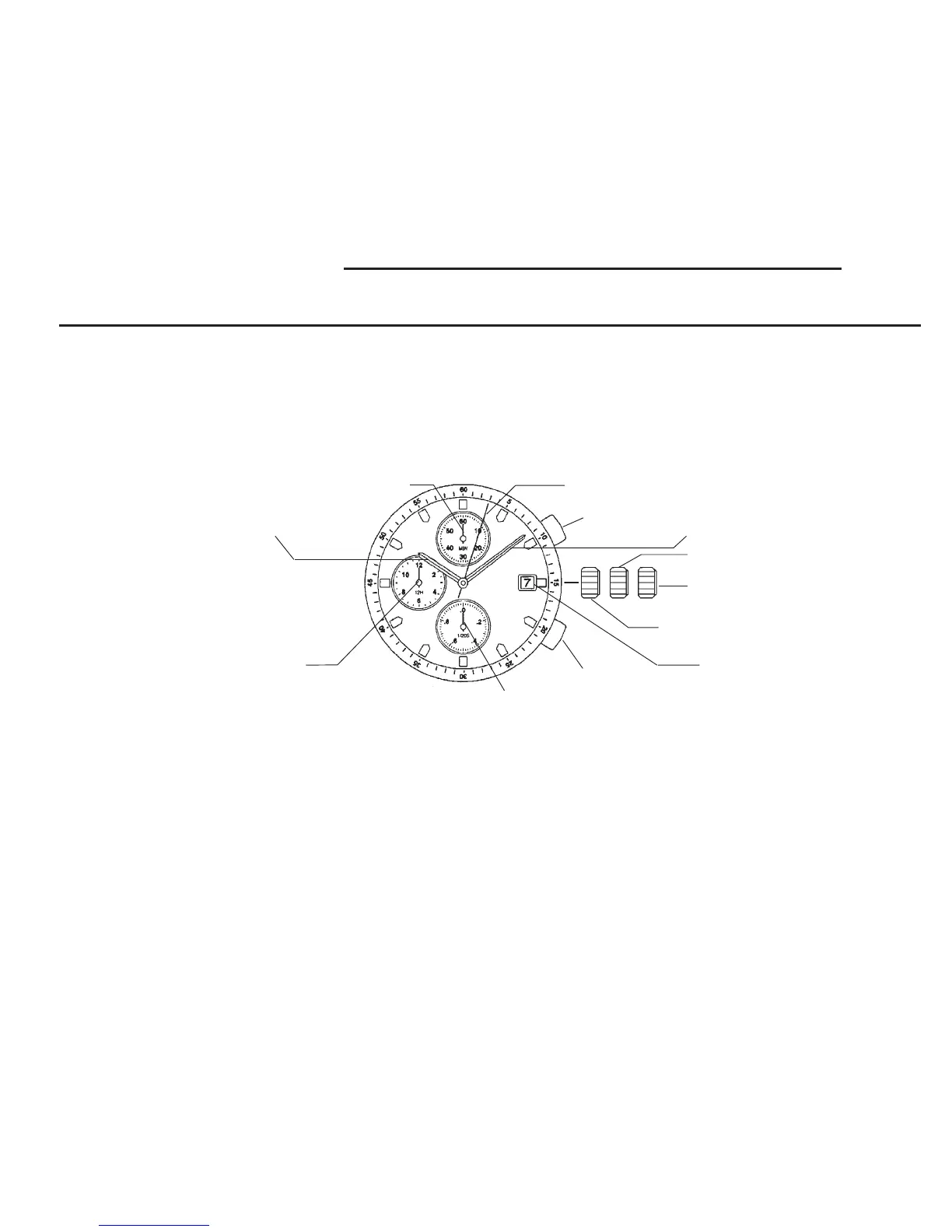
1st position
2nd position
Minute hand
Button A
Chronograph
second hand
Button B
Small Second hand or Chronograph 1/20 second hand
Calendar
Normal crown position
C) SETTING THE DATE
1. Pull the crown out to the 1st position.
2. Turn the crown counter-clockwise to set the date.
following day.
B) SETTING THE TIME
1. Pull the crown out to the 2nd position.
2. Turn the crown to set hour and minute hands.
Chronograph
minute hand
Hour hand
Chronograph
hour hand
A) DISPLAYS AND BUTT
ONS
A) DISPLAYS AND BUTTONS
B) SETTING THE TIME
C) SETTING THE DATE
D) USING THE CHRONOGRAPH
E) CHRONOGRAPH RESET (INCL. AFTER REPLACING BATTERY)
CHRONOGRAPH FUNCTION: CENTER SECOND HAND CHRONOGRAPH 1/20 sec.
up to 11 hours 59 minutes 59 seconds 95
BATTERY: SR927W
INSTRUCTION MANUAL FOR MIYOTA WATCH MOVEMENT
CALIBER NO. 0S60
7



 To Next Page